

Demod: SDR Receiver
Demod: SDR Receiver is made and published by Alphonse Romero. AppBrain is an independent app data site and isn't affiliated with Alphonse Romero. The app name, icon, screenshots and description belong to Alphonse Romero and are shown as published on the App Store.
AppBrain's verdict
- Best rank
- #48
- Top Paid, Russia
- Rating on App Store
- 5.00
- 4 ratings
- Last updated
- October 9, 2026
It doesn't have enough ratings yet to judge what users think. Its best ranking is #48 in Top Paid, Utilities in Russia.
Rankings
App Store top charts- Highest rank
- #48
- Chart
- Top Paid
- Utilities
- Country
- Russia
App Store Rankings for Demod: SDR Receiver
Top rankings
| Rank | Country | Category | List |
|---|---|---|---|
| 48 | Russia | Utilities | Top Paid |
Ranking history in Russia
Competitors
Similar apps and more from Alphonse RomeroMore from Alphonse Romero

Releases
Updates seen on the App Store- Version
- 1.5
- Launched
- June 2026
No changelog data
User feedback
Ratings and reviews on the App StoreComments on Demod: SDR Receiver for iOS
We don't have enough comments to show example comments. Please check back later.
Technology
Found in the app by AppBrain- Price
- $9.99
- App size
- 5.43 MB
- Content rating
- Everyone
Technologies used by Demod: SDR Receiver
About the app and developer
About Demod: SDR Receiver
Demod: SDR Receiver is an utilities app developed by Alphonse Romero.
What is the rating of Demod: SDR Receiver?
Demod: SDR Receiver is rated 5.00 out of 5 stars, based on 4 ratings.
Is Demod: SDR Receiver free?
Demod: SDR Receiver costs $9.99. The app size is 5.43 MB. The latest version available is 1.5. The last update was on October 9, 2026.
What are the requirements for Demod: SDR Receiver?
The app has a content rating of Everyone. The app has been available on the App Store since June 2026.
Developer information for Alphonse Romero
Address:
Store listing
By Alphonse Romero, from the App Store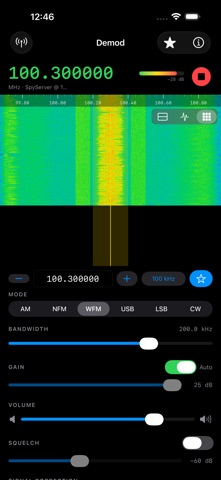


Description by Alphonse Romero Written by the developer, not by AppBrain. Click to read.
Demod is a client for the most common SDR servers:
• rtl_tcp — for RTL-SDR dongles
• SpyServer — for Airspy and RTL-SDR
• KiwiSDR — HF web receivers
• OpenWebRX — web SDRs (HF, VHF and UHF)
There's no hardware to plug into your phone. Point Demod at a server you run (a Raspberry Pi, PC, or Mac with an SDR dongle), or browse hundreds of public servers around the world and start listening in seconds.
FEATURES
• Real-time waterfall and spectrum display — Metal-accelerated and smooth
• Pinch to zoom, drag to tune, two-finger pan
• AM, NFM, WFM, USB, LSB, and CW demodulation
• Decode CW (Morse), RTTY, PSK31, and FT8 on-screen (beta)
• Time-Shift: pause and rewind live radio, DVR-style
• Record what you hear — with a pre-roll of the moment you tapped
• Live Text: on-device transcription of what you're listening to, with on-device translation of the captions (iOS 18+) and a full-screen transcript reader
• Identify: one-tap "what is this signal?" — measures the signal on-device, matches it against a built-in band plan, and suggests the right mode (works with Siri: "ask Demod what this signal is")
• Scanner: scan your memories, a band range, or let Smart scan find active signals across the captured spectrum
• Spectral noise reduction, noise blanker, and mains-hum notch
• Browse public KiwiSDR, OpenWebRX, and SpyServer receivers worldwide — list or map view
• Save and recall favorite frequencies — import and export as CSV
• Direct-sampling and upconverter support for HF
• AirPlay output and Lock Screen playback controls
• Adjustable bandwidth, gain (auto or manual), squelch, and display layouts
PRIVACY
Demod collects no data. No accounts, no tracking, no ads. Recording, transcription, translation, and signal identification all run entirely on your device — audio and text never leave it. Your settings, recordings, and transcripts stay under your control.
Built for radio hobbyists, shortwave listeners, scanner enthusiasts, and ham operators who want a fast, native receiver in their pocket.
Note: Demod is a receiver client and requires an SDR server to connect to. You can use a server you run yourself or one of the many free public servers listed in the app.