

Desktop Mode OS: ProDocktive
Desktop Mode OS: ProDocktive is made and published by Gautam Sukhramani. AppBrain is an independent app data site and isn't affiliated with Gautam Sukhramani. The app name, icon, screenshots and description belong to Gautam Sukhramani and are shown as published on the App Store.
AppBrain's verdict
- Rating on App Store
- 4.63
- 24 ratings
- Last updated
- October 6, 2026
- Size
- 38.4 MB
It doesn't have enough ratings yet to judge what users think.
User feedback
Ratings and reviews on the App StoreComments on Desktop Mode OS: ProDocktive for iOS
We don't have enough comments to show example comments. Please check back later.
Store listing
By Gautam Sukhramani, from the App Store



Description by Gautam Sukhramani Written by the developer, not by AppBrain. Click to read.
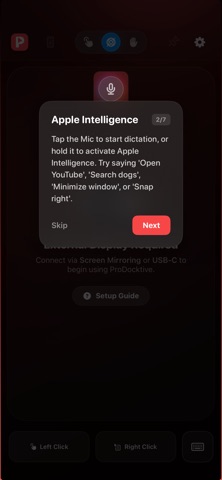
ProDocktive extends your iPhone to any external display — AR Glasses, Monitors, or TVs — creating a high-performance, multi-window desktop environment powered entirely by your phone. Your iPhone becomes the engine, trackpad, air mouse, and spatial hand tracker. No Mac or PC required!
THE ULTIMATE AR & XR COMPANION
Unlock spatial productivity with XREAL, VITURE, Rokid, and RayNeo glasses.
• Infinite Real Estate: Say goodbye to simple screen mirroring. Experience a massive virtual desktop for immersive multitasking.
• Privacy by Design: Work on sensitive projects in public spaces with total confidence.
• Spatial Interaction: Control your desktop with futuristic Hand Tracking or Air Mouse navigation.
CONNECT TO ANY DISPLAY
• AR Glasses: Instant, private cinema-sized workstation.
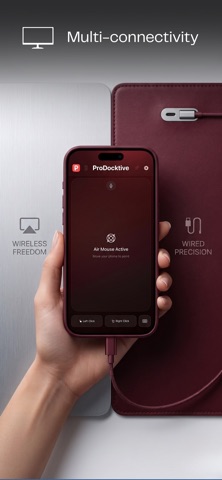
• USB-C / HDMI: Wired, zero-latency output to any monitor or TV.
• AirPlay: Wireless freedom for zero-friction browsing and casting.
REVOLUTIONARY INPUT MODES
• Air Mouse: Point your iPhone like a laser to move the cursor with physical precision.
• Hand Tracker (BETA): Use your iPhone's camera for hands-free spatial gestures.
• Liquid Trackpad: Transform your screen into a premium multi-touch trackpad (scroll, swipe, pinch-to-zoom).
• Bluetooth Support: Pair your favorite keyboard and mouse for a true PC feel.
PRO-GRADE FEATURES & PRIVACY
• Native Desktop UI: Optimized for large-scale displays and precision input.
• Pin to Dock: Save frequently used web apps for lightning-fast access.
• 100% On-Device: No cloud lag, no video compression. Pixel-perfect rendering using your iPhone's GPU.
Requirements: iOS 18+ and compatible USB-C/HDMI adapters or AirPlay displays.
Privacy Policy: https://prodocktive.com/privacy
Terms of Use (EULA): https://www.apple.com/legal/internet-services/itunes/dev/stdeula/
Safety and technology
Found in the app by AppBrain- Price
- Free
- App size
- 38.4 MB
- Content rating
- High
Technologies used by Desktop Mode OS: ProDocktive
Releases
Updates seen on the App Store- Version
- 1.4.9
- Launched
- April 2026
No changelog data
Alternatives
Similar apps and more from Gautam SukhramaniAlternatives to Desktop Mode OS: ProDocktive




Rankings
App Store top chartsApp Store Rankings for Desktop Mode OS: ProDocktive
About the app and developer
About Desktop Mode OS: ProDocktive
Desktop Mode OS: ProDocktive is a productivity app developed by Gautam Sukhramani.
User Ratings
Desktop Mode OS: ProDocktive is rated 4.63 out of 5 stars. The rating is based on 24 ratings.
App Information
Desktop Mode OS: ProDocktive is freely available from the App Store. The app size is 38.36 MB. The latest version available is 1.4.9. The last update was on October 6, 2026.
Technical Requirements
The app has a content rating of High Maturity. The app has been available on the App Store since April 2026.
Developer information for Gautam Sukhramani
Address:
Frequently asked questions about Desktop Mode OS: ProDocktive
Is Desktop Mode OS: ProDocktive free?
Yes. Desktop Mode OS: ProDocktive is free on the App Store.
Is Desktop Mode OS: ProDocktive still available?
Yes. Desktop Mode OS: ProDocktive is on the App Store, and the last update we saw was on October 6, 2026.
How large is Desktop Mode OS: ProDocktive?
Desktop Mode OS: ProDocktive is 38.36 MB.
Is Desktop Mode OS: ProDocktive suitable for children?
App Store gives Desktop Mode OS: ProDocktive a high maturity rating. It is meant for adults.
How do people rate Desktop Mode OS: ProDocktive?
Desktop Mode OS: ProDocktive scores 4.63 out of 5 stars, from 24 ratings on the App Store.
Who made Desktop Mode OS: ProDocktive?
Desktop Mode OS: ProDocktive was developed by Gautam Sukhramani. It is listed in the productivity category on the App Store.
What are the best alternatives to Desktop Mode OS: ProDocktive?
People looking at Desktop Mode OS: ProDocktive also look at these productivity apps: External Display Desktop: XeOS, Arrow Electronics Events, Mudra Band, ShortcutStudio - AI Shortcuts, infiniteX2P - Multitasking.