

Detail: AI Video Editor
Detail: AI Video Editor is made and published by Detail Technologies B.V. AppBrain is an independent app data site and isn't affiliated with Detail Technologies B.V. The app name, icon, screenshots and description belong to Detail Technologies B.V. and are shown as published on the App Store.
AppBrain's verdict
Loved by users- Rating on App Store
- 4.54
- 3,994 ratings
- Last updated
- October 21, 2026
- Size
- 392.8 MB
Users love it: 4.5 stars from 3,994 ratings.
User feedback
Ratings and reviews on the App StoreComments on Detail: AI Video Editor for iOS
We don't have enough comments to show example comments. Please check back later.
Store listing
By Detail Technologies B.V., from the App Store





Description by Detail Technologies B.V. Written by the developer, not by AppBrain. Click to read.
INSTANT VIDEO WITH AI AUTO-EDIT
Record or import a video and let AI Auto-Edit do the rest. Detail's AI finds the best moments, removes silences, and creates ready-to-share shorts and reels automatically. Instant video — record, done.
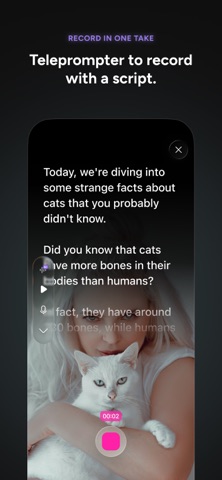
AI DIRECTOR — YOUR PERSONAL TELEPROMPTER
Stay on script with AI Director, your conversational teleprompter guide. It listens as you speak and keeps you on track, so every take is your best take. Perfect for content creators, educators, and presenters.
MULTICAM RECORDING
Turn your iPhone and iPad into a multi-camera video studio. Record from multiple angles simultaneously and switch between them in real time. Professional multicam production without the professional price tag.
REACTION VIDEOS MADE EASY
Record split-screen reaction videos to any content in seconds. Import a video, hit record, and share your reaction with the world. The fastest way to create reaction content for TikTok, YouTube Shorts, and Instagram Reels.
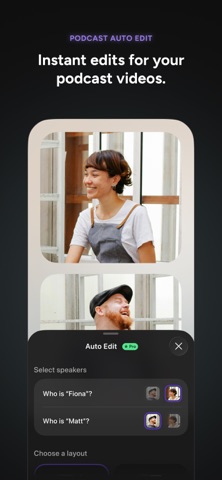
PODCAST & VIDEO PODCAST STUDIO
Record, edit, and publish professional video podcasts. Detail handles layouts, audio levels, and transitions so you can focus on the conversation. Support for remote guests and multi-camera setups.
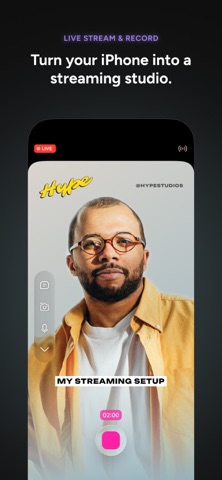
LIVESTREAMING TO ANY PLATFORM
Go live to YouTube, Twitch, Facebook, or any RTMP destination directly from Detail. Add overlays, switch cameras, and engage your audience — all from your iPhone or iPad.
GREEN SCREEN & CHROMA KEY
Remove or replace your background instantly with green screen support. No physical green screen needed — Detail's AI handles background removal automatically.
AI AUTO-CAPTIONS & SUBTITLES
Add accurate auto captions in 50+ languages. Customize fonts, colors, and styles. Captions are fully editable and can be exported as separate subtitle files. Transcribe your content with a single tap.
PROFESSIONAL EDITING TOOLS
• Trim, cut, and split clips with precision
• Add text, stickers, and overlays
• Apply filters, effects, and color grading
• Adjust speed — slow motion, time-lapse, and more
• 4K video export for maximum quality
• Music and sound effects library
BUILT FOR CONTENT CREATORS
Detail is the all-in-one video editor for UGC creators, vloggers, podcasters, and social media content creators. Create professional content for TikTok, YouTube, Instagram, and every platform — without juggling complicated apps or expensive gear.
CLOUD SYNC & COLLABORATION
Access your projects across all your Apple devices. Collaborate with your team in real time. Your video studio, everywhere you go.
Download Detail today and join millions of creators making better videos with AI.
Terms of Use: https://detail.co/terms
Privacy Policy: https://detail.co/privacy
Safety and technology
Found in the app by AppBrain- Price
- Free
- App size
- 392.8 MB
- Content rating
- Everyone
Technologies used by Detail: AI Video Editor
Releases
Updates seen on the App Store- Version
- 6.0.5
- Launched
- March 2023
No changelog data
Alternatives
Similar apps and more from Detail Technologies B.V.Alternatives to Detail: AI Video Editor


More from Detail Technologies B.V.




Rankings
App Store top chartsApp Store Rankings for Detail: AI Video Editor
About the app and developer
About Detail: AI Video Editor
Detail: AI Video Editor is a photo & video app developed by Detail Technologies B.V.
User Ratings
Detail: AI Video Editor is rated 4.54 out of 5 stars. The rating is based on 4 thousand ratings.
App Information
Detail: AI Video Editor is freely available from the App Store. The app size is 392.78 MB. The latest version available is 6.0.5. The last update was on October 21, 2026.
Technical Requirements
The app has a content rating of Everyone. The app has been available on the App Store since March 2023.
Developer information for Detail Technologies B.V.
Address:
Frequently asked questions about Detail: AI Video Editor
Is Detail: AI Video Editor free?
Yes. Detail: AI Video Editor is free on the App Store.
Is Detail: AI Video Editor still available?
Yes. Detail: AI Video Editor is on the App Store, and the last update we saw was on October 21, 2026.
How large is Detail: AI Video Editor?
Detail: AI Video Editor is 392.78 MB.
Is Detail: AI Video Editor suitable for children?
App Store rates the content of Detail: AI Video Editor as suitable for everyone.
How do people rate Detail: AI Video Editor?
Detail: AI Video Editor scores 4.54 out of 5 stars, from 3,994 ratings on the App Store.
Who made Detail: AI Video Editor?
Detail: AI Video Editor was developed by Detail Technologies B.V. It is listed in the photo & video category on the App Store.
What are the best alternatives to Detail: AI Video Editor?
People looking at Detail: AI Video Editor also look at these photo & video apps: Dual Camera Split Videos: Revo, Photo Enhancer & Unblur, Dehancer Film Emulation, Shoot Pro Camera Source, Beastcam - Pro Camera.