

Dev Star - Dev Network Tools
Dev Star - Dev Network Tools is made and published by Hotsource ESD. AppBrain is an independent app data site and isn't affiliated with Hotsource ESD. The app name, icon, screenshots and description belong to Hotsource ESD and are shown as published on the App Store.
AppBrain's verdict
- Last updated
- March 22, 2026
Rankings
App Store top chartsApp Store Rankings for Dev Star - Dev Network Tools
Competitors
Similar apps and more from Hotsource ESD


Releases
Updates seen on the App Store- Version
- 2.1.0+34
- Launched
- October 2023
No changelog data
User feedback
Ratings and reviews on the App StoreComments on Dev Star - Dev Network Tools for iOS
We don't have enough comments to show example comments. Please check back later.
Technology
Found in the app by AppBrain- Price
- $1.99
- App size
- 52.3 MB
- Content rating
- Everyone
Technologies used by Dev Star - Dev Network Tools
About the app and developer
About Dev Star - Dev Network Tools
Dev Star - Dev Network Tools is an utilities app developed by Hotsource ESD.
What is the rating of Dev Star - Dev Network Tools?
Dev Star - Dev Network Tools has no ratings yet.
Is Dev Star - Dev Network Tools free?
Dev Star - Dev Network Tools costs $1.99. The app size is 52.31 MB. The latest version available is 2.1.0+34. The last update was on March 22, 2026.
What are the requirements for Dev Star - Dev Network Tools?
The app has a content rating of Everyone. The app has been available on the App Store since October 2023.
Developer information for Hotsource ESD
Address:
Store listing
By Hotsource ESD, from the App Store
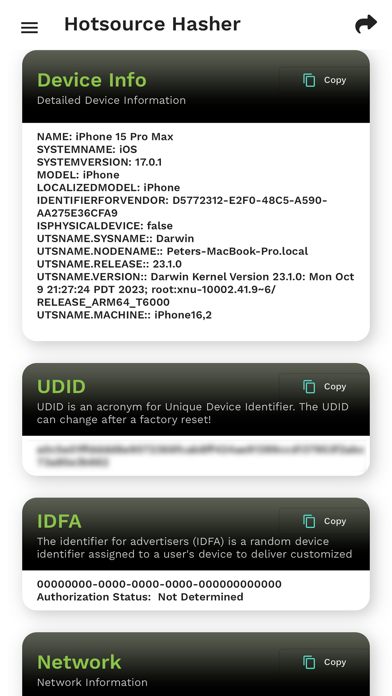

Description by Hotsource ESD Written by the developer, not by AppBrain. Click to read.
Dev Star, the ultimate developer tool for encryption, hashing, device information, network scanning. It combines ease of use, robust security, and seamless data sharing capabilities to keep your plaintext information under lock and key, right in the palm of your hand.
*What is this*
Dev Star is an utility tool with the following features:
1. Allows any user who wish to encrypt any plain text for encryption to standards like SHA-1, MD5, etc.
User just type in any text in the text box and the app will encrypt it and display the hashes in the appropriate sections (MD5, SHA-, etc)
After encryption, the user now has the option to copy the desired hashes to another app or share the results via the Sharing option through channels like SMS, email, WhatsApp, etc.
Effortless User Experience:
Dev Star boasts a user-friendly interface that ensures both beginners and experts.
Diverse Hashing Algorithms:
Take your pick from a wide array of encryption methods, including SHA-1, MD5, SHA-256, SHA-224, and SHA-384. Customize your hash to suit your specific needs, from basic to ultra-secure.
Bulletproof Security:
Rest easy knowing that your data is never transmitted or stored beyond your device. Dev Star is dedicated to maintaining your privacy and data protection.
Swift Copy-Paste Functionality:
Seamlessly copy and paste your hashed data into other apps or share it with friends and colleagues. Dev Star ensures smooth integration with your device's clipboard.
Offline Operation:
No internet connection? No problem. Dev Star operates offline, providing top-notch security and convenience wherever you go.
Cross-Platform Accessibility:
Dev Star ensures that you can secure your data regardless of your preferred platform.
2. Insightful Device Information:
Knowledge is security. Dev Star provides detailed device insights, including device make, operating system, and type. Dive deep into your network information with access to unique identifiers like UDID and IDFA, empowering you with the knowledge to safeguard your digital identity.
3.Host Scanner
Stay one step ahead with our Host Scanner features. Uncover vulnerabilities and potential threats by scanning hosts on your network.
Host scanning helps you detect vulnerabilities in a host that may be picked out for attack. Vulnerability scanning is performed to identify potential weaknesses.
4. Network Service Discovery & Registration
5. PING
Ping is used to test the reachability of a host on an Internet Protocol (IP) network.
Ping works by sending an Internet Control Message Protocol (ICMP) Echo Request to a specified interface on the network and waiting for a reply. When a ping command is issued, a ping signal is sent to a specified address and it responds by sending an echo reply packet.
6. Port Scan
An application can send traffic and listen on a particular port. The combination of an IP address and a port enables routing devices and the endpoint to ensure that traffic reaches the intended application.
A port scan can provide a wealth of information about a target system. In addition to identifying if a system is online and which ports are open, port scanners can also identify the applications listening to particular ports and the operating system of the host.
7. Reverse/DNS Lookup
- Find all DNS records for a domain name with this online tool. The DNS records include but are not limited to A, AAAA, CNAME, MX, NS, PTR, SRV, SOA, TXT, CAA, DS, and DNSKEY.
- Performing a reverse DNS lookup allows users to find the hostname of an IP address.
8. Bluetooth Scan and Advertiser
- Send advertising packets (PDUs) to broadcast data, and to allow other devices (scanners) to find & connect to them.
- Searches the local area for Bluetooth-enabled devices & requests some information about each one
9. Sensor Data
Accelerometer, Gyroscope, Magnetometer
10. GPS
11. NFC - Tag Read, Ndef Write, Ndef Write Lock