

DevDeck is made and published by Pablo Fonseca. AppBrain is an independent app data site and isn't affiliated with Pablo Fonseca. The app name, icon, screenshots and description belong to Pablo Fonseca and are shown as published on the App Store.
AppBrain's verdict
- Last updated
- May 12, 2026
Rankings
App Store top chartsApp Store Rankings for DevDeck
Competitors
Similar apps and more from Pablo FonsecaAlternatives to DevDeck


Releases
Updates seen on the App Store- Version
- 1.1
- Launched
- March 2026
No changelog data
User feedback
Ratings and reviews on the App StoreComments on DevDeck for iOS
We don't have enough comments to show example comments. Please check back later.
Technology
Found in the app by AppBrain- Price
- Free
- App size
- 1.37 MB
- Content rating
- Everyone
Technologies used by DevDeck
About the app and developer
About DevDeck
DevDeck is a productivity app developed by Pablo Fonseca.
What is the rating of DevDeck?
DevDeck has no ratings yet.
Is DevDeck free?
DevDeck is free. The app size is 1.37 MB. The latest version available is 1.1. The last update was on May 12, 2026.
What are the requirements for DevDeck?
The app has a content rating of Everyone. The app has been available on the App Store since March 2026.
Developer information for Pablo Fonseca
Address:
Frequently asked questions about DevDeck
Is DevDeck free?
Yes. DevDeck is free on the App Store.
Is DevDeck still available?
Yes. DevDeck is on the App Store, and the last update we saw was on May 12, 2026.
How large is DevDeck?
DevDeck is 1.37 MB.
Is DevDeck suitable for children?
App Store rates the content of DevDeck as suitable for everyone.
Who made DevDeck?
DevDeck was developed by Pablo Fonseca. It is listed in the productivity category on the App Store.
What are the best alternatives to DevDeck?
People looking at DevDeck also look at these productivity apps: ottomate - companion, Overdeck, MICRO LLM, Lend & Loan Tracker - Reminder, AnyTalk: Local Voice Notes.
Store listing
By Pablo Fonseca, from the App Store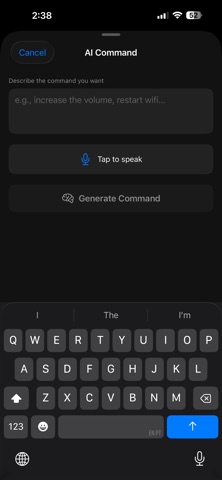

Description by Pablo Fonseca Written by the developer, not by AppBrain. Click to read.
HOW IT WORKS
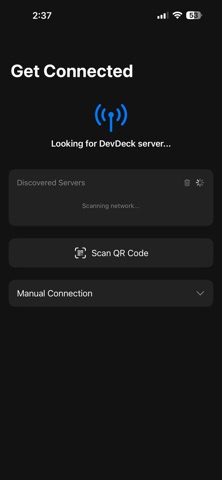
Install the free DevDeck Server on your Mac (via Homebrew or DMG). The app auto-discovers the server on your local network — no manual configuration needed. Scan a QR code or let mDNS handle the pairing.
CONTEXT-AWARE DECKS
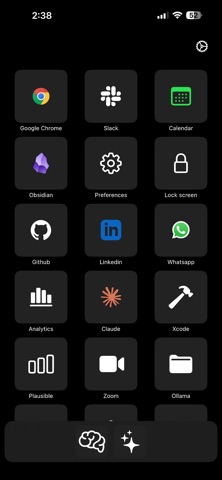
Your shortcuts automatically switch based on the active app on your Mac. Working in VS Code? Dev tools appear. Switched to Zoom? Meeting controls are ready. On Slack? Communication shortcuts at your fingertips. Define rules per app or let AI generate them.
AI-POWERED GENERATION
Describe what you want in plain English and AI generates commands, full decks, or multi-step workflows. Supports Claude, OpenAI, and local Ollama models. Preview and edit before saving.
MULTI-STEP WORKFLOWS
Chain actions together with dynamic inputs. One tap to "start my meeting" can open Zoom, snooze Slack notifications, and set your status — all automatically. Template variables let you reuse workflows with different inputs.
BROWSER AUTOMATION
With the optional Chrome extension, automate web pages directly from your phone — click buttons, fill forms with semantic field matching, and navigate sites.
CUSTOM ICONS
Use SF Symbols or your own PNG/JPEG images with color tinting. Make your deck truly yours.
FEATURES
- One-tap app launching and command execution
- Context-aware auto-switching decks
- AI command, context, and workflow generation
- Multi-step workflow automation with templated inputs
- Browser automation via Chrome extension
- Custom icons with color tinting
- Auto-discovery via Bonjour (mDNS)
- QR code pairing
- Portrait and landscape layouts
- Haptic feedback
- Configurable grid layout
- Hot-reload configuration — no restart needed
- Secure WebSocket communication
- Dark mode optimized
REQUIREMENTS
- Mac running DevDeck Server (free download at devdeck.app)
- iPhone and Mac on the same network (or use ngrok for remote access)
- iOS 17.0 or later
Visit devdeck.app for documentation and server download