

DexoPad
DexoPad is made and published by Palmblock Technology Co., Limited. AppBrain is an independent app data site and isn't affiliated with Palmblock Technology Co., Limited. The app name, icon, screenshots and description belong to Palmblock Technology Co., Limited and are shown as published on the App Store.
AppBrain's verdict
- Last updated
- August 13, 2026
Rankings
App Store top chartsApp Store Rankings for DexoPad
Competitors
Similar apps and more from Palmblock Technology Co., LimitedAlternatives to DexoPad


Releases
Updates seen on the App Store- Version
- 1.0
- Launched
- August 2026
No changelog data
User feedback
Ratings and reviews on the App StoreComments on DexoPad for iOS
We don't have enough comments to show example comments. Please check back later.
Technology
Found in the app by AppBrain- Price
- Free
- App size
- 31.1 MB
- Content rating
- Everyone
Technologies used by DexoPad
About the app and developer
About DexoPad
DexoPad is an utilities app developed by Palmblock Technology Co., Limited.
User Ratings
The app has no ratings yet.
App Information
DexoPad is freely available from the App Store. The app size is 31.07 MB. The latest version available is 1.0. The last update was on August 13, 2026.
Technical Requirements
The app has a content rating of Everyone. The app has been available on the App Store since August 2026.
Developer information for Palmblock Technology Co., Limited
Palmblock Technology Co., Limited
Address:
Store listing
By Palmblock Technology Co., Limited, from the App Store




Description by Palmblock Technology Co., Limited Written by the developer, not by AppBrain. Click to read.
Because the DexoPad dongle presents itself to your computer as a standard USB keyboard and mouse (HID), it works everywhere: Windows, macOS, Linux, ChromeOS, and even at the BIOS/UEFI level before any operating system boots. Type into BIOS setup, navigate boot menus, unlock encrypted drives, or run keyboard-only servers — DexoPad works when nothing else can.
Key features:
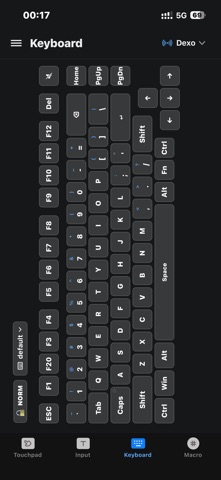
• Full keyboard input with modifier combos: Ctrl+C, Cmd+V, Ctrl+Alt+Del, Win+R, and every F-key (F1–F12) plus arrow, Home/End, PageUp/Down, and Insert/Delete.
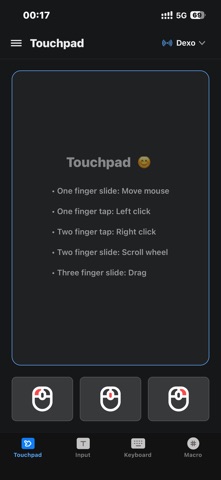
• Precision touchpad with two-finger scroll, tap-to-click, drag, and left/right/middle mouse buttons.
• Multi-OS Unicode input: Type Chinese, Japanese, Korean, emoji, and other Unicode characters into any target OS — DexoPad handles keyboard layout translation for Windows (Alt+Numpad), macOS (Unicode Hex Input), and Linux (Ctrl+Shift+U).
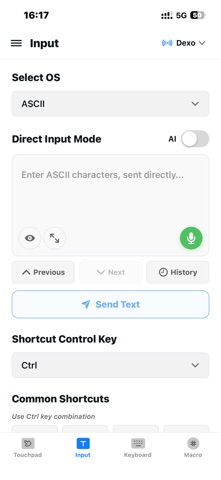
• ASCII mode for pre-OS environments: Send raw HID scancodes when no IME is available (BIOS, GRUB, recovery consoles, embedded systems).
• Custom shortcut buttons: Save your favorite key combinations as one-tap actions.
• Low-latency BLE: Real-time typing and pointer control over Bluetooth.
• Multi-device pairing: Manage several DexoPad dongles from one iPhone.
Perfect for:
• Remote IT support and system administration
• Developers working with headless machines and embedded devices
• Presenters who need a discrete, wireless remote
• Anyone who wants their phone to double as a keyboard/mouse for a nearby computer