

Diagrams: Visualize your ideas
Diagrams: Visualize your ideas is made and published by Elsa Mourato. AppBrain is an independent app data site and isn't affiliated with Elsa Mourato. The app name, icon, screenshots and description belong to Elsa Mourato and are shown as published on the App Store.
AppBrain's verdict
- Best rank
- #25
- Top Paid, South Korea
- Last updated
- August 26, 2026
Rankings
App Store top charts- Highest rank
- #25
- Chart
- Top Paid
- Productivity
- Country
- South Korea
App Store Rankings for Diagrams: Visualize your ideas
Top rankings
| Rank | Country | Category | List |
|---|---|---|---|
| 25 | South Korea | Productivity | Top Paid |
Ranking history in South Korea
Competitors
Similar apps and more from Elsa MouratoMore from Elsa Mourato




Releases
Updates seen on the App Store- Version
- 1.0.1
- Launched
- August 2026
No changelog data
User feedback
Ratings and reviews on the App StoreComments on Diagrams: Visualize your ideas for iOS
We don't have enough comments to show example comments. Please check back later.
Technology
Found in the app by AppBrain- Price
- $4.99
- App size
- 3.65 MB
- Content rating
- Everyone
Technologies used by Diagrams: Visualize your ideas
About the app and developer
About Diagrams: Visualize your ideas
Diagrams: Visualize your ideas is a productivity app developed by Elsa Mourato.
User Ratings
The app has no ratings yet.
App Information
Diagrams: Visualize your ideas costs $4.99. The app size is 3.65 MB. The latest version available is 1.0.1. The last update was on August 26, 2026.
Technical Requirements
The app has a content rating of Everyone. The app has been available on the App Store since August 2026.
Developer information for Elsa Mourato
Address:
Frequently asked questions about Diagrams: Visualize your ideas
Is Diagrams: Visualize your ideas free?
No. Diagrams: Visualize your ideas costs $4.99 on the App Store.
Is Diagrams: Visualize your ideas still available?
Yes. Diagrams: Visualize your ideas is on the App Store, and the last update we saw was on August 26, 2026.
How large is Diagrams: Visualize your ideas?
Diagrams: Visualize your ideas is 3.65 MB.
Is Diagrams: Visualize your ideas suitable for children?
App Store rates the content of Diagrams: Visualize your ideas as suitable for everyone.
Who made Diagrams: Visualize your ideas?
Diagrams: Visualize your ideas was developed by Elsa Mourato. It is listed in the productivity category on the App Store.
Store listing
By Elsa Mourato, from the App Store


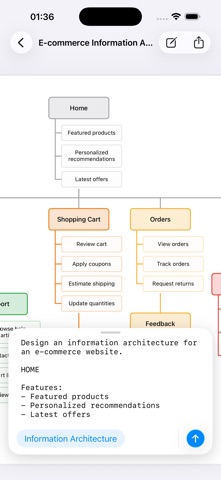

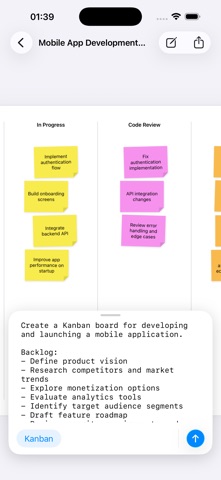

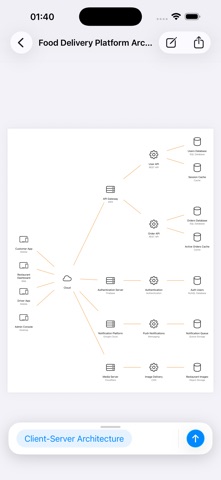

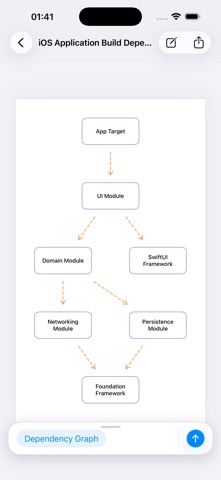
Description by Elsa Mourato Written by the developer, not by AppBrain. Click to read.
Describe a problem, concept, or process — and instantly get a clean, structured, vector-based diagram.
A modern evolution of concept mapping and brainstorming — fast, smart, and visually stunning.
A universal visual thinking tool for work, study, and everyday problem solving. From simple notes to complex systems, it helps you structure ideas visually across science, technology, business, education, and engineering.
Not a drawing app. A thinking app. Turn ideas into visuals — instantly.
Designed for specification-driven diagram generation rather than chat.
AVAILABLE DIAGRAM SKILLS:
• Kanban
• Gantt Chart
• Mindmap
• Conceptmap
• Dependency Graph
• Sticky Notes
• Lists
• Data Model (e.g. ER Diagram)
• Object Model
• Organizational Chart
• Decision Tree
• Processflow
• Workflow (e.g. swimlane or activity diagram)
• Messageflow (e.g. sequence diagram)
• Tree Structure
• Information Architecture (e.g. sitemap)
• Layered Architecture
• Client-Server Architecture
Every skill includes a ready-to-use example prompt to help you get started.
KEY FEATURES:
• AI-powered diagram generation from text prompts
• Vector-based output (PDF quality, not raster images)
• Export or share the PDF diagram
• Runs fully on-device using Apple AI models
• No subscriptions, no usage limits
• Clean, structured, professional diagrams
• Works for any domain: science, business, education, engineering and more
USE IT FOR:
• Explaining concepts
• Studying complex topics
• Planning projects and systems
• Creating structured diagrams from ideas
• Visualizing workflows, processes, and relationships
• Turning messy thoughts into clarity
DESIGNED FOR:
• Students learning complex subjects
• Professionals in documents and presentations
• System and business analysts
• Engineers designing systems and flows
• Software architects and developers
• Teachers explaining concepts visually
• Anyone who thinks better visually
Apple Intelligence is required for this app. Make sure it is supported on your device and enabled in Settings.