

DICOM Viewer: DCM & MRI Reader
DICOM Viewer: DCM & MRI Reader is made and published by Bon App & T. AppBrain is an independent app data site and isn't affiliated with Bon App & T. The app name, icon, screenshots and description belong to Bon App & T and are shown as published on the App Store.
AppBrain's verdict
New- Best rank
- #42
- Top Grossing, Turkey
- Rating on App Store
- 5.00
- 1 ratings
- Last updated
- October 18, 2026
DICOM Viewer: DCM & MRI Reader came out 30 days ago. It doesn't have enough ratings yet to judge what users think. Its best ranking is #42 in Top Grossing, Medical in Turkey.
Rankings
App Store top charts- Highest rank
- #42
- Chart
- Top Grossing
- Medical
- Country
- Turkey
App Store Rankings for DICOM Viewer: DCM & MRI Reader
Top rankings
| Rank | Country | Category | List |
|---|---|---|---|
| 42 | Turkey | Medical | Top Grossing |
Ranking history in Turkey
Competitors
Similar apps and more from Bon App & TAlternatives to DICOM Viewer: DCM & MRI Reader


More from Bon App & T


Releases
Updates seen on the App Store- Version
- 1.3
- Launched
- September 2026
No changelog data
User feedback
Ratings and reviews on the App StoreComments on DICOM Viewer: DCM & MRI Reader for iOS
We don't have enough comments to show example comments. Please check back later.
Technology
Found in the app by AppBrain- Price
- Free
- App size
- 15.6 MB
- Content rating
- Medium
Technologies used by DICOM Viewer: DCM & MRI Reader
About the app and developer
About DICOM Viewer: DCM & MRI Reader
DICOM Viewer: DCM & MRI Reader is a medical app developed by Bon App & T.
User Ratings
DICOM Viewer: DCM & MRI Reader is rated 5.00 out of 5 stars. The rating is based on one rating ratings.
App Information
DICOM Viewer: DCM & MRI Reader is freely available from the App Store. The app size is 15.64 MB. The latest version available is 1.3. The last update was on October 18, 2026.
Technical Requirements
The app has a content rating of Medium Maturity. The app has been available on the App Store since September 2026.
Developer information for Bon App & T
Address:
Frequently asked questions about DICOM Viewer: DCM & MRI Reader
Is DICOM Viewer: DCM & MRI Reader free?
Yes. DICOM Viewer: DCM & MRI Reader is free on the App Store.
Is DICOM Viewer: DCM & MRI Reader still available?
Yes. DICOM Viewer: DCM & MRI Reader is on the App Store, and the last update we saw was on October 18, 2026.
How large is DICOM Viewer: DCM & MRI Reader?
DICOM Viewer: DCM & MRI Reader is 15.64 MB.
Is DICOM Viewer: DCM & MRI Reader suitable for children?
App Store gives DICOM Viewer: DCM & MRI Reader a medium maturity rating, so it is not meant for young children.
How do people rate DICOM Viewer: DCM & MRI Reader?
DICOM Viewer: DCM & MRI Reader has one rating of 5.00 stars on the App Store.
Who made DICOM Viewer: DCM & MRI Reader?
DICOM Viewer: DCM & MRI Reader was developed by Bon App & T. It is listed in the medical category on the App Store.
What are the best alternatives to DICOM Viewer: DCM & MRI Reader?
People looking at DICOM Viewer: DCM & MRI Reader also look at these medical apps: OsteoViewer, MediShot - DICOM Camera, Chartrix, Voxelis: DICOM Viewer CT & MRI, ViewScan.
Store listing
By Bon App & T, from the App Store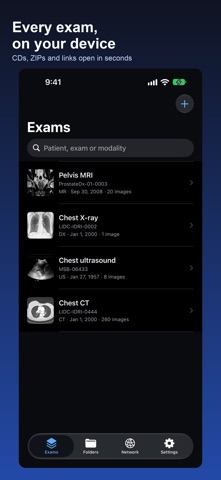

Description by Bon App & T Written by the developer, not by AppBrain. Click to read.
them? This app opens them in seconds, right on your iPhone, iPad or Mac.
It reads CT, MRI, X-ray, ultrasound, PET and more. Everything stays on
your device. No account. Nothing is uploaded.
TRY IT BEFORE YOU IMPORT ANYTHING
Tap Import, then Sample exams, and the app downloads a real chest CT,
chest X-ray, pelvis MRI or chest ultrasound so you can test it right
away.
WHO IT IS FOR
- Patients who want to see their own scan
- Students learning to read images
- Doctors, nurses and techs who need a quick look away from the desk
OPEN WHAT THE CLINIC GAVE YOU
- Import from folders, ZIP files, single files or a link
- Studies, series and slices, sorted the way the scanner sent them
- Reads the packed file types hospitals really use, including JPEG 2000,
JPEG Lossless and JPEG-LS
- Thumbnails, plus search by patient, exam or scan type
READ THE IMAGES
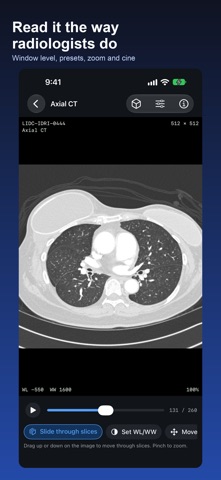
- Set brightness and contrast by dragging, with CT presets for brain,
lung, bone, soft tissue and vessels
- Scroll a stack, zoom, pan, rotate, flip, invert and play as a movie
- Put two series side by side, linked by position, so different slice
thicknesses stay lined up
- See the full file information, tag by tag
MEASURE AND MARK UP
- Distance, angle, Cobb angle, area, closed path, curved line, pixel
value and cardiothoracic ratio
- Arrows, ellipses, boxes, text and free drawing
- Area statistics: mean, standard deviation, lowest and highest value
- Marks stay with the slice, and the timeline shows where they are
- Save a marked-up image straight to Photos
SEE IT IN 3D
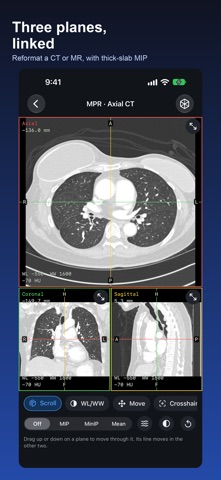
- Turn a CT or MR series into three linked views, at any angle
- Thick slab views: maximum, minimum and mean
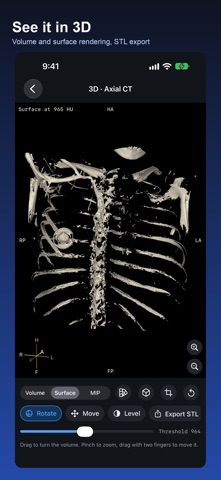
- Volume rendering with presets for bone, skin, vessels and soft tissue
- Surface rendering and STL export at life size, ready for 3D printing
WORK WITH YOUR SERVERS
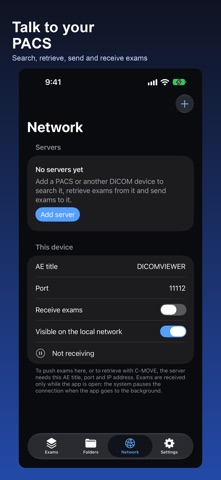
- Search and pull exams from a PACS, or send exams to one
- Receive exams pushed from a scanner or another device
- Find DICOM devices on the local network
SHARE WITHOUT SHARING TOO MUCH
- Export the original DICOM files
- Export or keep a copy with names, IDs, dates and private tags removed
- Sort exams into folders, and fix labels an exam arrived with
PRIVACY
Exams are read and kept on your device. Nothing is sent anywhere unless
you choose to send it to a server you set up yourself.
IMPORTANT
This app is for viewing and organizing medical imaging files. It is not
cleared for primary diagnosis and does not replace clinical systems,
diagnostic workstations or professional medical judgment.
ABOUT THE SAMPLE EXAMS
The sample exams, and the scans in the screenshots, are de-identified
public research data from The Cancer Imaging Archive: the LIDC-IDRI
(CC BY 3.0, https://doi.org/10.7937/K9/TCIA.2015.LO9QL9SX),
PROSTATE-DIAGNOSIS (CC BY 3.0,
https://doi.org/10.7937/K9/TCIA.2015.FOQEUJVT) and CMB-LCA
(CC BY 4.0, https://doi.org/10.7937/3CX3-S132) collections. Full
citations are in the app under Settings > Acknowledgements.
Privacy Policy: https://bon-app.net/privacy-policy/
Terms of Use (EULA): https://bon-app.net/terms-of-use/