Diedro Angle Finder & Level is an utilities app developed by ROBERTO INSUA BRANDARIZ.
User Ratings
The app has no ratings yet.
App Information
Diedro Angle Finder & Level is freely available from the App Store. The app size is 8.66 MB. The latest version available is 1.2.0. The last update was on October 31, 2026.
Technical Requirements
The app has a content rating of Everyone. The app has been available on the App Store since October 2026.
Diedro Angle Finder & Level is made and published by
ROBERTO INSUA BRANDARIZ.
AppBrain is an independent app data site and isn't affiliated with ROBERTO INSUA BRANDARIZ.
The app name, icon, screenshots and description belong to ROBERTO INSUA BRANDARIZ and are shown as published on the App Store.
Description by ROBERTO INSUA BRANDARIZ(from the App Store)
Diedro measures angles with the hinge of iPhone Duo: open the phone against a corner and read the angle between its two halves. On any other iPhone it is a bubble level, a corner gauge and a true-scale ruler. No ads, no account.
ON iPHONE DUO: THE HINGE IS THE INSTRUMENT • Measure. The interior angle, with its exterior, its supplement and the miter saw setting that joins two pieces in that corner. • Square. Color and a tap tell you when you reach 90°, 45° and the usual workshop angles. • Target. Pick an angle and be guided to it: how far, and which way. Use it to transfer an angle: measure it, save it, make it the target. • Two-plane level. With the Duo folded, one half rests on the base and the other rises against the slope: you read both at once. • A true-scale ruler whose zero is the fold. • Hold and Auto hold. The reading freezes as soon as it is steady, so you can take the phone off the work and read it. • A log of saved readings, and hinge calibration. • Nearly closed, it keeps measuring on the cover display, with Hold and Save under your thumbs; shut, it shows the last reading.
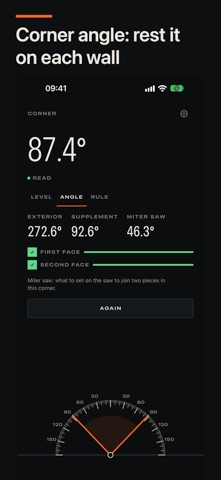
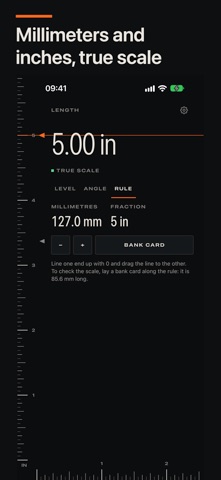
ON ANY iPHONE • Bubble level. Lying flat, on two axes, or standing on its edge; in degrees and percent of slope. It zeroes in two positions, like a real level. • Corner gauge. Rest the back of the iPhone on one face of a corner, then on the other: the turn between the two rests is the corner, with its exterior, its supplement and the miter saw setting. Two walls, a floor and a wall, the bevel of a blade. • True-scale ruler in millimeters or inches (decimals and fractions). Check it with a bank card: the long side is 85.6 mm. Measure, Square and Target read the hinge angle, so they only appear on iPhone Duo. Nothing is simulated on other iPhones.
DIEDRO PRO On iPhone Duo, the live angle, the level and the ruler work without Diedro Pro. Diedro Pro unlocks the workshop tools: Hold and Auto hold, the Log, Square, Target, the two-plane level, calibration, and the correction for the camera and the case. Pay once and keep it for good, or subscribe by the month; the subscription renews automatically until you cancel it. Both are shared with Family Sharing. On other iPhones nothing is locked.
HONEST ABOUT PRECISION Diedro shows the resolution the sensor really delivers and never adds decimals that are not there. It is a handy instrument, not a certified one: check anything that matters against a tool you trust.
PRIVACY No ads, no account, no tracking. The readings you save stay on your iPhone. Apple handles the purchase; RevenueCat checks its status without identifying you.
Privacy policy: https://roberib.github.io/legal/diedro/ Terms of use (Apple's standard EULA): https://www.apple.com/legal/internet-services/itunes/dev/stdeula/
Each subscription will automatically renew 3 days before the expiration date for
the same time period. Subscriptions can be cancelled at any time before the renewal.