DiGi SWAP is made and published by
FIRE WORKS K.K..
AppBrain is an independent app data site and isn't affiliated with FIRE WORKS K.K..
The app name, icon, screenshots and description belong to FIRE WORKS K.K. and are shown as
published on the App Store.
About DiGi SWAP
DiGi SWAP is a photo & video app developed by FIRE WORKS K.K..
What is the rating of DiGi SWAP?
DiGi SWAP has no ratings yet.
Is DiGi SWAP free?
DiGi SWAP costs $39.99. The app size is 3.29 MB. The latest version available is 2.0.1. The last update was on September 2, 2026.
What are the requirements for DiGi SWAP?
The app has a content rating of Everyone. The app has been available on the App Store since December 2021.
Description by FIRE WORKS K.K.(from the App Store)
Hello (again) This is the catchphrase when the iMac first appeared in the world. It was the moment the Mac came back.
Hello (again) Next, use your iPhone to turn your old film camera swap into a digital camera.
Film cameras that are no longer used much. Cameras and lenses that are called famous machines and have the best mechanical beauty and functions. Use DIGI SWAP to upgrade your film camera to a digital camera. I want to leave precious cameras that are no longer in production to posterity. With that in mind, we have developed gadgets and dedicated applications for film cameras. Gadget & application "DIGISWAP" to revive film cameras on iPhone An amazing system that works with FILM CAMERA shutters is patent pending. -The captured image has a color similar to that of a film camera. -No film required. The image is saved on your iPhone. -The shutter speed and aperture are set on the film camera, and the shutter of the film camera and the application work together to shoot. The impression and fun are the best.
DIGI SWAP Application description
warning This app is a groundbreaking gadget-only app. It cannot be used with the app alone. You need a film camera and a dedicated gadget.
Please check the details of the dedicated gadget from here. https://www.digi-swap.com/
1. This application works like the film used for the camera. 2. This application can be used by attaching it to a dedicated gadget. 3. This application is for iPhone XS, XS max, XR, SE (2nd generation), 11, 11 pro, 11 pro max, 12, 12 mini, 12 pro, 12 pro max, 13, 13 mini, 13 pro, 13 pro max,14,14pro,14proMAX,15,15pro,15proMAX,16,16pro,16proMAX only.
①First, adjust the focus.
(1)Make sure that the smartphone is installed in the dedicated gadget. Press the focus calibration on the various setting screens.
(2)Focus the film camera and set the shutter to B. Hold down the shutter and press the focus calibration start button.
(3)When the completion screen is displayed, the process is complete. If an error message is displayed, return to the various setting screens, and make adjustments again.
② How to shoot still images. This application acts as a film. The focus, shutter speed, and aperture are set on the film camera side. Sensitivity settings can be set in the app at the time of shooting.
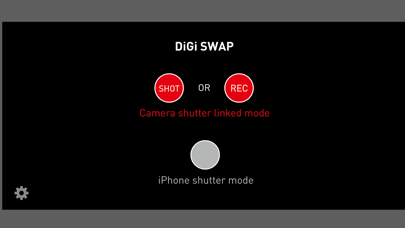
(1) Press the SHOT button and wait for shooting. (2) Set the sensitivity in the app. (3) Adjust the focus, aperture, and shutter speed of the film camera, wind it up, and press the shutter. (4)Save the captured image to the iPhone photo. The saved image can be enlarged and previewed by moving it to the bottom right of the screen and tapping it.
When 36 shots are taken, "Film Empty" is displayed. If you want to continue shooting, tap "Film replacement" to start shooting.
A playful feature that incorporates the elements of a film camera.
③How to take a video This application acts as a cinema film. Focus and aperture are set on the film camera side. On the application side, you can set the sensitivity and FPS when shooting. * Please set FPS on various setting screens (1) Press the REC button and wait for shooting. (2)Set the sensitivity in the application. (AUTO is recommended.) (3)Set the focus, aperture, and shutter speed of the film camera to (B), wind up the shutter, and then press the shutter button. * Hold down the shutter button while shooting, and release the shutter button to end movie shooting. (4)The recorded video is saved on your iPhone. * The REC mark flashes during movie recording.
④Various settings The default values are fine for the basic settings. The left side is the still image setting, and the right side is the video setting. It is recommended to set the video frame rate (FPS) to 30 depending on the model.
Patented in Japan. International patent (PCT) pending.
Each subscription will automatically renew 3 days before the expiration date for
the same time period. Subscriptions can be cancelled at any time before the renewal.