

DigiDate Calendar
DigiDate Calendar is made and published by Christopher Keeser. AppBrain is an independent app data site and isn't affiliated with Christopher Keeser. The app name, icon, screenshots and description belong to Christopher Keeser and are shown as published on the App Store.
AppBrain's verdict
- Rating on App Store
- 5.00
- 4 ratings
- Last updated
- October 30, 2026
It doesn't have enough ratings yet to judge what users think.
Rankings
App Store top chartsApp Store Rankings for DigiDate Calendar
Competitors
Similar apps and more from Christopher KeeserAlternatives to DigiDate Calendar


Releases
Updates seen on the App Store- Version
- 1.2
- Launched
- February 2026
No changelog data
User feedback
Ratings and reviews on the App StoreComments on DigiDate Calendar for iOS
We don't have enough comments to show example comments. Please check back later.
Technology
Found in the app by AppBrain- Price
- Free
- App size
- 1.83 MB
- Content rating
- Everyone
Technologies used by DigiDate Calendar
About the app and developer
About DigiDate Calendar
DigiDate Calendar is an utilities app developed by Christopher Keeser.
What is the rating of DigiDate Calendar?
DigiDate Calendar is rated 5.00 out of 5 stars, based on 4 ratings.
Is DigiDate Calendar free?
DigiDate Calendar is free. The app size is 1.83 MB. The latest version available is 1.2. The last update was on October 30, 2026.
What are the requirements for DigiDate Calendar?
The app has a content rating of Everyone. The app has been available on the App Store since February 2026.
Developer information for Christopher Keeser
Address:
Store listing
By Christopher Keeser, from the App Store


Description by Christopher Keeser Written by the developer, not by AppBrain. Click to read.
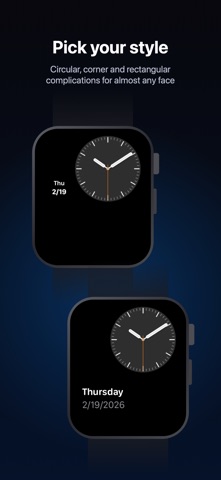
Three complication styles to fit any watch face:
• Circular: Day of week and date, stacked compactly
• Corner: Large curved date with the day of the week, and a line that tracks your progress through the month
• Rectangular: Full day name and date, clean and readable
Tap the complication to open a full monthly calendar with today highlighted. Scroll with the Digital Crown to browse months, swipe to jump by year, and double-tap to snap back to today.
Choose your preferred date format — MM/DD/YYYY, DD/MM/YYYY, or YYYY/MM/DD — and the complication updates to match.
No accounts. No subscriptions. No data collected. Just the date on your wrist.