

Dipole ck
Dipole ck is made and published by Christian Krause. AppBrain is an independent app data site and isn't affiliated with Christian Krause. The app name, icon, screenshots and description belong to Christian Krause and are shown as published on the App Store.
AppBrain's verdict
- Last updated
- October 17, 2026
Rankings
App Store top chartsApp Store Rankings for Dipole ck
Competitors
Similar apps and more from Christian KrauseAlternatives to Dipole ck


More from Christian Krause


Releases
Updates seen on the App Store- Version
- 1.2
- Launched
- September 2026
No changelog data
User feedback
Ratings and reviews on the App StoreComments on Dipole ck for iOS
We don't have enough comments to show example comments. Please check back later.
Technology
Found in the app by AppBrain- Price
- Free
- App size
- 3.42 MB
- Content rating
- Everyone
Technologies used by Dipole ck
About the app and developer
About Dipole ck
Dipole ck is an utilities app developed by Christian Krause.
User Ratings
The app has no ratings yet.
App Information
Dipole ck is freely available from the App Store. The app size is 3.42 MB. The latest version available is 1.2. The last update was on October 17, 2026.
Technical Requirements
The app has a content rating of Everyone. The app has been available on the App Store since September 2026.
Developer information for Christian Krause
Address:
Frequently asked questions about Dipole ck
Is Dipole ck free?
Yes. Dipole ck is free on the App Store.
Is Dipole ck still available?
Yes. Dipole ck is on the App Store, and the last update we saw was on October 17, 2026.
How large is Dipole ck?
Dipole ck is 3.42 MB.
Is Dipole ck suitable for children?
App Store rates the content of Dipole ck as suitable for everyone.
Who made Dipole ck?
Dipole ck was developed by Christian Krause. It is listed in the utilities category on the App Store.
What are the best alternatives to Dipole ck?
People looking at Dipole ck also look at these utilities apps: NetFlow X, Network Speed Window, WristSpeed Pro, Trick Button FF, PDF Converter : All Documents.
Store listing
By Christian Krause, from the App Store




Description by Christian Krause Written by the developer, not by AppBrain. Click to read.
A PERIOD THAT MATCHES YOUR PLAN
Most data counters can do one thing: reset on the 1st of the month. Dipole does both.
• Monthly on any day you choose, from 1 to 31 • By number of days – 7, 28, 30 or whatever your plan uses, starting from a date you pick
This is exactly where most apps fall short: prepaid plans almost never follow the calendar month. A 28-day bundle drifts forward a little every month. Dipole follows that drift and always shows you the real current period, the days remaining and the date of the next reset.
THE OVERVIEW
Two large tiles, one for cellular and one for Wi-Fi, each showing: • Today's usage, split into download and upload • Total usage in the current period • Daily average • A forecast for the end of the period, based on your last 30 days • Data remaining until your limit
Below that you see at a glance when the last reset happened, when the next one is due and how many days are left.
STATISTICS
Bar charts by day, month and year. Filter by connection (all, Wi-Fi, cellular) and by direction (all, uploads, downloads), with total, average and maximum. Page back as far as Dipole has data.
LIMITS AND WARNINGS
Enter your data limit for cellular and Wi-Fi in MB or GB. Dipole shows a progress ring and a bar, and sends you a notification when you reach two freely chosen percentage thresholds of your cellular limit – say 80 % and 95 %. Each warning is sent once per period, not more.
WIDGETS
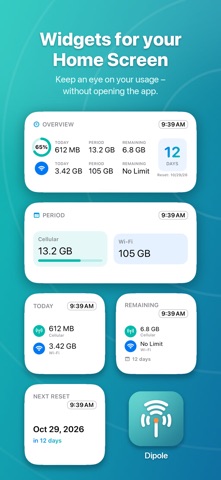
Five home screen widgets: Today's Usage, Current Period, Remaining Data, Next Reset, and a configurable Overview widget where you choose whether it shows cellular, Wi-Fi or both.
WHAT DIPOLE DOES FOR FREE
• Full tracking, permanently and in the background • The complete overview with both tiles, every figure and the reset dates • Statistics for the last 21 days • The small "Today's Usage" widget
Tracking runs in full from day one. Unlock later and your entire history is there retroactively – nothing is lost.
FULL VERSION – ONE PURCHASE, NO SUBSCRIPTION
• Statistics without limits: months, years and paging back through the past • All five widgets in every size, including the configurable Overview widget • Limits with progress display and the two warning thresholds • iCloud backup, automatically on launch, daily or weekly • Adjust usage data manually, for example when you switch plans mid-month
One purchase, unlocked for good, no subscription, no recurring cost.
GERMAN AND ENGLISH
You can switch the language inside the app, independently of your system language.
GOOD TO KNOW
Dipole counts from the moment you install it. Figures can differ from your carrier's or from iOS Settings, because those counters started at a different time and partly count differently. For your own overview and for spotting trends Dipole is exactly what you need – it is not meant as evidence for disputing a bill.
PRIVACY
Dipole measures entirely on your iPhone. No servers, no account, no sign-in, no tracking, no ads. Your data leaves the device only if you turn on iCloud backup yourself – and then only into your own iCloud.