


AppBrain's verdict
Established- Rating on App Store
- 4.00
- 1 ratings
- Last updated
- January 16, 2026
- Size
- 61.3 MB
It doesn't have enough ratings yet to judge what users think.
User feedback
Ratings and reviews on the App StoreComments on Discriminating Money (US) for iOS
We don't have enough comments to show example comments. Please check back later.
Store listing
By Blooming Kids Software LLC, from the App StoreDescription by Blooming Kids Software LLC Written by the developer, not by AppBrain. Click to read.
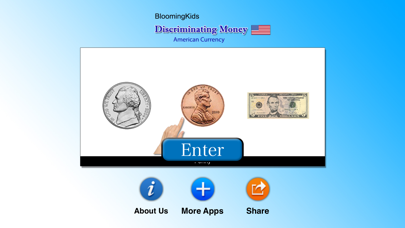
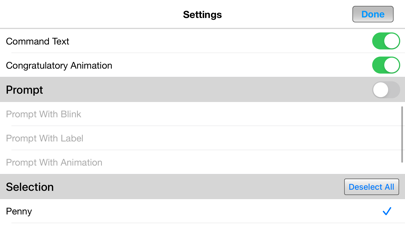
The default selections for this program are Level 3, Command Text, Prompt with Blink, Congratulatory Animation, and Select All.
Settings
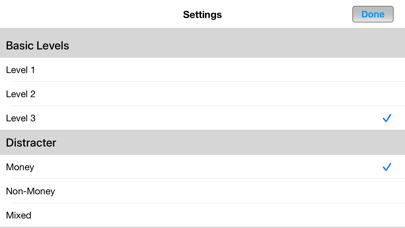
Level 1
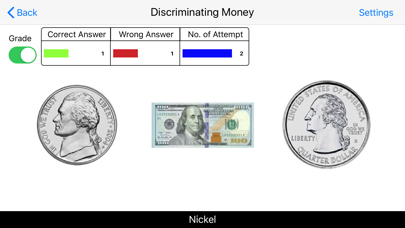
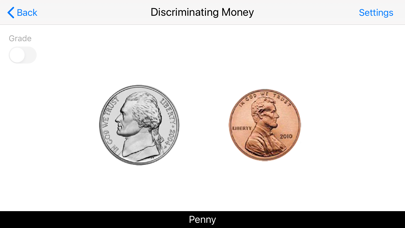
When this option is selected, one coin or bill appears at the top of the screen. One coin or bill is shown at the bottom of the screen to be matched with the one at the top, without any distracter.
Level 2
When this option is selected, one coin or bill appears at the top of the screen. Two items (coins or bills or pictures) are shown at the bottom of the screen to be matched with the coin or bill at the top of the screen. There is one correct choice and one distracter. You can choose a coin or bill or non-money distracter. “Mixed" gets disabled.
Level 3
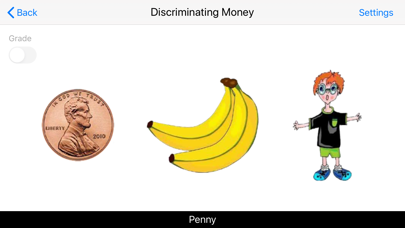
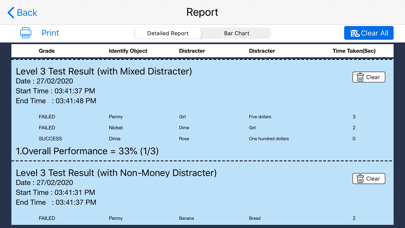
This level is selected by default. One coin or bill appears at the top of the screen. When this option is selected, three items (coins or bills or pictures) are shown at the bottom of the screen to be matched with the coin or bill at the top of the screen. There is one correct choice and two distracters. You can choose one coin or bill or non-money, or “Mixed" distracter.
Distracter
Money
This option is selected by default. When this is selected, distracters are all coins or bills.
Non-Money
If this option is selected, distracters are not coins or bills but some other items
Mixed
Distracters are either coins or bills or other
items.
Command Text
This option is selected by default. When this is checked, the coins or bills to be selected appear at the bottom of the screen. If unchecked, the coins or bills won't be visible.
Prompt
Prompt with Blink
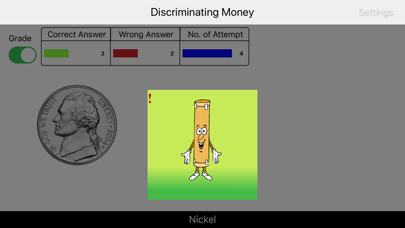
This is checked by default. If the student fails to match the correct coins or bills within ten seconds, the program guides him/her to the correct coin or bill by making the coin or bill blink. This is available for “Training" mode but disabled for “Test" mode.
Prompt with Label
If this box is checked the value of the coin or bill appears under the picture of the coin or bill. When this is checked, “No Label under Coin or Bill" is unchecked, and vice versa.
Prompt with Animation
If the student fails to match the correct coins or bills within ten seconds, the program guides him/her to the correct coin or bill by making the coin or bill Animation.
Congratulatory Animation
This box is checked by default. This is available only for the “Training" mode. When this is checked, clicking the correct coins or bills invites a congratulatory animation. This animation runs for ten seconds. Click anywhere on the screen or press space bar to stop the congratulatory animation.
Uncheck the box if the student doesn't need congratulatory animation.
Selection
Click on the check box to select or deselect the coins or bills.
Select All
Check this box to select all coins and bills. Uncheck to deselect.
OK
Click this button to open this program after choosing settings.
Done
Click this button to close the program and return to the main program.
Safety and technology
Found in the app by AppBrain- Price
- Free
- App size
- 61.3 MB
- Content rating
- Everyone
Technologies used by Discriminating Money (US)
Releases
Updates seen on the App Store- Version
- 1.5
- Launched
- February 2013
No changelog data
Alternatives
Similar apps and more from Blooming Kids Software LLCAlternatives to Discriminating Money (US)


More from Blooming Kids Software LLC


Rankings
App Store top chartsApp Store Rankings for Discriminating Money (US)
About the app and developer
About Discriminating Money (US)
Discriminating Money (US) is an education app developed by Blooming Kids Software LLC.
What is the rating of Discriminating Money (US)?
Discriminating Money (US) is rated 4.00 out of 5 stars, based on one rating ratings.
Is Discriminating Money (US) free?
Discriminating Money (US) is free. The app size is 61.35 MB. The latest version available is 1.5. The last update was on January 16, 2026.
What are the requirements for Discriminating Money (US)?
The app has a content rating of Everyone. The app has been available on the App Store since February 2013.
Discriminating Money (US) is made and published by Blooming Kids Software LLC. AppBrain is an independent app data site and isn't affiliated with Blooming Kids Software LLC. The app name, icon, screenshots and description belong to Blooming Kids Software LLC and are shown as published on the App Store.
Developer information for Blooming Kids Software LLC
Address:
Frequently asked questions about Discriminating Money (US)
Is Discriminating Money (US) free?
Yes. Discriminating Money (US) is free on the App Store.
Is Discriminating Money (US) still available?
Yes. Discriminating Money (US) is on the App Store, and the last update we saw was on January 16, 2026.
How large is Discriminating Money (US)?
Discriminating Money (US) is 61.35 MB.
Is Discriminating Money (US) suitable for children?
App Store rates the content of Discriminating Money (US) as suitable for everyone.
How do people rate Discriminating Money (US)?
Discriminating Money (US) has one rating of 4.00 stars on the App Store.
Who made Discriminating Money (US)?
Discriminating Money (US) was developed by Blooming Kids Software LLC. It is listed in the education category on the App Store.
What are the best alternatives to Discriminating Money (US)?
People looking at Discriminating Money (US) also look at these education apps: Cloudlabs Controllers, AI Essentials Learning Hub, Let's Go Places, MatchTime Lite, Money Up! - Build Life Skills.