

Distance and Area Measure
Distance and Area Measure is made and published by TappiApps. AppBrain is an independent app data site and isn't affiliated with TappiApps. The app name, icon, screenshots and description belong to TappiApps and are shown as published on the App Store.
AppBrain's verdict
- Last updated
- August 22, 2026
- Size
- 6.54 MB
User feedback
Ratings and reviews on the App StoreComments on Distance and Area Measure for iOS
We don't have enough comments to show example comments. Please check back later.
Store listing
By TappiApps, from the App Store


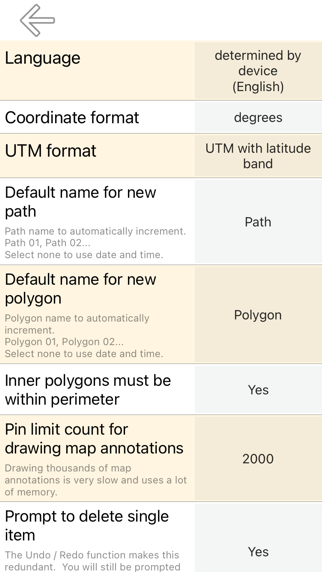
Description by TappiApps Written by the developer, not by AppBrain. Click to read.
Features that this application offers that most competitors do not:
- Add custom distance and area units.
- Draw interior polygons. For example, land area with bodies of water removed.
- Add a point to the middle of a path (Most only allow you to add to the end of the path) Tap to add to the end of a path. Long press to add to the middle of a path.
- Swap two points in a path or polygon.
- Add your current location from GPS receiver.
Features:
- 3 map layer options
- Export and import .kml files via Dropbox, iCloud, email, etc
- Pins are draggable and manually editable
- Name, notes, and color fields for each path and polygon
- Email or text message path and polygon data
- 4 verbosity modes. See only the information that you want to see
- Search by postal code, city, address, etc
- Get addresses near point on map
4 drawing modes:
- Path
- Polygon
- Polygon with hollow spaces inside
- No edit mode (to prevent accidental edits)
Values displayed for paths:
- Total distance
- Incremental distance for each waypoint
Values displayed for polygons:
- Area
- Perimeter
- Distance for each side
Add points to a path or polygon in 1 of 4 ways:
- Tap on the map
- Use current location
- Enter coordinates manually
- Import .kml file
Default distance units include:
- Meter
- Foot
- Yard
- Kilometer
- Mile
- Nautical mile
Default area units include:
- Square meter
- Square foot
- Square yard
- Square kilometer
- Square mile
- Square nautical mile
- Square acre
- Square hectare
Coordinate formats:
- Degrees
- Degrees, minutes
- Degrees, minutes, seconds
- UTM / UPS (Universal Transverse Mercator) / (Universal Polar Stereographic)
- MGRS (Military Grid Reference System)
Safety and technology
Found in the app by AppBrain- Price
- $7.99
- App size
- 6.54 MB
- Content rating
- Everyone
Technologies used by Distance and Area Measure
Releases
Updates seen on the App Store- Version
- 2.8
- Launched
- August 2015
No changelog data
Alternatives
Similar apps and more from TappiAppsAlternatives to Distance and Area Measure




More from TappiApps





Rankings
App Store top charts- Highest rank
- #38
- Chart
- Top Paid
- Productivity
- Country
- Austria
About the app and developer
About Distance and Area Measure
Distance and Area Measure is a productivity app developed by TappiApps.
User Ratings
The app has no ratings yet.
App Information
Distance and Area Measure costs $7.99. The app size is 6.54 MB. The latest version available is 2.8. The last update was on August 22, 2026.
Technical Requirements
The app has a content rating of Everyone. The app has been available on the App Store since August 2015.
Developer information for TappiApps
Address:
Frequently asked questions about Distance and Area Measure
Is Distance and Area Measure free?
No. Distance and Area Measure costs $7.99 on the App Store.
Is Distance and Area Measure still available?
Yes. Distance and Area Measure is on the App Store, and the last update we saw was on August 22, 2026.
How large is Distance and Area Measure?
Distance and Area Measure is 6.54 MB.
Is Distance and Area Measure suitable for children?
App Store rates the content of Distance and Area Measure as suitable for everyone.
Who made Distance and Area Measure?
Distance and Area Measure was developed by TappiApps. It is listed in the productivity category on the App Store.
What are the best alternatives to Distance and Area Measure?
People looking at Distance and Area Measure also look at these productivity apps: topoArea, Deed Calls - Area - Perimeter, RF-Toolbox Pro, A-Truss Pro, PhytechPlanner.