

DM Home Theater Remote
DM Home Theater Remote is made and published by JOSHUA CHARLES JORDAN. AppBrain is an independent app data site and isn't affiliated with JOSHUA CHARLES JORDAN. The app name, icon, screenshots and description belong to JOSHUA CHARLES JORDAN and are shown as published on the App Store.
AppBrain's verdict
- Last updated
- October 17, 2026
Rankings
App Store top chartsApp Store Rankings for DM Home Theater Remote
Competitors
Similar apps and more from JOSHUA CHARLES JORDANMore from JOSHUA CHARLES JORDAN


Releases
Updates seen on the App Store- Version
- 1.0.0
- Launched
- October 2026
No changelog data
User feedback
Ratings and reviews on the App StoreComments on DM Home Theater Remote for iOS
We don't have enough comments to show example comments. Please check back later.
Technology
Found in the app by AppBrain- Price
- Free
- App size
- 2.21 MB
- Content rating
- Everyone
Technologies used by DM Home Theater Remote
About the app and developer
About DM Home Theater Remote
DM Home Theater Remote is an utilities app developed by JOSHUA CHARLES JORDAN.
User Ratings
The app has no ratings yet.
App Information
DM Home Theater Remote is freely available from the App Store. The app size is 2.21 MB. The latest version available is 1.0.0. The last update was on October 17, 2026.
Technical Requirements
The app has a content rating of Everyone. The app has been available on the App Store since October 2026.
Developer information for JOSHUA CHARLES JORDAN
Address:
Store listing
By JOSHUA CHARLES JORDAN, from the App Store

Description by JOSHUA CHARLES JORDAN Written by the developer, not by AppBrain. Click to read.
Press "Watch Apple TV" and it turns on the receiver, picks the right input, wakes the Apple TV and opens your app. Press "All Off" and it all turns off. Make your own buttons: choose the devices, the receiver input, the listening mode, the volume, the Apple TV app to open, and a Shortcut or (on iPhone) the lights to set.
WHAT YOU GET
• One-button activities you design yourself, with your own names and icons
• A signal-path strip showing Apple TV, receiver input and TV at a glance; tap a device to wake it
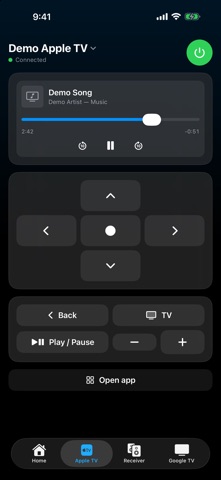
• A full Apple TV remote: directions, now playing with scrubbing, apps, keyboard, volume
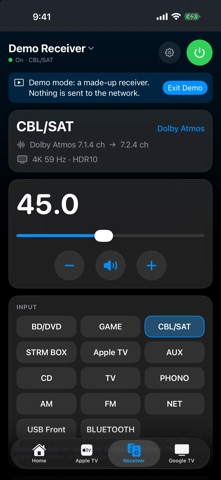
• A full network AV receiver remote: power, precise volume, inputs by name, listening modes and live audio and video format, bass and treble, zones, setup menu
• A Google TV remote: directions, Back, Home, media keys, HDMI inputs, app shortcuts, power
• On iPhone, lights in any of your Apple Homes can be part of a button; on the Mac a button can run a Shortcut
• Menu-bar controls and keyboard shortcuts on the Mac
WORKS WITH
Apple TV, many Pioneer, Onkyo and Integra network receivers, and Google TV televisions. Everything talks to your devices directly over your home Wi-Fi, so it is fast and keeps working without an internet connection.
TRY IT FIRST
No devices handy? Tap "Try Demo Mode" on the first screen to explore the whole app with made-up devices. Nothing is sent to your network in demo mode.
PRIVACY
DM Home Theater Remote does not collect, store or send any information about you. It only talks to the devices on your own network. Local Network access is needed to find them.
An independent app, not affiliated with or endorsed by Apple, Google or any receiver or TV manufacturer.