

do!bookⅡ
do!bookⅡ is made and published by Digital Office [Japan] Inc. AppBrain is an independent app data site and isn't affiliated with Digital Office [Japan] Inc. The app name, icon, screenshots and description belong to Digital Office [Japan] Inc. and are shown as published on the App Store.
AppBrain's verdict
- Last updated
- December 19, 2022
Rankings
App Store top chartsApp Store Rankings for do!bookⅡ
Competitors
Similar apps and more from Digital Office [Japan] Inc.Alternatives to do!bookⅡ








More from Digital Office [Japan] Inc.

Releases
Updates seen on the App Store- Version
- 1.6.1
- Launched
- February 2013
No changelog data
User feedback
Ratings and reviews on the App StoreComments on do!bookⅡ for iOS
We don't have enough comments to show example comments. Please check back later.
Technology
Found in the app by AppBrain- Price
- Free
- App size
- 21.2 MB
- Content rating
- Everyone
Technologies used by do!bookⅡ
About the app and developer
About do!bookⅡ
do!bookⅡ is a business app developed by Digital Office [Japan] Inc.
User Ratings
The app has no ratings yet.
App Information
do!bookⅡ is freely available from the App Store. The app size is 21.21 MB. The latest version available is 1.6.1. The last update was on December 19, 2022.
Technical Requirements
The app has a content rating of Everyone. The app has been available on the App Store since February 2013.
Developer information for Digital Office [Japan] Inc.
Address:
Store listing
By Digital Office [Japan] Inc., from the App Store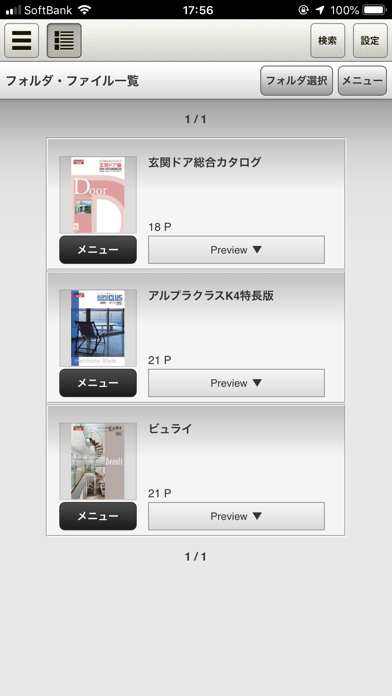
Description by Digital Office [Japan] Inc. Written by the developer, not by AppBrain. Click to read.
PDFファイルから自動生成された電子カタログを閲覧するツールで、あなたのビジネスシーンで
iPadを便利にご活用いただけます。
例えばカタログやマニュアルなど用途に応じて、複数のファイルを閲覧できるキャビネット(書棚)や
フォルダを分類できるツリー機能などを使い分けてドキュメントを手軽に公開できます。
PDFに設定したリンクも自動的に設定されるので、リンクをクリックするだけで、Webサイトや動画を
iPadで表示させることも可能です。
■新機能
ご好評のDO!BOOKアプリのHTML5バージョン。新機能が続々とリリースされます。
1)BOOKエリアの二重化
2冊のBOOKを開いて切り替えて閲覧することができます。
2)お気に入り機能
お気に入りのBOOKを登録し、iPadにダウンロードすることが可能です。
3)セキュリティ機能
ダウンロード情報は全て暗号化され、大切な情報を確実に保護可能となりました。
■サイト閲覧方法
閲覧したいサイトのIDを既にご登録済みの場合は、設定画面にIDを入力するだけで閲覧可能です。
サイトIDの登録については弊社までお問い合わせください。
■主な特徴
1)ツリー表示
フォルダ構成を開閉可能なツリーで表示します。
2)ファイル一覧表示
各フォルダに登録されているファイルを一覧で表示します。
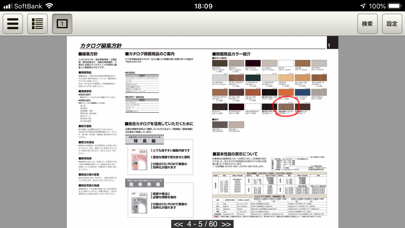
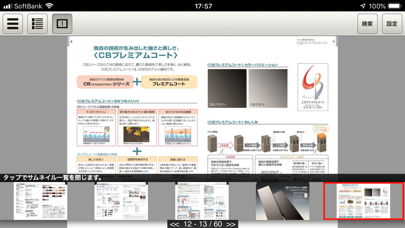
3)ファイル閲覧
縦にすると1ページずつ、横にすると見開きで閲覧が可能です。
3Gでも高速表示され、ダブルタップやピッチで拡大・縮小して閲覧できます。
4)全文検索
ファイル内の文字で全文検索し、ヒットしたファイルとページを一覧で表示し、文字ブロックが
ハイライト表示されます。
5)リンク機能
PDF内のリンクを自動的に読み込んで他のホームページや動画をアプリケーション内で表示できます。
6)目次機能
PDFに登録してあるしおりが目次として自動的に組み込まれます。
7)ペンツール機能
どこにでも自由にフリーハンドで色を選んでペンで書き込みできます。
■ご注意点
・詳細機能については、当社ホームページをご覧ください。
・本アプリケーションの開発には細心の注意をはらっておりますが、通信環境の変化などが
動作に影響を与える可能性があります。
その際、当社はその責を負いませんので予めご了承ください。