Doc Scanner App & PDF Printer is an overall app developed by Smart Mobile Apps FZCO.
Download Statistics
User Ratings
Doc Scanner App & PDF Printer is rated 5.00 out of 5 stars. The rating is based on 6 ratings.
App Information
Doc Scanner App & PDF Printer is FREE to download. The APK download size is 264.91 MB. The latest version available is 2.4. The last update was on November 20, 2023.
Technical Requirements
The app has a content rating of Everyone. The app has been available on Google Play July 2021.
Description
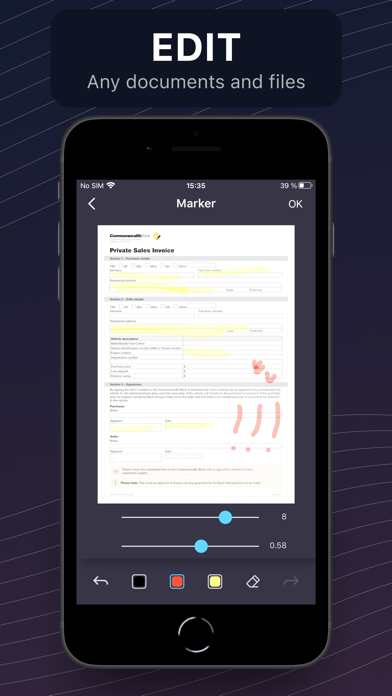
Doc Printer App & PDF Scanner is the only tool you need to work with documents anywhere you are: SCAN, PRINT, FAX, EDIT, MANAGE and SHARE your documents and files in a few taps! Remote office in your pocket for modern remote work!
SCANNER - Scan documents, photos, books, papers, receipts, business cards and so on - Smart scan feature: auto-border detection, color correction and noise removing features - Edit your scans: add signatures, modify, delete, insert and make all the necessary changes - Built-in OCR feature: recognize text from your scans and edit it as you want
PRINTER - Print any files and over 30+ types of documents: PDF, Pages, Numbers, DOC, XLS, PPT and so on - Print photos, web-pages, email attachments, clipboard texts, contacts and many more - Wide settings options: paper size, orientation, range, borders, 1/2-sided printing, color/bw/grayscale and many more - Over 1000 printer models supported and counting
FAX - Fax any documents and photos to over 100 countries worldwide - Over 30+ types of documents are supported - Preview, Edit and Sign faxes - Send faxes at affordable and transparent pricing
EXTENDED FEATURES: - CLOUDS SUPPORT iCloud, Google.Drive, Dropbox, etc - PDF CONVERTER: convert anything to PDF, edit and share it - SHARE DOCUMENTS: sms, email, social networks, cloud services - 100% UP TO DATE: iOS 17 ready with the support of all the latest iPhone models
Doc Printer App & PDF Scanner is free to use with limited functions. Premium version provides unlimited access to apps features. Payment will be charged to iTunes Account at confirmation of purchase. Subscription automatically renews unless auto-renew is turned off at least 24-hours before the end of the current period. Account will be charged for renewal within 24-hours prior to the end of the current period, and identify the cost of the renewal. Subscriptions may be managed by the user and auto-renewal may be turned off by going to the user's Account Settings after purchase. Any unused portion of a free trial period, if offered, will be forfeited when the user purchases a subscription to that publication.
Terms and Conditions: http://doc-scan-app.com/terms.html Privacy Policy: http://doc-scan-app.com/privacy.html
Each subscription will automatically renew 3 days before the expiration date for
the same time period. Subscriptions can be cancelled at any time before the renewal.