

DocClair: Scan PDF is made and published by Mewey. AppBrain is an independent app data site and isn't affiliated with Mewey. The app name, icon, screenshots and description belong to Mewey and are shown as published on the App Store.
AppBrain's verdict
- Last updated
- June 17, 2026
- Size
- 9.87 MB
User feedback
Ratings and reviews on the App StoreComments on DocClair: Scan PDF for iOS
We don't have enough comments to show example comments. Please check back later.
Store listing
By Mewey, from the App Store

Screenshots by Mewey, from the the App Store listing
Description by Mewey Written by the developer, not by AppBrain. Click to read.
DocClair turns your iPhone into a fast, private document scanner. Point, capture, and get a clean, sharp PDF in seconds — no account, no ads, no tracking. Everything stays on your device.
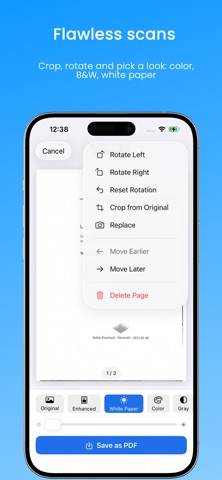
Automatic edge detection and perspective correction straighten every page, while smart filters (Document, Black & White, Whitening) make text crisp and backgrounds clean. Live framing, lighting, and focus guidance — plus a flash for low light — help you capture the perfect page every time. Add multiple pages, reorder them, and export a polished multi-page PDF.
SPECIAL CAPTURE MODES
• ID Card mode — front and back on a single, tidy page
• Book mode — capture a two-page spread and split it into two pages
YOUR DATA, SAFE AND YOURS
• Recently Deleted — restore deleted documents for up to 30 days
• Local Backup & Restore — save your whole library to one file and bring it back anytime, with no cloud and no account
PART OF YOUR iPHONE
• Scan with Siri and Shortcuts
• One-tap scan from the Lock Screen and Control Center
• A Recent Scans Home Screen widget
• Find documents in Spotlight by title or by the text inside them
FREE
• Scan or import documents up to 3 pages
• Automatic edge detection & perspective crop
• Enhancement filters
• Recently Deleted & local backup
• Save, share, rename and print your PDFs
DocClair Pro — one-time purchase, no subscription
• Unlimited pages per document
• ID Card and Book capture modes
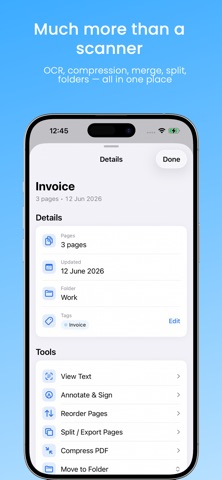
• Text recognition (OCR) to search and copy text
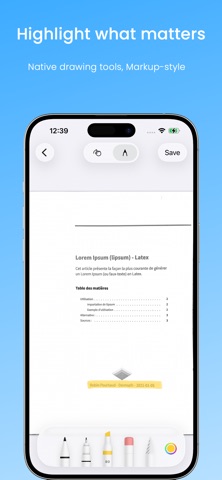
• Annotate & sign your documents
• Compress, merge, split and reorder PDFs
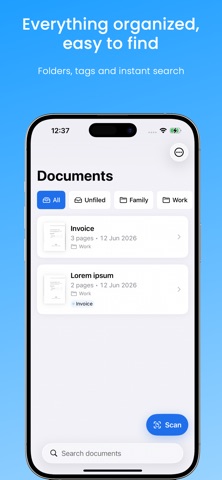
• Organize with folders and tags
• Password-protect your PDFs
Available in English, French, German, Spanish, Italian, Portuguese, and Russian, with VoiceOver and Dynamic Type support.
Private by design: DocClair works fully offline. Your scans and recognized text are processed and stored only on this device — never uploaded.
No subscription. No account. No data collection.
Automatic edge detection and perspective correction straighten every page, while smart filters (Document, Black & White, Whitening) make text crisp and backgrounds clean. Live framing, lighting, and focus guidance — plus a flash for low light — help you capture the perfect page every time. Add multiple pages, reorder them, and export a polished multi-page PDF.
SPECIAL CAPTURE MODES
• ID Card mode — front and back on a single, tidy page
• Book mode — capture a two-page spread and split it into two pages
YOUR DATA, SAFE AND YOURS
• Recently Deleted — restore deleted documents for up to 30 days
• Local Backup & Restore — save your whole library to one file and bring it back anytime, with no cloud and no account
PART OF YOUR iPHONE
• Scan with Siri and Shortcuts
• One-tap scan from the Lock Screen and Control Center
• A Recent Scans Home Screen widget
• Find documents in Spotlight by title or by the text inside them
FREE
• Scan or import documents up to 3 pages
• Automatic edge detection & perspective crop
• Enhancement filters
• Recently Deleted & local backup
• Save, share, rename and print your PDFs
DocClair Pro — one-time purchase, no subscription
• Unlimited pages per document
• ID Card and Book capture modes
• Text recognition (OCR) to search and copy text
• Annotate & sign your documents
• Compress, merge, split and reorder PDFs
• Organize with folders and tags
• Password-protect your PDFs
Available in English, French, German, Spanish, Italian, Portuguese, and Russian, with VoiceOver and Dynamic Type support.
Private by design: DocClair works fully offline. Your scans and recognized text are processed and stored only on this device — never uploaded.
No subscription. No account. No data collection.
Safety and technology
Found in the app by AppBrain- Price
- Free
- App size
- 9.87 MB
- Content rating
- Everyone
Technologies used by DocClair: Scan PDF
Releases
Updates seen on the App Store- Version
- 1.1
- Launched
- June 2026
No changelog data
Alternatives
Similar apps and more from MeweyAlternatives to DocClair: Scan PDF




More from Mewey





Rankings
App Store top chartsApp Store Rankings for DocClair: Scan PDF
This app is not ranked
About the app and developer
About DocClair: Scan PDF
DocClair: Scan PDF is an utilities app developed by Mewey.
What is the rating of DocClair: Scan PDF?
DocClair: Scan PDF has no ratings yet.
Is DocClair: Scan PDF free?
DocClair: Scan PDF is free. The app size is 9.87 MB. The latest version available is 1.1. The last update was on June 17, 2026.
What are the requirements for DocClair: Scan PDF?
The app has a content rating of Everyone. The app has been available on the App Store since June 2026.
Developer information for Mewey
Address: