

DocConvert: Word to PDF, DOCX
DocConvert: Word to PDF, DOCX is made and published by RUEBEN ANSOLIWEN AKANKOBATENG. AppBrain is an independent app data site and isn't affiliated with RUEBEN ANSOLIWEN AKANKOBATENG. The app name, icon, screenshots and description belong to RUEBEN ANSOLIWEN AKANKOBATENG and are shown as published on the App Store.
AppBrain's verdict
- Last updated
- September 15, 2026
Rankings
App Store top chartsApp Store Rankings for DocConvert: Word to PDF, DOCX
Competitors
Similar apps and more from RUEBEN ANSOLIWEN AKANKOBATENGAlternatives to DocConvert: Word to PDF, DOCX


More from RUEBEN ANSOLIWEN AKANKOBATENG


Releases
Updates seen on the App Store- Version
- 1.1
- Launched
- August 2026
No changelog data
User feedback
Ratings and reviews on the App StoreComments on DocConvert: Word to PDF, DOCX for iOS
We don't have enough comments to show example comments. Please check back later.
Technology
Found in the app by AppBrain- Price
- Free
- App size
- 19.4 MB
- Content rating
- Everyone
Technologies used by DocConvert: Word to PDF, DOCX
About the app and developer
About DocConvert: Word to PDF, DOCX
DocConvert: Word to PDF, DOCX is a productivity app developed by RUEBEN ANSOLIWEN AKANKOBATENG.
User Ratings
The app has no ratings yet.
App Information
DocConvert: Word to PDF, DOCX is freely available from the App Store. The app size is 19.43 MB. The latest version available is 1.1. The last update was on September 15, 2026.
Technical Requirements
The app has a content rating of Everyone. The app has been available on the App Store since August 2026.
Developer information for RUEBEN ANSOLIWEN AKANKOBATENG
Address:
Store listing
By RUEBEN ANSOLIWEN AKANKOBATENG, from the App Store


Description by RUEBEN ANSOLIWEN AKANKOBATENG Written by the developer, not by AppBrain. Click to read.
Your documents stay on your device. No cloud servers, no file uploads, and no waiting. Open a file, convert it, and share it in seconds.
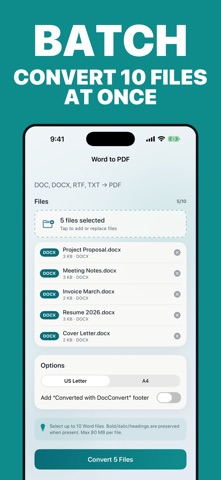
WORD TO PDF
• Convert DOCX, DOC, RTF, and TXT files into clean PDFs
• Preserve bold, italics, and headings
• Choose US Letter or A4 page size
• Batch convert up to 10 files at once
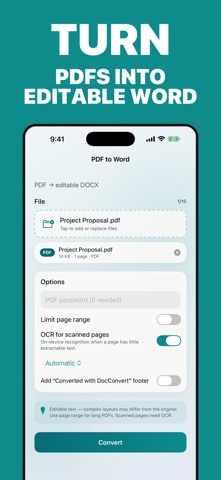
PDF TO WORD (DOCX)
• Turn PDFs into editable Word documents
• Built-in OCR recognizes text in scanned documents
• Open password-protected PDFs
• Convert only the pages you need
PRIVATE BY DESIGN
• Document conversion happens entirely on your device
• No account required
• Works offline
BUILT FOR EVERYDAY WORK
• Convert directly from Files, Mail, or another app using the Share Extension
• Open PDF and Word files directly in DocConvert
• Search history, add tags, rename files, and view thumbnails
• Preview, print, share, or save every result to Files
• Siri Shortcuts support
Ideal for contracts, resumes, essays, invoices, scanned paperwork, and any document you need in another format.
DocConvert Pro is available as a weekly or yearly auto-renewing subscription, or a one-time lifetime purchase. Subscriptions renew automatically unless cancelled at least 24 hours before the end of the current period and can be managed in your Apple ID settings.
Privacy Policy: https://docs.google.com/document/d/e/2PACX-1vTlGVP2ki1b5wa-OvTEYVPDl2krGyYHVz4hs18gMAK08i5rQrE-fZ3dTKaS9FG6gBqQz_PWwZzfh2EO/pub
Terms of Use: https://www.apple.com/legal/internet-services/itunes/dev/stdeula/