

DocKit: PDF Scanner & Toolkit
DocKit: PDF Scanner & Toolkit is made and published by Mohamed Al-Kainai. AppBrain is an independent app data site and isn't affiliated with Mohamed Al-Kainai. The app name, icon, screenshots and description belong to Mohamed Al-Kainai and are shown as published on the App Store.
AppBrain's verdict
- Rating on App Store
- 5.00
- 5 ratings
- Last updated
- September 11, 2026
It doesn't have enough ratings yet to judge what users think.
Rankings
App Store top chartsApp Store Rankings for DocKit: PDF Scanner & Toolkit
Competitors
Similar apps and more from Mohamed Al-KainaiAlternatives to DocKit: PDF Scanner & Toolkit





More from Mohamed Al-Kainai


Releases
Updates seen on the App Store- Version
- 2.1.0-beta
- Launched
- April 2026
No changelog data
User feedback
Ratings and reviews on the App StoreComments on DocKit: PDF Scanner & Toolkit for iOS
We don't have enough comments to show example comments. Please check back later.
Technology
Found in the app by AppBrain- Price
- Free
- App size
- 135.4 MB
- Content rating
- Everyone
Technologies used by DocKit: PDF Scanner & Toolkit
About the app and developer
About DocKit: PDF Scanner & Toolkit
DocKit: PDF Scanner & Toolkit is an utilities app developed by Mohamed Al-Kainai.
User Ratings
DocKit: PDF Scanner & Toolkit is rated 5.00 out of 5 stars. The rating is based on 5 ratings.
App Information
DocKit: PDF Scanner & Toolkit is freely available from the App Store. The app size is 135.37 MB. The latest version available is 2.1.0-beta. The last update was on September 11, 2026.
Technical Requirements
The app has a content rating of Everyone. The app has been available on the App Store since April 2026.
Developer information for Mohamed Al-Kainai
Address:
Frequently asked questions about DocKit: PDF Scanner & Toolkit
Is DocKit: PDF Scanner & Toolkit free?
Yes. DocKit: PDF Scanner & Toolkit is free on the App Store.
Is DocKit: PDF Scanner & Toolkit still available?
Yes. DocKit: PDF Scanner & Toolkit is on the App Store, and the last update we saw was on September 11, 2026.
How large is DocKit: PDF Scanner & Toolkit?
DocKit: PDF Scanner & Toolkit is 135.37 MB.
Is DocKit: PDF Scanner & Toolkit suitable for children?
App Store rates the content of DocKit: PDF Scanner & Toolkit as suitable for everyone.
How do people rate DocKit: PDF Scanner & Toolkit?
DocKit: PDF Scanner & Toolkit scores 5.00 out of 5 stars, from 5 ratings on the App Store.
Who made DocKit: PDF Scanner & Toolkit?
DocKit: PDF Scanner & Toolkit was developed by Mohamed Al-Kainai. It is listed in the utilities category on the App Store.
What are the best alternatives to DocKit: PDF Scanner & Toolkit?
People looking at DocKit: PDF Scanner & Toolkit also look at these utilities apps: Subscription Manager - Censo, SunForm-Quotation&Bookkeeping, Maskduck, Calendar Island, BoCake Master.
Store listing
By Mohamed Al-Kainai, from the App Store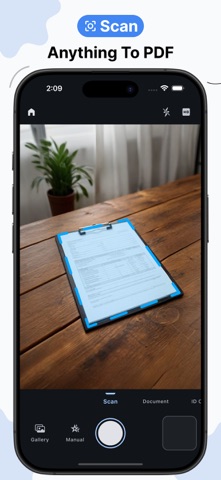

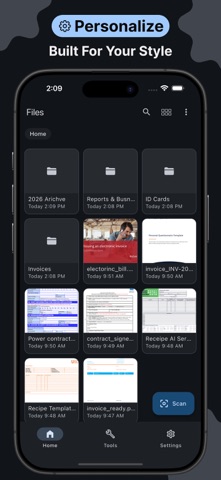
Description by Mohamed Al-Kainai Written by the developer, not by AppBrain. Click to read.
Scan documents with your camera and get clean, professional results instantly. Smart filters run entirely on-device to auto-detect edges, correct perspective, remove shadows, and produce crisp scans whether you're capturing a receipt, a contract, an ID card, or a passport.
DOCUMENT SCANNER
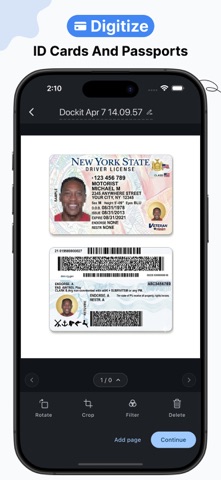
Scan in four modes built for different needs — General for any document, Document for standard paper sizes like A4 and Letter, ID Card for capturing both sides of an identity card, and Passport for travel documents. Every scan is processed locally with no data sent anywhere.
ORGANIZE YOUR PDFs
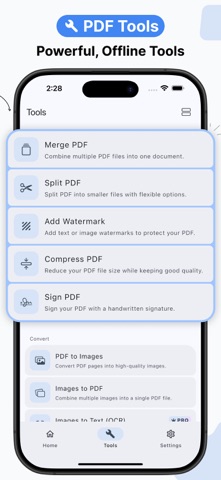
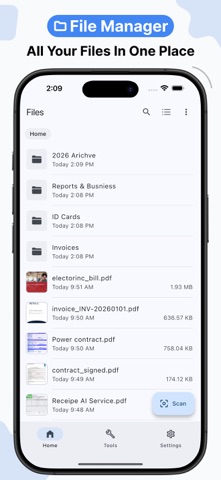
Merge multiple PDFs into one, or split a file your way — by page range, by file size, or at fixed intervals. Reorder, rotate, delete, or extract pages with a few taps.
CONVERT & EXTRACT
Turn PDFs into images or build a PDF from your photos in seconds. Extract text from any PDF or use OCR to pull text out of scanned images — all offline.
SECURITY & SIGNING
Sign documents digitally, add custom watermarks, protect files with a password, or remove protection from any PDF. Your documents, fully under your control.
COMPRESS & OPTIMIZE
Reduce PDF file sizes significantly without losing quality — useful for sharing, emailing, or simply freeing up storage.
PRIVACY BY DESIGN
Dockit works entirely offline. Nothing is uploaded and no data is collected. What's on your device stays on your device.
SUBSCRIPTION & PREMIUM FEATURES
Dockit offers a free version with core scanning features. Advanced tools require a subscription.
Premium features include:
• OCR (text recognition)
• PDF compression
• Digital signatures
• Password protection for PDFs
• ID card and passport scanning
• Extended scan limits
Subscription details are shown in-app before purchase.
Terms of Use: https://www.apple.com/legal/internet-services/itunes/dev/stdeula/