

DockLock Plus is made and published by Ihor July. AppBrain is an independent app data site and isn't affiliated with Ihor July. The app name, icon, screenshots and description belong to Ihor July and are shown as published on the App Store.
AppBrain's verdict
- Last updated
- January 12, 2026
Rankings
App Store top chartsApp Store Rankings for DockLock Plus
This app is not ranked
Competitors
Similar apps and more from Ihor JulyMore from Ihor July

Releases
Updates seen on the App Store- Version
- 2.1.0
- Launched
- March 2025
No changelog data
User feedback
Ratings and reviews on the App StoreComments on DockLock Plus for iOS
We don't have enough comments to show example comments. Please check back later.
Technology
Found in the app by AppBrain- Price
- $39.99
- App size
- 6.11 MB
- Content rating
- Everyone
Technologies used by DockLock Plus
About the app and developer
About DockLock Plus
DockLock Plus is a productivity app developed by Ihor July.
User Ratings
The app has no ratings yet.
App Information
DockLock Plus costs $39.99. The app size is 6.11 MB. The latest version available is 2.1.0. The last update was on January 12, 2026.
Technical Requirements
The app has a content rating of Everyone. The app has been available on the App Store since March 2025.
Developer information for Ihor July
Address:
Store listing
By Ihor July, from the App Store

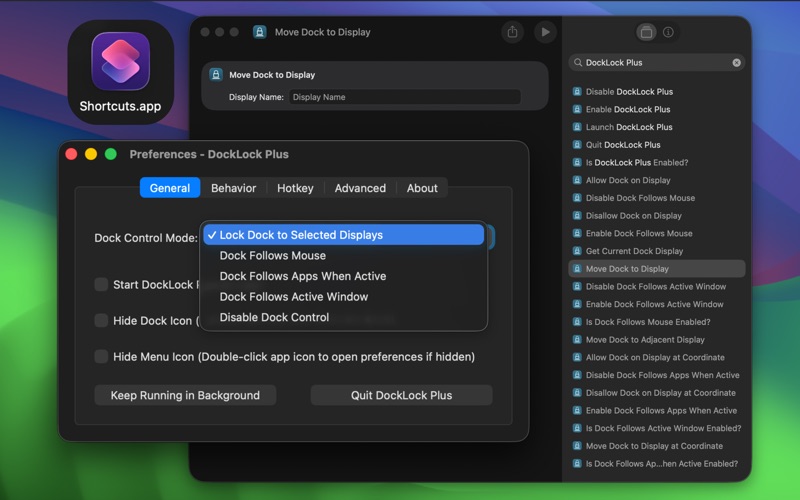
Screenshots by Ihor July, from the the App Store listing
Description by Ihor July Written by the developer, not by AppBrain. Click to read.
DockLock Plus - True Lifetime License, No Forced Upgrades, with Family Sharing Support
Tired of your Mac's Dock jumping between screens? DockLock Plus locks it exactly where you want - or makes it follow your active window or mouse - with powerful automation, official Raycast extension support, and a true lifetime license.
Stop losing focus when macOS moves your Dock unexpectedly. Whether you're working with multiple monitors, a Sidecar iPad, or a DisplayLink setup, DockLock Plus ensures your Dock stays exactly where you need it.
This app exists because of a principle I discovered - one that made precise Dock control possible for the first time in macOS history. Before DockLock, this level of control simply wasn't possible. By choosing DockLock Plus, you're not only getting a unique solution, you're supporting the creator who invented it.
Why DockLock Plus?
DockLock Lite offers essential Dock-locking features with a 7-day trial, but DockLock Plus adds:
- Dock Follows Mouse - Automatically lock the Dock under your cursor as you switch screens.
- Dock Follows Active Window - Keep the Dock with your focused window automatically.
- Full Automation Toolkit - Apple Shortcuts, URL Scheme control, menu-bar repositioning, hotkeys, and scripting support.
- Official Raycast Extension - Trigger any DockLock Plus command instantly from Raycast.
Core Features
- Lock the Dock to the display you choose
- Hide the Dock during screen sharing or meetings in single and multi-screen setups (see FAQ on the official website).
- Prevent accidental Dock jumps between screens
- Allow or disallow specific monitors for Dock placement
- Temporarily override locking with a modifier key
- Auto-start on login and restore position after sleep
- Fully sandboxed, works entirely offline
Automation Power Users
Every action - from enabling/disabling lock to moving the Dock by display name, direction, or coordinate - is available as an App Intent. Integrate DockLock Plus into Shortcuts, Siri, Automator, Raycast, or scripts with simple DockLockPlus\:// URLs.
Ideal if you:
- Have at least two connected screens (including Sidecar or DisplayLink)
- Keep your Dock at the bottom of the screen
- Have "Displays have separate Spaces" enabled in macOS
Important Notes
- Requires at least two connected displays to function
- Works only with the Dock positioned at the bottom of the screen
- Can only lock the Dock to screens where macOS allows manual movement
- Command+Tab remains tied to the Dock's location
Download DockLock Plus today and experience the first-ever true Dock control for macOS.
If you have questions, feedback, or encounter any issues, please contact support@docklock.pro
Thank you for choosing DockLock Plus!
Tired of your Mac's Dock jumping between screens? DockLock Plus locks it exactly where you want - or makes it follow your active window or mouse - with powerful automation, official Raycast extension support, and a true lifetime license.
Stop losing focus when macOS moves your Dock unexpectedly. Whether you're working with multiple monitors, a Sidecar iPad, or a DisplayLink setup, DockLock Plus ensures your Dock stays exactly where you need it.
This app exists because of a principle I discovered - one that made precise Dock control possible for the first time in macOS history. Before DockLock, this level of control simply wasn't possible. By choosing DockLock Plus, you're not only getting a unique solution, you're supporting the creator who invented it.
Why DockLock Plus?
DockLock Lite offers essential Dock-locking features with a 7-day trial, but DockLock Plus adds:
- Dock Follows Mouse - Automatically lock the Dock under your cursor as you switch screens.
- Dock Follows Active Window - Keep the Dock with your focused window automatically.
- Full Automation Toolkit - Apple Shortcuts, URL Scheme control, menu-bar repositioning, hotkeys, and scripting support.
- Official Raycast Extension - Trigger any DockLock Plus command instantly from Raycast.
Core Features
- Lock the Dock to the display you choose
- Hide the Dock during screen sharing or meetings in single and multi-screen setups (see FAQ on the official website).
- Prevent accidental Dock jumps between screens
- Allow or disallow specific monitors for Dock placement
- Temporarily override locking with a modifier key
- Auto-start on login and restore position after sleep
- Fully sandboxed, works entirely offline
Automation Power Users
Every action - from enabling/disabling lock to moving the Dock by display name, direction, or coordinate - is available as an App Intent. Integrate DockLock Plus into Shortcuts, Siri, Automator, Raycast, or scripts with simple DockLockPlus\:// URLs.
Ideal if you:
- Have at least two connected screens (including Sidecar or DisplayLink)
- Keep your Dock at the bottom of the screen
- Have "Displays have separate Spaces" enabled in macOS
Important Notes
- Requires at least two connected displays to function
- Works only with the Dock positioned at the bottom of the screen
- Can only lock the Dock to screens where macOS allows manual movement
- Command+Tab remains tied to the Dock's location
Download DockLock Plus today and experience the first-ever true Dock control for macOS.
If you have questions, feedback, or encounter any issues, please contact support@docklock.pro
Thank you for choosing DockLock Plus!