

Doclii is made and published by The Capitalyst Limited. AppBrain is an independent app data site and isn't affiliated with The Capitalyst Limited. The app name, icon, screenshots and description belong to The Capitalyst Limited and are shown as published on the App Store.
AppBrain's verdict
- Last updated
- July 9, 2026
Rankings
App Store top chartsApp Store Rankings for Doclii
Competitors
Similar apps and more from The Capitalyst LimitedMore from The Capitalyst Limited

Releases
Updates seen on the App Store- Version
- 1.0
- Launched
- July 2026
No changelog data
User feedback
Ratings and reviews on the App StoreComments on Doclii for iOS
We don't have enough comments to show example comments. Please check back later.
Technology
Found in the app by AppBrain- Price
- Free
- App size
- 9.14 MB
- Content rating
- Everyone
Technologies used by Doclii
About the app and developer
About Doclii
Doclii is a business app developed by The Capitalyst Limited.
User Ratings
The app has no ratings yet.
App Information
Doclii is freely available from the App Store. The app size is 9.14 MB. The latest version available is 1.0. The last update was on July 9, 2026.
Technical Requirements
The app has a content rating of Everyone. The app has been available on the App Store since July 2026.
Developer information for The Capitalyst Limited
Address:
Frequently asked questions about Doclii
Is Doclii free?
Yes. Doclii is free on the App Store.
Is Doclii still available?
Yes. Doclii is on the App Store, and the last update we saw was on July 9, 2026.
How large is Doclii?
Doclii is 9.14 MB.
Is Doclii suitable for children?
App Store rates the content of Doclii as suitable for everyone.
Who made Doclii?
Doclii was developed by The Capitalyst Limited. It is listed in the business category on the App Store.
Store listing
By The Capitalyst Limited, from the App Store
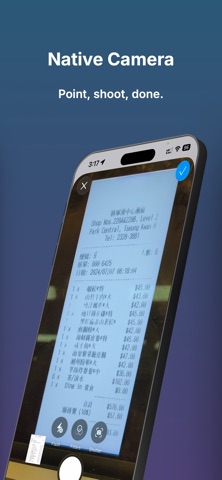

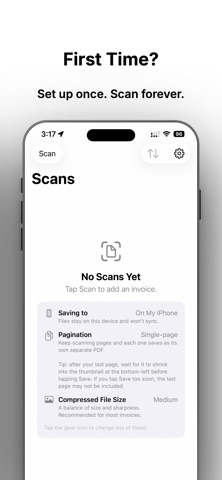
Description by The Capitalyst Limited Written by the developer, not by AppBrain. Click to read.
No account needed. No cloud service to sign up for. Your files go exactly where you want them: a folder on iCloud Drive that syncs to your Mac automatically, or a local folder on your device. Open Finder on your Mac and your scans are already there.
Key features:
• Scan single or multi-page documents into clean PDFs
• Save directly to any iCloud Drive folder — accessible on your Mac instantly, no cable
• Choose between single-page mode (each shot = one PDF) or multi-page mode (one session = one PDF)
• Automatic file naming using the date and text detected on the document
• Adjustable image compression: smallest files for fast sync, or full resolution when you need it
• Works with any Files-app folder: iCloud Drive, On My iPhone, or third-party providers
• No subscription, no ads, no data collection
Built for people who need a fast, no-nonsense way to get paper documents off a desk and into a folder on their computer.