

DocScan: Document Scanner+OCR
DocScan: Document Scanner+OCR is made and published by Halilibrahim Karabag. AppBrain is an independent app data site and isn't affiliated with Halilibrahim Karabag. The app name, icon, screenshots and description belong to Halilibrahim Karabag and are shown as published on the App Store.
AppBrain's verdict
- Rating on App Store
- 5.00
- 2 ratings
- Last updated
- August 17, 2026
It doesn't have enough ratings yet to judge what users think.
Rankings
App Store top chartsApp Store Rankings for DocScan: Document Scanner+OCR
Competitors
Similar apps and more from Halilibrahim KarabagAlternatives to DocScan: Document Scanner+OCR





More from Halilibrahim Karabag


Releases
Updates seen on the App Store- Version
- 1.2
- Launched
- May 2025
No changelog data
User feedback
Ratings and reviews on the App StoreComments on DocScan: Document Scanner+OCR for iOS
We don't have enough comments to show example comments. Please check back later.
Technology
Found in the app by AppBrain- Price
- Free
- App size
- 133.3 MB
- Content rating
- Medium
Technologies used by DocScan: Document Scanner+OCR
About the app and developer
About DocScan: Document Scanner+OCR
DocScan: Document Scanner+OCR is a productivity app developed by Halilibrahim Karabag.
What is the rating of DocScan: Document Scanner+OCR?
DocScan: Document Scanner+OCR is rated 5.00 out of 5 stars, based on 2 ratings.
Is DocScan: Document Scanner+OCR free?
DocScan: Document Scanner+OCR is free. The app size is 133.34 MB. The latest version available is 1.2. The last update was on August 17, 2026.
What are the requirements for DocScan: Document Scanner+OCR?
The app has a content rating of Medium Maturity. The app has been available on the App Store since May 2025.
Developer information for Halilibrahim Karabag
Address:
Store listing
By Halilibrahim Karabag, from the App Store




Description by Halilibrahim Karabag Written by the developer, not by AppBrain. Click to read.
KEY FEATURES:
- High-resolution document and photo scanning
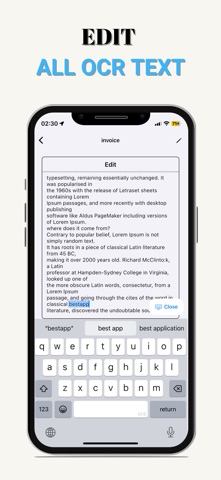
- Advanced OCR technology for text recognition in multiple languages
- Add images directly from your photo gallery
- Easy page reordering and organization
- Professional editing: crop, rotate, advanced filters
- Digital signature support for documents
- Instant high-quality PDF conversion
ADVANCED SHARING OPTIONS:
- Share as professional PDF documents
- Export as high-quality JPG images
- Compress images into ZIP files for easy sharing
- Share extracted text via OCR technology
- Convert OCR to searchable PDF
- Export text as TXT files
PRIVACY & SECURITY:
- Your data is completely safe - we never store any of your documents on our servers
- All files and images are saved locally on your device only
- We cannot see or access any of your documents
- When you delete the app, all your data is permanently removed from your device
- Your privacy is our top priority
WHY CHOOSE ASYA SCANNER?
- Modern and intuitive user interface
- Fast document processing
- Excellent image quality
- All features unlocked
- No watermarks
- Continuous free updates
PERFECT FOR:
- Students: scan notes, books, and assignments
- Professionals: contracts, invoices, and reports
- Personal use: receipts and important documents
- Businesses: digital archiving and document management
- Travelers: scan passports and tickets
SUPPORTED FORMATS:
PDF, JPG, PNG, TXT, ZIP
Download now and discover professional scanning with complete privacy protection!