

DocScan – PDF Document Scanner
DocScan – PDF Document Scanner is made and published by Tightrope Interactive, Inc. AppBrain is an independent app data site and isn't affiliated with Tightrope Interactive, Inc. The app name, icon, screenshots and description belong to Tightrope Interactive, Inc. and are shown as published on the App Store.
AppBrain's verdict
Loved by users- Best rank
- #51
- Top Grossing, Slovakia
- Rating on App Store
- 4.66
- 1,698 ratings
- Last updated
- August 13, 2026
Users love it: 4.7 stars from 1,698 ratings. Its best ranking is #51 in Top Grossing, Business in Slovakia.
Rankings
App Store top charts- Highest rank
- #51
- Chart
- Top Grossing
- Business
- Country
- Slovakia
App Store Rankings for DocScan – PDF Document Scanner
Top rankings
| Rank | Country | Category | List |
|---|---|---|---|
| 51 | Slovakia | Business | Top Grossing |
Ranking history in Slovakia
Competitors
Similar apps and more from Tightrope Interactive, Inc.More from Tightrope Interactive, Inc.


Releases
Updates seen on the App Store- Version
- 2.2.6
- Launched
- November 2023
No changelog data
User feedback
Ratings and reviews on the App StoreComments on DocScan – PDF Document Scanner for iOS
We don't have enough comments to show example comments. Please check back later.
Technology
Found in the app by AppBrain- Price
- Free
- App size
- 56.2 MB
- Content rating
- Medium
Technologies used by DocScan – PDF Document Scanner
About the app and developer
About DocScan – PDF Document Scanner
DocScan – PDF Document Scanner is a business app developed by Tightrope Interactive, Inc.
User Ratings
DocScan – PDF Document Scanner is rated 4.66 out of 5 stars. The rating is based on 1.7 thousand ratings.
App Information
DocScan – PDF Document Scanner is freely available from the App Store. The app size is 56.19 MB. The latest version available is 2.2.6. The last update was on August 13, 2026.
Technical Requirements
The app has a content rating of Medium Maturity. The app has been available on the App Store since November 2023.
Developer information for Tightrope Interactive, Inc.
Address:
Frequently asked questions about DocScan – PDF Document Scanner
Is DocScan – PDF Document Scanner free?
Yes. DocScan – PDF Document Scanner is free on the App Store.
Is DocScan – PDF Document Scanner still available?
Yes. DocScan – PDF Document Scanner is on the App Store, and the last update we saw was on August 13, 2026.
How large is DocScan – PDF Document Scanner?
DocScan – PDF Document Scanner is 56.19 MB.
Is DocScan – PDF Document Scanner suitable for children?
App Store gives DocScan – PDF Document Scanner a medium maturity rating, so it is not meant for young children.
How do people rate DocScan – PDF Document Scanner?
DocScan – PDF Document Scanner scores 4.66 out of 5 stars, from 1,698 ratings on the App Store.
Who made DocScan – PDF Document Scanner?
DocScan – PDF Document Scanner was developed by Tightrope Interactive, Inc. It is listed in the business category on the App Store.
Store listing
By Tightrope Interactive, Inc., from the App Store




Description by Tightrope Interactive, Inc. Written by the developer, not by AppBrain. Click to read.
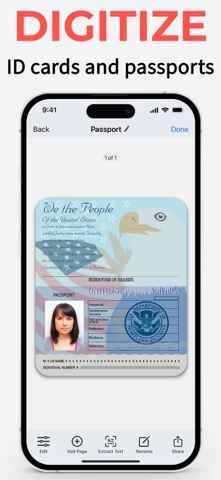
DocScan is your pocket-sized powerhouse for scanning and editing documents, extracting texts, converting scans to PDFs, and deciphering QR codes with ease and precision. With DocScan, managing paperwork is a breeze, whether you're a professional on the move, a student juggling assignments, or simply organizing personal documents.
FEATURE-PACKED PDF SCANNER
- Quickly digitize documents: Scan receipts, notes, invoices, business cards, and more. Effortlessly export them as high-quality PDF or JPG files.
- Multi-Page PDFs: Assemble multi-page documents with ease. Perfect for reports, presentations, and lengthy contracts.
- Signing: Sign any scanned document with your signature. Create and save custom signatures for easy use later.
- Edit documents easily: markup, highlight, blur, add formatted text, rotate, crop, grayscale, and remove pages.
- OCR (optical character recognition): Extract a part of a scanned text and paste it where you need it.
- Import smartly: Automatically detect and import document photos, handwritten notes, and receipts from your photo library into dedicated folders. Simply select a category, and DocScan will sort and sync everything for you.
- Organize files in folders: Streamline your workflow by grouping your business, study, personal, and other documents in dedicated folders.
YOUR GO-TO QR CODE READER:
Need to scan a QR code? DocScan handles that seamlessly, making it your all-in-one scanning solution.
SIGN AND SEND
DocScan allows you to scan any paper document and add your signature for easy sending as a PDF.
SAFE AND SECURE
With DocScan, your documents remain confidential. Keep your sensitive PDFs protected from prying eyes.
AI-ENHANCED SCANNING
Advanced AI technology automatically detects borders, enhances sharpness, and corrects perspective—ensuring your scans are clear and readable.
PDF SCANNER FOR EVERY NEED
Whether it's a single receipt or a stack of pages, DocScan caters to all scanning scenarios. It's the document scanner that adapts to you.
USER-FRIENDLY INTERFACE
Enjoy a sleek, intuitive interface that makes scanning documents as simple as snapping a photo.
WHY CHOOSE DOCSCAN?
- Fast and reliable PDF scanning
- Signing and signature management
- Powerful editing tools
- Automatic AI importing
- Optical character recognition
- Advanced AI for perfect scans
- QR code reader integrated
- Secure document management
Experience the next level of scanning with PRO features:
- Scan and share unlimited PDFs
- Sign any document in seconds
- Scan and save multiple page documents
- Extract text with OCR
- Go ad-free for a cleaner interface
Languages supported by OCR: English (United States), French, Italian, German, Spanish (Spain), Portuguese (Brazil), Chinese (Simplified), Chinese (Traditional), Cantonese (Simplified), Cantonese (Traditional), Korean, Japanese, Russian, Ukrainian, Thai, Vietnamese.
When you confirm your purchase, your App Store account will be charged for the subscription cost. Remember, your subscription will renew automatically unless you turn off auto-renew or cancel at least 24 hours before the current period ends.
Jumping into a premium subscription from a free trial? Any unused portion of your trial will be forfeited. Renewal costs will be based on your chosen Subscription Plan.
You can manage your subscriptions and auto-renewal by heading to your Account Settings after purchase. Need assistance? Our Customer Support is here to help.
Download DocScan today and step into a world where document scanning is as fast, easy, and reliable as you need it to be. Your on-the-go office awaits in the palm of your hand!
Disclaimer: Contains AI-generated content & synthetic performers by Tightrope Interactive, Inc.
Privacy Policy: https://docscan.live/privacy-policy/
Terms of Service: https://docscan.live/terms-of-service/