It doesn't have enough ratings yet to judge what users think.
DocScan : PDF Scanning App is made and published by
xita apps.
AppBrain is an independent app data site and isn't affiliated with xita apps.
The app name, icon, screenshots and description belong to xita apps and are shown as
published on the App Store.
About DocScan : PDF Scanning App
DocScan : PDF Scanning App is an utilities app developed by xita apps.
User Ratings
DocScan : PDF Scanning App is rated 4.07 out of 5 stars. The rating is based on 15 ratings.
App Information
DocScan : PDF Scanning App is freely available from the App Store. The app size is 75.91 MB. The latest version available is 1.29.0. The last update was on September 3, 2026.
Technical Requirements
The app has a content rating of Medium Maturity. The app has been available on the App Store since August 2019.
Description by xita apps(from the App Store)
Docscan – PDF Scans & Document Scanner is a powerful docscanner and camera scanner that helps you quickly scan document files, create PDF scans, and convert scan to PDF using your phone. This smart docscan app combines an advanced docu scan tool, PDF editor, OCR text scanner, and document manager to make scanning fast, simple, and efficient.
Whether you need a reliable cam scanner, a high-quality camera scanner, or a full document scanning solution, Docscan lets you scan, edit, convert, and organize every document directly from your mobile device.
Perfect for students, professionals, and everyday users who want a fast scan to PDF and document management app.
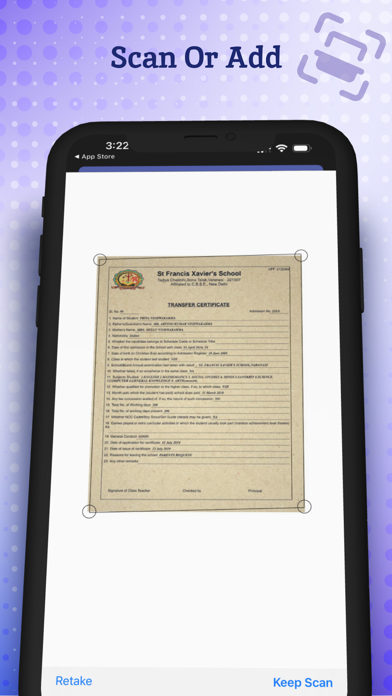
Key Features of Docscan – PDF Scans & Docscanner Smart Document Scan Use your phone as a powerful camera scanner to scan document pages instantly. This intelligent docscanner automatically detects edges and enhances images for clean PDF scans.
Scan to PDF Converter Easily scan to PDF and turn any document scan into high-quality digital files. Create professional PDF scans for reports, notes, receipts, or contracts.
Multi-Page Document Scanner Combine multiple scan pages into one organized document PDF. This advanced docu scan tool makes it easy to store long documents.
OCR Text Scanner Extract text from any scanned document using powerful OCR technology. Simply scan text from camera scanner and convert it into editable content.
Powerful PDF Editor Edit your scanned document with built-in tools. Crop, rotate, highlight, annotate, or sign your PDF scans with the integrated document editor.
Forms & Document Signing Fill out forms and sign scanned document files quickly. The app makes doc scan editing simple for contracts, forms, and agreements.
Secure Document Storage Protect important PDF scans and document files with password security (Premium feature).
Scan Receipts, IDs & Photos Use the camera scanner to scan receipts, ID cards, photos, and business documents quickly with clear results.
Document Reader Open and view your PDF scans and document files inside the app using the built-in document reader.
Extra Smart Tools Docscan also includes helpful tools like passport scanner, barcode scener, and advanced OCR reader for professional scanning tasks.
Why Choose Docscan?
• Powerful docscan and docscanner technology • Fast scan to PDF and high-quality PDF scans • Easy docu scan and document editing tools • Reliable cam scanner and camera scanner performance • Smart OCR for extracting text from any document scan • Complete scan, convert, and document management solution
Docscan is designed to help you scan document files faster, create professional PDF scans, and manage documents efficiently.
Ideal Use Cases
Docscan helps you:
• Scan documents for work or school • Convert notes using scan to PDF • Digitize receipts using the camera scanner • Create clean PDF scans of contracts or reports • Extract text using the OCR docscanner • Organize every important document in one place • Use your phone as a professional cam scanner
Go Paperless with Docscan
Turn your smartphone into a powerful docscan and camera scanner tool. With Docscan you can scan document pages, create PDF scans, convert scan to PDF, and edit any document instantly.
This advanced docscanner and document app allows you to scan, edit, store, and share documents anywhere. From quick docu scan tasks to professional PDF document management, Docscan makes paperwork simple.
Download Docscan – PDF Scans & Document Scanner today and experience the easiest way to scan document files, create PDF scans, and manage every document from your phone.
Privacy Policy: https://sites.google.com/view/docpdf-privacy-policy/home Terms of Use: https://sites.google.com/view/scan-app-terms-and-condition
Each subscription will automatically renew 3 days before the expiration date for
the same time period. Subscriptions can be cancelled at any time before the renewal.