

Docu Nest is made and published by Topal Oleg. AppBrain is an independent app data site and isn't affiliated with Topal Oleg. The app name, icon, screenshots and description belong to Topal Oleg and are shown as published on the App Store.
AppBrain's verdict
- Last updated
- June 4, 2025
Rankings
App Store top chartsApp Store Rankings for Docu Nest
This app is not ranked
Releases
Updates seen on the App Store- Version
- 1.1
- Launched
- June 2025
No changelog data
User feedback
Ratings and reviews on the App StoreComments on Docu Nest for iOS
We don't have enough comments to show example comments. Please check back later.
Technology
Found in the app by AppBrain- Price
- Free
- App size
- 21.7 MB
- Content rating
- Everyone
Technologies used by Docu Nest
About the app and developer
About Docu Nest
Docu Nest is a productivity app developed by Topal Oleg.
What is the rating of Docu Nest?
Docu Nest has no ratings yet.
Is Docu Nest free?
Docu Nest is free. The app size is 21.67 MB. The latest version available is 1.1. The last update was on June 4, 2025.
What are the requirements for Docu Nest?
The app has a content rating of Everyone. The app has been available on the App Store since June 2025.
Developer information for Topal Oleg
Address:
Store listing
By Topal Oleg, from the App Store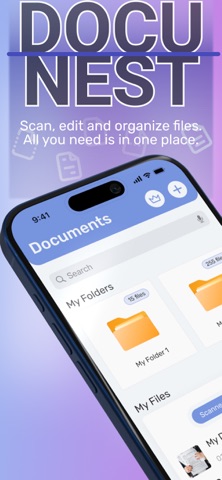

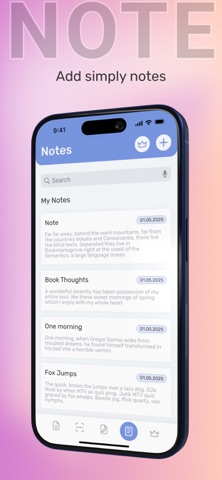
Screenshots by Topal Oleg, from the the App Store listing
Description by Topal Oleg Written by the developer, not by AppBrain. Click to read.
Docu Nest – All-in-One Document Manager, Scanner & Quick Look Viewer
Docu Nest is the ultimate solution for managing, scanning, and viewing documents directly from your phone.
Designed for efficiency and simplicity, Docu Nest ensures that you can organize, preview, and share documents wherever you are, with just a few taps.
Whether you’re scanning physical papers, organizing your files, jotting down notes, or adding a signature, Docu Nest makes document management easy and accessible.
KEY FEATURES of Docu Nest:
Document Manager
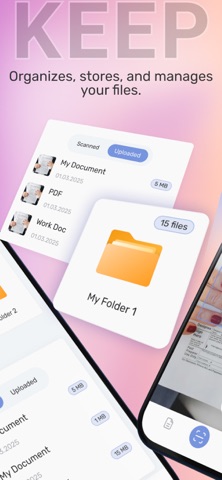
Create and manage folders, upload documents, rename or delete files, and easily find everything with the search bar. Keep your documents organized and at your fingertips.
Smart Scanner
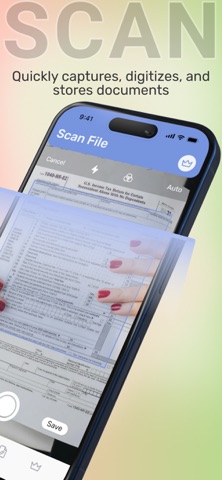
Quickly scan documents using your phone’s camera with automatic edge detection, ensuring clean scans every time. Save documents directly to your library and rename them for easy reference.
Quick Look Viewer
Instantly preview your documents, images, and PDFs with Quick Look—fast, smooth, and without the need for additional editing tools.
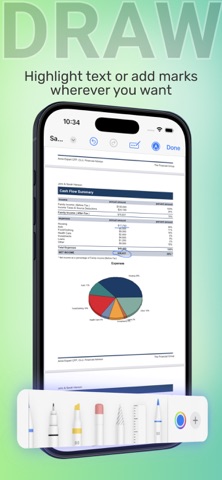
Includes simple editing options like crop, pen, and signature for quick adjustments.
Notes Functionality
Quickly jot down ideas, tasks, and reminders with the built-in Notes feature. Keep everything in one place!
In the free version, you can enjoy the following options:
Keep up to 3 documents
Scan up to 2 documents
Quick Look up to 2 times
3 notes for your ideas
Need more? Upgrade to Premium for unlimited access
Docu Nest Subscription
Subscribe to stay informed about the latest innovations in Docu Nest.
Auto-Renewal: Subscriptions automatically renew unless canceled 24 hours before the end of the current period.
Manage Settings: You can adjust your subscription settings anytime in your Account Settings.
By subscribing, you agree to our Privacy Policy and Terms of Use.
Continued use indicates your acceptance.
Docu Nest is perfect for professionals, students, or anyone who needs a simple, efficient way to manage and view their documents on the go.
Download Docu Nest now and experience the ultimate document management tool in your pocket!
Privacy Policy: https://docs.google.com/document/d/1N8Nptm_f6IiqLk3aw4Hdf7em8wLEvbLCiMl9_FXfLDU
Terms of Use: https://docs.google.com/document/d/14a-BwcB3koh_mX1Y0uFtWMN3yDJ1jYtEoyMTyn4u95c
Docu Nest is the ultimate solution for managing, scanning, and viewing documents directly from your phone.
Designed for efficiency and simplicity, Docu Nest ensures that you can organize, preview, and share documents wherever you are, with just a few taps.
Whether you’re scanning physical papers, organizing your files, jotting down notes, or adding a signature, Docu Nest makes document management easy and accessible.
KEY FEATURES of Docu Nest:
Document Manager
Create and manage folders, upload documents, rename or delete files, and easily find everything with the search bar. Keep your documents organized and at your fingertips.
Smart Scanner
Quickly scan documents using your phone’s camera with automatic edge detection, ensuring clean scans every time. Save documents directly to your library and rename them for easy reference.
Quick Look Viewer
Instantly preview your documents, images, and PDFs with Quick Look—fast, smooth, and without the need for additional editing tools.
Includes simple editing options like crop, pen, and signature for quick adjustments.
Notes Functionality
Quickly jot down ideas, tasks, and reminders with the built-in Notes feature. Keep everything in one place!
In the free version, you can enjoy the following options:
Keep up to 3 documents
Scan up to 2 documents
Quick Look up to 2 times
3 notes for your ideas
Need more? Upgrade to Premium for unlimited access
Docu Nest Subscription
Subscribe to stay informed about the latest innovations in Docu Nest.
Auto-Renewal: Subscriptions automatically renew unless canceled 24 hours before the end of the current period.
Manage Settings: You can adjust your subscription settings anytime in your Account Settings.
By subscribing, you agree to our Privacy Policy and Terms of Use.
Continued use indicates your acceptance.
Docu Nest is perfect for professionals, students, or anyone who needs a simple, efficient way to manage and view their documents on the go.
Download Docu Nest now and experience the ultimate document management tool in your pocket!
Privacy Policy: https://docs.google.com/document/d/1N8Nptm_f6IiqLk3aw4Hdf7em8wLEvbLCiMl9_FXfLDU
Terms of Use: https://docs.google.com/document/d/14a-BwcB3koh_mX1Y0uFtWMN3yDJ1jYtEoyMTyn4u95c