

Document Camera
Document Camera is made and published by SwiftKick Mobile LLC. AppBrain is an independent app data site and isn't affiliated with SwiftKick Mobile LLC. The app name, icon, screenshots and description belong to SwiftKick Mobile LLC and are shown as published on the App Store.
AppBrain's verdict
EstablishedWell rated- Rating on App Store
- 4.50
- 418 ratings
- Last updated
- May 30, 2023
Users rate it well: 4.5 stars from 418 ratings.
Rankings
App Store top chartsApp Store Rankings for Document Camera
Competitors
Similar apps and more from SwiftKick Mobile LLCAlternatives to Document Camera





More from SwiftKick Mobile LLC


Releases
Updates seen on the App Store- Version
- 1.1.1
- Launched
- September 2020
No changelog data
User feedback
Ratings and reviews on the App StoreComments on Document Camera for iOS
We don't have enough comments to show example comments. Please check back later.
Technology
Found in the app by AppBrain- Price
- Free
- App size
- 20.3 MB
- Content rating
- Everyone
Technologies used by Document Camera
About the app and developer
About Document Camera
Document Camera is an education app developed by SwiftKick Mobile LLC.
What is the rating of Document Camera?
Document Camera is rated 4.50 out of 5 stars, based on 420 ratings.
Is Document Camera free?
Document Camera is free. The app size is 20.30 MB. The latest version available is 1.1.1. The last update was on May 30, 2023.
What are the requirements for Document Camera?
The app has a content rating of Everyone. The app has been available on the App Store since September 2020.
Developer information for SwiftKick Mobile LLC
Address:
Store listing
By SwiftKick Mobile LLC, from the App Store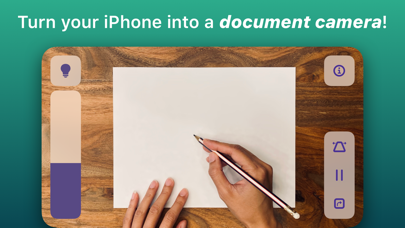


Description by SwiftKick Mobile LLC Written by the developer, not by AppBrain. Click to read.
Doc Cam is a straightforward app for sharing your workspace with your students, just like a document camera or old school overhead projector. Doc Cam was designed with the needs of the remote learning classroom in mind. It’s compatible with Zoom, Google Meet, Microsoft Teams, and other services through screen mirroring, all with easy step-by-step guides for setup. For teachers who have already transitioned back to the classroom, you can still use Doc Cam with modern classrooms outfitted with computers or projectors compatible with AirPlay Screen Mirroring.
DOC CAM FEATURES
1. Works with Zoom, Google Meet, Screen Mirroring and more.
2. Perfect for remote learning.
3. Zoom and pan the camera.
4. Smart Flashlight - distributes the lighting evenly across the entire document camera image when the flashlight is enabled.
5. Auto Level - keeps the document camera image level even when your phone isn't.
6. Freeze video frame.
7. Transition back to the classroom with AirPlay support.
8. And more!