

Document Organizer - DocuRadar
Document Organizer - DocuRadar is made and published by Nicolo Decet. AppBrain is an independent app data site and isn't affiliated with Nicolo Decet. The app name, icon, screenshots and description belong to Nicolo Decet and are shown as published on the App Store.
AppBrain's verdict
- Last updated
- September 8, 2026
Rankings
App Store top chartsApp Store Rankings for Document Organizer - DocuRadar
Competitors
Similar apps and more from Nicolo DecetAlternatives to Document Organizer - DocuRadar


Also available on Google Play

Releases
Updates seen on the App Store- Version
- 1.4.0
- Launched
- April 2026
No changelog data
User feedback
Ratings and reviews on the App StoreComments on Document Organizer - DocuRadar for iOS
We don't have enough comments to show example comments. Please check back later.
Technology
Found in the app by AppBrain- Price
- Free
- App size
- 86.9 MB
- Content rating
- Everyone
Technologies used by Document Organizer - DocuRadar
About the app and developer
About Document Organizer - DocuRadar
Document Organizer - DocuRadar is a productivity app developed by Nicolo Decet.
User Ratings
The app has no ratings yet.
App Information
Document Organizer - DocuRadar is freely available from the App Store. The app size is 86.94 MB. The latest version available is 1.4.0. The last update was on September 8, 2026.
Technical Requirements
The app has a content rating of Everyone. The app has been available on the App Store since April 2026.
Developer information for Nicolo Decet
Address:
Frequently asked questions about Document Organizer - DocuRadar
Is Document Organizer - DocuRadar free?
Yes. Document Organizer - DocuRadar is free on the App Store.
Is Document Organizer - DocuRadar still available?
Yes. Document Organizer - DocuRadar is on the App Store, and the last update we saw was on September 8, 2026.
How large is Document Organizer - DocuRadar?
Document Organizer - DocuRadar is 86.94 MB.
Is Document Organizer - DocuRadar suitable for children?
App Store rates the content of Document Organizer - DocuRadar as suitable for everyone.
Who made Document Organizer - DocuRadar?
Document Organizer - DocuRadar was developed by Nicolo Decet. It is listed in the productivity category on the App Store.
What are the best alternatives to Document Organizer - DocuRadar?
People looking at Document Organizer - DocuRadar also look at these productivity apps: Capture: AI Assistant, DocFlow Personal, Filedra: PDF Scanner & OCR, Rulo: Receipt Warranty Tracker, Emuage.
Store listing
By Nicolo Decet, from the App Store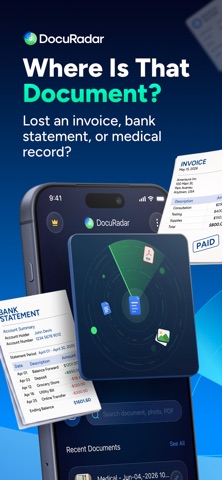



Description by Nicolo Decet Written by the developer, not by AppBrain. Click to read.
Please note: DocuRadar is a paid app. All features — document scanning, OCR text recognition, search, PDF tools, tags and categories, and Google Drive backup — require a DocuRadar Premium subscription. New users start with a free 1-week trial; after the trial, an active subscription or a one-time Lifetime purchase is required to keep using the app.
How it works
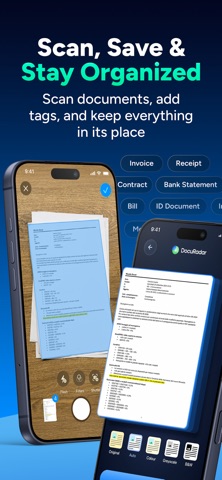
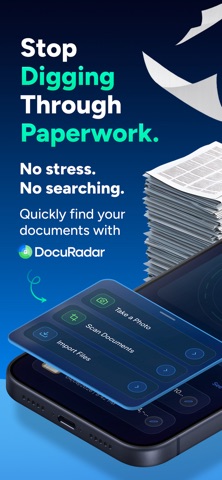
- Take a photo of a document, or import a PDF/image.
- DocuRadar reads the text with OCR.
- Save it to the right category: bills, receipts, tax papers, medical records, IDs, contracts, and more.
- Search later by the word, date, amount, name, or detail you remember.
A private home for your paperwork
DocuRadar is more than a camera scanner. Scan to PDF, import images, and organize multi-page documents. Its OCR turns PDFs, photos, and scanned pages into searchable content, so image to text isn't just a side feature — look up a receipt, bill, bank statement, invoice, or contract by the detail you still remember. Use it as a bill organizer, receipt scanner, and tax document organizer, and a secure place for IDs, passports, insurance cards, invoices, and contracts. Smart categories and tags — with totals, vendors, dates, and invoice numbers — keep your archive from becoming another messy folder.
Private by design
OCR happens on your device, so your bills, medical records, bank statements, IDs, and tax papers don't need to leave your phone to be processed. No ads, no tracking, no unnecessary data collection, and no account needed.
Optional Google Drive backup
Keep a copy of your scanned documents and PDFs in your own Google Drive and restore them when you change phones — a backup option without making the cloud the center of the app.
Subscription and purchase details
DocuRadar starts with a free 1-week trial with full access. After the trial, continue with a Premium subscription or a one-time Lifetime purchase — both unlock the same features. A subscription auto-renews at the price and period shown on the purchase screen, charged to your Apple ID, unless cancelled at least 24 hours before the current period ends. Manage or cancel anytime in your Apple ID settings; cancel during the trial and you are not charged. Lifetime is a one-time purchase with no renewal.
Privacy Policy: https://docuradar.com/#privacy
Terms of Use: https://docuradar.com/#terms
DocuRadar® is a registered trademark.