Download Android Apps and Games
AppBrain
  • Apps
  • Apps being viewed right now Trending apps today Most popular apps All-time most downloaded apps Top rated apps
  • Intelligence ▾
    Intelligence overview → Track any Android app or your whole market
    Track & analyze
    Keyword Tracker & OptimizerTrack & improve Play rankings App Performance ReportOne-off PDF for any app StatisticsFree Android & Play market stats
    Promote your app
    Featured Apps App Links
  • Intelligence
  • Pricing
  • Dashboard
  • Sign up
  • Log in
Last updated on: 2026-07-07
App Store Apps > Utilities > Document Scanner : Doc To PDF
Document Scanner : Doc To PDF icon

Document Scanner : Doc To PDF

1.0.1
Trupti Parsaniya
0.00
0 reviews
Free

Document Scanner : Doc To PDF Screenshot 1 of 7
Document Scanner : Doc To PDF Screenshot 2 of 7
Document Scanner : Doc To PDF Screenshot 3 of 7
Document Scanner : Doc To PDF Screenshot 4 of 7
Document Scanner : Doc To PDF Screenshot 5 of 7
Document Scanner : Doc To PDF Screenshot 6 of 7
Document Scanner : Doc To PDF Screenshot 7 of 7
Download from the App Store

About Document Scanner : Doc To PDF

Document Scanner : Doc To PDF is an overall app developed by Trupti Parsaniya.

Download Statistics

User Ratings

The app has no ratings yet.

App Information

Document Scanner : Doc To PDF is FREE to download. The APK download size is 11.49 MB. The latest version available is 1.0.1. The last update was on March 17, 2025.

Technical Requirements

The app has a content rating of Everyone. The app has been available on Google Play March 2025.

Description
Document Scanner : Doc To PDF - Best Free Document Scanner & PDF Creator

Transform Your Smartphone into a Powerful Scanner!

Say goodbye to bulky scanners! Document Scanner : Doc To PDF is the best free document scanning app that lets you scan, edit, and manage documents effortlessly. Whether you need to scan receipts, contracts, business cards, notes, or books, DocsScanner ensures high-quality results every time. Perfect for students, professionals, and businesses, this app simplifies document handling like never before!

**Why DocsScanner? **

Instant Scanning – Convert your smartphone into a professional PDF scanner with one tap!
Scan & Store – Organise all your documents digitally and access them anytime.
Secure & Private – Password-protect your confidential files and keep them safe.
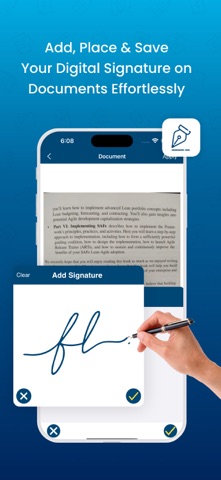
Sign Documents Digitally – Add electronic signatures in seconds—no printing needed!
Works Offline – Scan, edit, and save documents even without an internet connection.

**Key Features**

Unlimited Free Document Scanning – No limits, no subscriptions. Scan anytime, anywhere using your camera or photo gallery.
Digital Signatures & Annotation – Easily sign PDFs or highlight key points for quick review.
Smart OCR Technology – Extract text from scanned documents for editing & sharing. Easily copy, search, or edit scanned text.
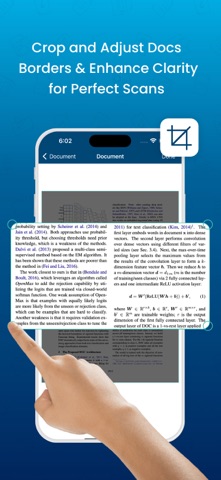
Auto-Enhance & Filters – Adjust brightness, contrast, and apply filters to improve scan clarity. Ensure every scan looks crisp and professional.
Multiple Format Support – Save and share scans as PDF or JPG via email, cloud storage, or messaging apps.
Secure with Password Protection – Lock your PDFs with a password for extra privacy. Protect sensitive documents from unauthorised access.
Custom Page Sizes – Format documents in A4, Letter, Legal, or custom sizes. Perfect for invoices, business contracts, and official documents.
Offline Scanning – No internet? No problem! Scan and save documents without WiFi.
Batch Scanning Mode – Scan multiple pages in one go and save them as a single PDF document.
Fast and Lightweight – DocsScanner is optimised for speed and efficiency, ensuring smooth performance on any device.
AI-Powered Edge Detection – Automatically detects document edges and corrects perspective for a clean, professional look.
One-Tap Sharing – Instantly share scanned documents via email, WhatsApp, Messenger, and other platforms.
Print Directly from App – Send scanned files to your printer with a single tap, making physical copies effortless.
Multi-Language Support – Recognises and extracts text and user can translator in multiple languages for global usability.

** Premium Subscription **

- Weekly : $4.99 per week
- Monthly : $9.99 per month (Save 50%!)
- Yearly : $49.99 per year (Save 80%!)


** Subscription to unlock the premium features **

- Unlimited scans and exports your documents.
- Ad-free experience
- App Lock feature for privacy and security
- Text Recognition by (OCR) and Translate that text in multiple languages

** Subscription Terms **

- Payment will be charged to your Apple ID account upon confirmation of purchase.
- Subscription automatically renews unless canceled at least 24 hours before the end of the current period.
- Manage or cancel your subscription in Settings > Apple ID > Subscriptions.
- Any unused portion of a free trial will be forfeited upon purchasing a subscription.

Download Now & Simplify Your Life!

Privacy Policy : https://thepremiumapps.com/docscan/pvpolicy.html
Terms of use : https://thepremiumapps.com/docscan/terms.html
EULA : https://thepremiumapps.com/docscan/eula.html

If you have any questions, please email taparsaniya@gmail.com.
Show more Show less

More data about Document Scanner : Doc To PDF

Price Free to download
Rating No ratings
Ranking Not ranked
Version 1.0.1
App download size 11.5 MB
Suitable for Everyone

More from Trupti Parsaniya

Amharic Keyboard  & Translator icon Amharic Keyboard & Translator
Trupti Parsaniya
4.5
Free
432 ratings
Persian Keyboard & Translator icon Persian Keyboard & Translator
Trupti Parsaniya
4.4
Free
58 ratings
Arabic Keyboard & Translator icon Arabic Keyboard & Translator
Trupti Parsaniya
4.4
Free
46 ratings
Pashto Keyboard & Translator icon Pashto Keyboard & Translator
Trupti Parsaniya
4.4
Free
41 ratings
Khmer Keyboard & Translator icon Khmer Keyboard & Translator
Trupti Parsaniya
4.3
Free
40 ratings
Nepali Keyboard & Translator icon Nepali Keyboard & Translator
Trupti Parsaniya
4.3
Free
32 ratings
Hebrew Keyboard & Translator icon Hebrew Keyboard & Translator
Trupti Parsaniya
4.5
Free
27 ratings
Japanese Keyboard & Translator icon Japanese Keyboard & Translator
Trupti Parsaniya
4.0
Free
24 ratings

Changelog of Document Scanner : Doc To PDF

No changelog data

Developer information for Trupti Parsaniya

Trupti Parsaniya

Address:

Share Document Scanner : Doc To PDF

Comments on Document Scanner : Doc To PDF for iOS

We don't have enough comments to show example comments. Please check back later.

App Store Rankings for Document Scanner : Doc To PDF

This app is not ranked

Technologies used by Document Scanner : Doc To PDF

More hot apps 🔥

Back to top
AppBrain Intelligence premium content

Subscribe now to get full and unlimited access to AppBrain Intelligence. You'll have access to:

  • App Intelligence dashboard (performance timeline, competitor comparison, country rankings, insight cards)
  • Detailed ranking data per app
  • Full timeline per developer
  • Device market shares data per country
  • Unlimited keyword tracking
1 Month

$75/mo
(billed every month)

SAVE 0%
Subscribe
3 Months

$65/mo
($195 billed every 3 months)

SAVE 13%
Subscribe
1 Year

$57.50/mo
($690 billed every year)

SAVE 23%
Subscribe
Each subscription will automatically renew 3 days before the expiration date for the same time period. Subscriptions can be cancelled at any time before the renewal.

AppBrain is a directory focused on discovering great apps and games. We give statistics, rankings and search options that Google Play and the App Store don't have. All trademarks are owned by their respective owners. AppBrain doesn't offer APKs or binaries, and always lets users install the official version from Google Play or the App Store.

More apps

  • Top Android apps being viewed
  • illuMEnate: Front Camera Flash
  • Implosion stats
  • Smart IPTV Pro: Live Stream TV

Android Statistics

  • Android statistics
  • Google Play Developer stats
  • Trending Android Apps
  • Top popular Apps
  • Buy the best Android phone

About AppBrain

  • Contact
  • Privacy
  • Documentation
  • DMCA takedowns
  • Articles
  • Blog
  • The AppBrain advertising system
© 2010-2026 - AppBrain