

AppBrain's verdict
- Last updated
- August 25, 2026
- Size
- 5.23 MB
User feedback
Ratings and reviews on the App StoreComments on Document Scanner: PDF OCR Tool for iOS
We don't have enough comments to show example comments. Please check back later.
Store listing
By Moca LLC, from the App StoreDescription by Moca LLC Written by the developer, not by AppBrain. Click to read.
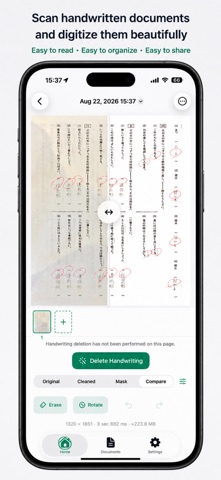
Document Scanner helps you capture paper, import photos or PDFs, correct uneven lighting and perspective, recognize text, and export the result. Keep multi-page documents organized without sending your files to an external processing server.
KEY FEATURES
• Scan single-page or multi-page documents with the camera
• Import multiple images from your photo library
• Import PDFs and edit their pages
• Automatically detect document edges and correct crop, perspective, and skew
• Reduce shadows and uneven lighting for a clearer paper background
• Choose Original, Document, Color, Grayscale, or B&W filters
• Adjust brightness and contrast, or rotate pages in 90-degree steps
• Compare the original and processed page with a slider
• Recognize Japanese or English text, with automatic language selection
• Run OCR on one page or the full document, copy results, and search recognized text
• Remove handwriting on demand and refine the affected area with Erase and Restore brushes
• Undo, redo, reset, resize the brush, zoom, and pan while editing
• Add, delete, reorder, and save pages as one document
• Search saved documents by title or recognized text
• Select and delete multiple documents at once
• Export and share PDF, PNG, JPEG, TXT, or Markdown files
• Choose original size, A4, or Letter for PDFs, plus standard or high quality
• Set the appearance, default filter, OCR language, export format, and JPEG quality
GREAT FOR
• Class handouts, worksheets, and study materials
• Receipts, forms, meeting notes, and business documents
• Converting multi-page paper documents into PDFs
• Copying Japanese or English text from an image
• Cleaning up written-on worksheets when you choose to
• Finding a saved document from words inside it
BUILT AROUND YOUR ORIGINAL
The Document filter is applied to new imports to improve readability. Your original image remains available, so you can revisit filter, brightness, contrast, rotation, and handwriting-removal edits. Handwriting removal runs only when you request it. Results depend on the source, and Erase and Restore tools let you adjust the removal area.
Documents are stored on your device. After importing or scanning, cleanup, OCR, editing, search, and export work offline. No account, sync feature, or in-app purchase is included.
PRIVACY
Image processing, handwriting detection, and OCR run locally on your device. Imported images, PDFs, and recognized text are not uploaded to an external server for processing. The app does not include tracking or analytics.
Safety and technology
Found in the app by AppBrain- Price
- $2.99
- App size
- 5.23 MB
- Content rating
- Everyone
Technologies used by Document Scanner: PDF OCR Tool
Releases
Updates seen on the App Store- Version
- 1.0.0
- Launched
- August 2026
No changelog data
Alternatives
Similar apps and more from Moca LLCMore from Moca LLC


Rankings
App Store top chartsApp Store Rankings for Document Scanner: PDF OCR Tool
About the app and developer
About Document Scanner: PDF OCR Tool
Document Scanner: PDF OCR Tool is an utilities app developed by Moca LLC.
User Ratings
The app has no ratings yet.
App Information
Document Scanner: PDF OCR Tool costs $2.99. The app size is 5.23 MB. The latest version available is 1.0.0. The last update was on August 25, 2026.
Technical Requirements
The app has a content rating of Everyone. The app has been available on the App Store since August 2026.
Document Scanner: PDF OCR Tool is made and published by Moca LLC. AppBrain is an independent app data site and isn't affiliated with Moca LLC. The app name, icon, screenshots and description belong to Moca LLC and are shown as published on the App Store.
Developer information for Moca LLC
Address:
Frequently asked questions about Document Scanner: PDF OCR Tool
Is Document Scanner: PDF OCR Tool free?
No. Document Scanner: PDF OCR Tool costs $2.99 on the App Store.
Is Document Scanner: PDF OCR Tool still available?
Yes. Document Scanner: PDF OCR Tool is on the App Store, and the last update we saw was on August 25, 2026.
How large is Document Scanner: PDF OCR Tool?
Document Scanner: PDF OCR Tool is 5.23 MB.
Is Document Scanner: PDF OCR Tool suitable for children?
App Store rates the content of Document Scanner: PDF OCR Tool as suitable for everyone.
Who made Document Scanner: PDF OCR Tool?
Document Scanner: PDF OCR Tool was developed by Moca LLC. It is listed in the utilities category on the App Store.