

Document Scanner: PDF & OCR
Document Scanner: PDF & OCR is made and published by Mitul Kanani. AppBrain is an independent app data site and isn't affiliated with Mitul Kanani. The app name, icon, screenshots and description belong to Mitul Kanani and are shown as published on the App Store.
AppBrain's verdict
- Last updated
- February 20, 2026
- Size
- 74.5 MB
User feedback
Ratings and reviews on the App StoreComments on Document Scanner: PDF & OCR for iOS
We don't have enough comments to show example comments. Please check back later.
Store listing
By Mitul Kanani, from the App Store


Description by Mitul Kanani Written by the developer, not by AppBrain. Click to read.
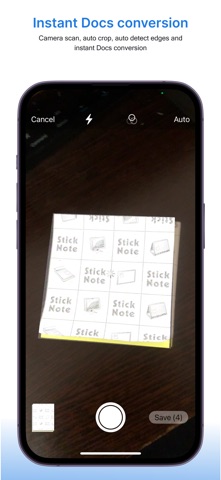
Using your iPhone camera, you can scan documents in real time and convert single or multiple images into a well-structured PDF file. The app also supports photo-to-PDF conversion, allowing you to select images from your gallery and merge them into a single document. If needed, you can convert PDF files back into images while maintaining clarity and quality.
The built-in OCR scanner lets you extract text from scanned documents and images. You can copy, edit, search, and share extracted text across other apps such as Notes, Mail, WhatsApp, or any messaging platform. This makes the app useful for students, professionals, and businesses who regularly work with printed text.
The app also includes a complete QR scanner and QR generator. You can scan any QR code instantly using your camera. You can also create QR codes for websites, WiFi networks, UPI payments, WhatsApp chats, email addresses, phone numbers, SMS messages, and locations.
All scanned documents, converted PDFs, extracted text files, and generated QR codes are saved in one organised place. You can rename files, access recent documents, and share them instantly via AirDrop, email, cloud storage, or messaging apps.
Document Scanner: PDF & OCR is designed to be simple, fast, and reliable. There is no complicated setup — open the app, scan your document, and save or share it immediately. Download now and use your iPhone as a professional document scanner.
Privacy Policy:https://docs.google.com/document/d/e/2PACX-1vTwwf5uYJOqk-36muAn2JT0ytrAC31TLOPUGmnjE9miV60NXhT5vyq5YUaUkTJC17dEo7_q9vkv5oDa/pub
Terms Of Use: https://www.freeprivacypolicy.com/live/fca868e6-3da5-44ca-b986-514b48281686
Premium Plans
Weekly Plan: $4.99
Monthly Plan: $9.99
Annual Plan: $19.99
Premium Benefits:
- Ad-free Experience
- Unlimited Access to all features
Safety and technology
Found in the app by AppBrain- Price
- Free
- App size
- 74.5 MB
- Content rating
- Everyone
Technologies used by Document Scanner: PDF & OCR
Releases
Updates seen on the App Store- Version
- 1.0
- Launched
- February 2026
No changelog data
Alternatives
Similar apps and more from Mitul KananiAlternatives to Document Scanner: PDF & OCR


More from Mitul Kanani

Rankings
App Store top chartsApp Store Rankings for Document Scanner: PDF & OCR
About the app and developer
About Document Scanner: PDF & OCR
Document Scanner: PDF & OCR is an utilities app developed by Mitul Kanani.
What is the rating of Document Scanner: PDF & OCR?
Document Scanner: PDF & OCR has no ratings yet.
Is Document Scanner: PDF & OCR free?
Document Scanner: PDF & OCR is free. The app size is 74.49 MB. The latest version available is 1.0. The last update was on February 20, 2026.
What are the requirements for Document Scanner: PDF & OCR?
The app has a content rating of Everyone. The app has been available on the App Store since February 2026.
Developer information for Mitul Kanani
Address: