

Document Scanner & Scan to PDF
Document Scanner & Scan to PDF is made and published by Md Sajedur Rahaman. AppBrain is an independent app data site and isn't affiliated with Md Sajedur Rahaman. The app name, icon, screenshots and description belong to Md Sajedur Rahaman and are shown as published on the App Store.
AppBrain's verdict
- Rating on App Store
- 4.58
- 12 ratings
- Last updated
- September 21, 2026
- Size
- 120.4 MB
It doesn't have enough ratings yet to judge what users think.
User feedback
Ratings and reviews on the App StoreComments on Document Scanner & Scan to PDF for iOS
We don't have enough comments to show example comments. Please check back later.
Store listing
By Md Sajedur Rahaman, from the App Store


Description by Md Sajedur Rahaman Written by the developer, not by AppBrain. Click to read.
Key Features:
- Scan PDF, photos, documents, receipts, papers, ID card, Passport, etc.
- Scan QR code & barcode.
- Edit, crop, filters, rotate, save, share, and delete document.
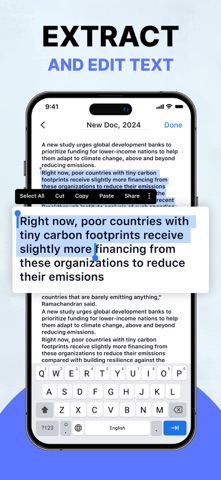
- Extract image to text with OCR.
- Draw a signature on your document.
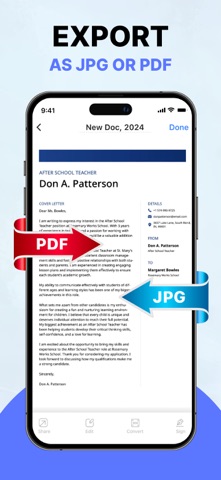
- Import photos and export documents.
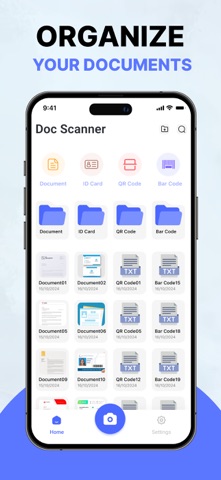
Document Scanner:
Our Document scanner is helpful for students, educators, managers, accountants, realtors, and lawyers. You can easily scan PDF, photos, documents, passports, ID cards, receipts, papers, books, etc. You can also organize your documents and save them as PDF.
Scanning Modes:
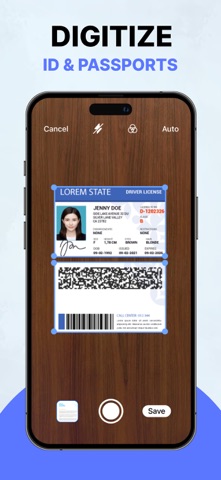
- ID card & Passport Scanner: ID card & Passport Scanner lets you scan your ID card & passport.
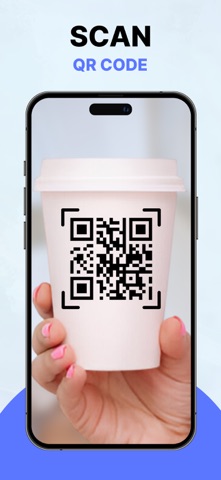
- QR code & Barcode Scanner: QR code & barcode scanner allows you to scan QR code & barcode.
- Photo, Receipt, Paper & Book Scanner: This scanner helps you to scan PDF, photos, receipts, papers, books, and many more things.
Extract image (OCR):
Easily extract text from images with the OCR tool. With just a few taps you can convert your image into editable text, which save your time and effort. After that, you can save it.
Edit:
You can edit, crop, and rotate your photos. You can also add your favorite filters to make your documents more attractive.
Draw Signature:
You can use this scanner to draw signatures in different colors on your images. Then you can resize and place them in your image.
Organize Documents:
The Documents Organizer feature helps you to keep your documents in different folders. It keeps them organized so you can find them at the right time. You can also delete unnecessary documents.
Import & Export:
Through our Doc Scanner, you can import your photos from your device and export them to PDF.
Share:
Share your information via Email, WhatsApp, Instagram, Facebook, Telegram, Google Drive, etc.
Safety and technology
Found in the app by AppBrain- Price
- Free
- App size
- 120.4 MB
- Content rating
- Medium
Technologies used by Document Scanner & Scan to PDF
Releases
Updates seen on the App Store- Version
- 1.7.1
- Launched
- June 2024
No changelog data
Alternatives
Similar apps and more from Md Sajedur RahamanAlternatives to Document Scanner & Scan to PDF


 POLICE CREDIT UNION




More from Md Sajedur Rahaman


Rankings
App Store top chartsApp Store Rankings for Document Scanner & Scan to PDF
About the app and developer
About Document Scanner & Scan to PDF
Document Scanner & Scan to PDF is a business app developed by Md Sajedur Rahaman.
What is the rating of Document Scanner & Scan to PDF?
Document Scanner & Scan to PDF is rated 4.58 out of 5 stars, based on 12 ratings.
Is Document Scanner & Scan to PDF free?
Document Scanner & Scan to PDF is free. The app size is 120.43 MB. The latest version available is 1.7.1. The last update was on September 21, 2026.
What are the requirements for Document Scanner & Scan to PDF?
The app has a content rating of Medium Maturity. The app has been available on the App Store since June 2024.
Developer information for Md Sajedur Rahaman
Address: