



AppBrain's verdict
EstablishedLoved by users- Rating on App Store
- 4.58
- 4,682 ratings
- Last updated
- November 3, 2026
- Size
- 37.1 MB
Users love it: 4.6 stars from 4,682 ratings.
User feedback
Ratings and reviews on the App StoreComments on Documents Pro, Download & Edit for iOS
We don't have enough comments to show example comments. Please check back later.
Store listing
By Savy Soda Pty Ltd, from the App StoreDescription by Savy Soda Pty Ltd Written by the developer, not by AppBrain. Click to read.
• Trusted by Over 7 Million iOS Users •
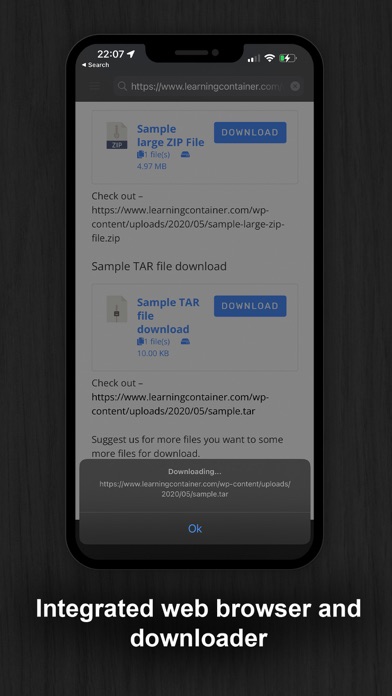
Built on top of the acclaimed documents iPhone suite. Documents PRO is the most comprehensive file manager and mini office suite for the iPhone. View and edit many types of files including documents, spreadsheets, photos, and media. Easily copy and share files using WiFi, dropbox, SkyDrive, and Google Docs.
DOCUMENTS PRO FREE EDITION
by SavySoda™
- Take your documents anywhere -
Works with Dropbox™
Works with iCloud™
Works with Microsoft OneDrive™
Works with Google Drive™
Works with Box™
DOCUMENTS PRO DETAILS
The ultimate All-In-One Mobile Office Suite for the
iPhone. 8 Premium Apps in One. Most essential productivity & business apps in one easy to use, high quality package. Transfer documents to/from your iPhone via FTP or WiFi, Google, or Email. Edit & View many types of documents on the fly. A powerful, top value, must have app for any iPhone.
INCLUDES
- Latest iSpreadsheet (mobile spreadsheet app)
- Integrated FTP Server and WiFi HD (mobile hard drive)
- Text Editor (Easy to use text pad)
- Google Sync (Upload & Download directly to Google)
- Photo Album (Photo manager)
- Direct Email (Email any documents to anyone)
- Pixi Sound Recorder (High Quality Sound Recorder)
- Integrated Preview (Preview any known document)
GENERAL FEATURES
- Full Portrait & Landscape Support
- Smooth all black interface
- Formatting & Formulas in Spreadsheet
- Works online or offline
- Folder Management
WIFI HD
- Transfer Files between iPhone, iPod, Mac, PC, or any network device with a Browser
- Easy to use, no additional software necessary
- Can be used as file server
Google Docs Connection
- Upload & Download directly to your google docs account
Direct Email
- Email files as attachments to anyone
- Select email from contacts
iSpreadsheet
- Full CSV support
- Formatting
- Formulas
- Selection Assist
- Multi Touch Interface
- Beautiful Smooth UI
File Preview:
- View any file, PDF Reader
- Microsoft Word: .doc, .docx
- Microsoft Excel: .xls, .xlsx
- Microsoft PowerPoint: .ppt, .pptx
- Images: .jpg, .jpeg, .tif, .gif, .svg
- iWork: Pages, Number, Keynote
- Adobe Acrobat: .pd
- Web Pages: .htm, .html
- Web Archive: .mht
- Audio: .mp3, .wav
Pixi Sound Recorder:
- 44.1khz high quality recording
- Scrolling
- Playback
Text Editor
- Wide screen or normal view text editing
Photo Album
- Take photos
- Resize, Zoom
- Preview in Slide Show
Direct Email
- Email documents to anyone
- Access to address book
More Apps:
http://www.savysoda.com
Note on Auto-Renewing Subscription -
Documents Pro contains optional in-app subscription to activate premium services - "1 Month, 3 Month and 1 Year Premium Subscription". Premium subscription adds support for more file types. The active work area is increased and all ads from the Application are removed. Biometric security features are unlocked by the premium subscription feature.
The price of subscription in local currency is displayed in Extra Features page in app.
1 Month Subscription USD 99 cents.
3 Month Subscription USD 1.99.
12 Month Subscription USD 2.99.
Subscriptions are auto-renewable and can be cancelled through User Account Settings. Payment will be charged to iTunes Account at confirmation of purchase. Account will be charged for renewal within 24-hours prior to the end of the current period, and identify the cost of the renewal. No cancellation of the current subscription is allowed during active subscription period. There is also a 7 day free trial for the membership; the free trial period is not transferrable and any remaining free time is cancelled if a paying subscription starts.
EULA: www.documentsforios.com/eula.html
Privacy Policy: www.documentsforios.com/privacypolicy.html
Safety and technology
Found in the app by AppBrain- Price
- Free
- App size
- 37.1 MB
- Content rating
- High
Technologies used by Documents Pro, Download & Edit
Releases
Updates seen on the App Store- Version
- 27.2
- Launched
- before 2010
No changelog data
Alternatives
Similar apps and more from Savy Soda Pty LtdAlternatives to Documents Pro, Download & Edit





More from Savy Soda Pty Ltd





Rankings
App Store top chartsApp Store Rankings for Documents Pro, Download & Edit
About the app and developer
About Documents Pro, Download & Edit
Documents Pro, Download & Edit is a productivity app developed by Savy Soda Pty Ltd.
User Ratings
Documents Pro, Download & Edit is rated 4.58 out of 5 stars. The rating is based on 4.7 thousand ratings.
App Information
Documents Pro, Download & Edit is freely available from the App Store. The app size is 37.09 MB. The latest version available is 27.2. The last update was on November 3, 2026.
Technical Requirements
The app has a content rating of High Maturity. The app has been available on the App Store since before 2010.
Documents Pro, Download & Edit is made and published by Savy Soda Pty Ltd. AppBrain is an independent app data site and isn't affiliated with Savy Soda Pty Ltd. The app name, icon, screenshots and description belong to Savy Soda Pty Ltd and are shown as published on the App Store.
Developer information for Savy Soda Pty Ltd
Address: