

Doing is made and published by Marco Petrucci. AppBrain is an independent app data site and isn't affiliated with Marco Petrucci. The app name, icon, screenshots and description belong to Marco Petrucci and are shown as published on the App Store.
AppBrain's verdict
- Last updated
- May 12, 2026
Rankings
App Store top chartsApp Store Rankings for Doing
Competitors
Similar apps and more from Marco PetrucciMore from Marco Petrucci




Releases
Updates seen on the App Store- Version
- 1.0
- Launched
- May 2026
No changelog data
User feedback
Ratings and reviews on the App StoreComments on Doing for iOS
We don't have enough comments to show example comments. Please check back later.
Technology
Found in the app by AppBrain- Price
- $0.99
- App size
- 1018.0 KB
- Content rating
- Everyone
Technologies used by Doing
About the app and developer
About Doing
Doing is a productivity app developed by Marco Petrucci.
What is the rating of Doing?
Doing has no ratings yet.
Is Doing free?
Doing costs $0.99. The app size is 1,018.00 kB. The latest version available is 1.0. The last update was on May 12, 2026.
What are the requirements for Doing?
The app has a content rating of Everyone. The app has been available on the App Store since May 2026.
Developer information for Marco Petrucci
Address:
Frequently asked questions about Doing
Is Doing free?
No. Doing costs $0.99 on the App Store.
Is Doing still available?
Yes. Doing is on the App Store, and the last update we saw was on May 12, 2026.
How large is Doing?
Doing is 1,018.00 kB.
Is Doing suitable for children?
App Store rates the content of Doing as suitable for everyone.
Who made Doing?
Doing was developed by Marco Petrucci. It is listed in the productivity category on the App Store.
Store listing
By Marco Petrucci, from the App Store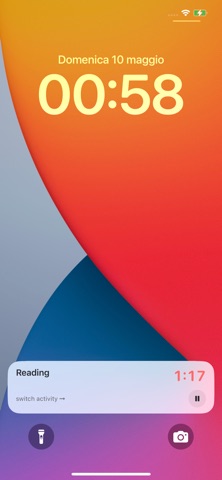

Description by Marco Petrucci Written by the developer, not by AppBrain. Click to read.
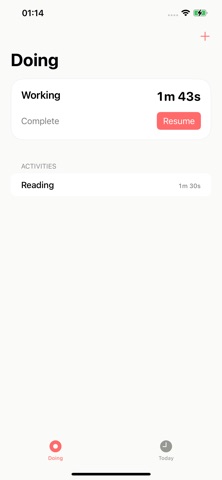
Start an activity, see what you are doing at a glance, and pause or resume it whenever needed. When you switch to another activity, Doing keeps everything organized in a continuous timeline, so you can easily review how your time was spent.
Each activity includes cumulative time tracking, making it simple to understand how long you spent working, studying, relaxing, exercising, or handling everyday tasks.
Features:
• Show your current activity on the iPhone home screen
• Start, pause, and resume activities
• Switch between activities quickly
• Save activities in a continuous timeline
• Track cumulative time spent on each activity
• Review what you did during the day
• Simple interface focused on clarity and focus
Doing helps you stay aware of your time without complicated setup, so you always know what you are doing and how long you have been doing it.