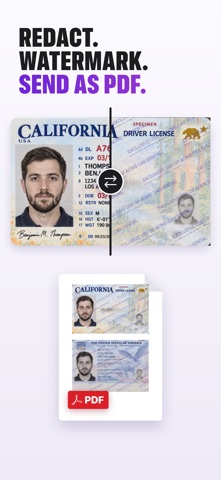
Dokus - ID & Document Wallet is an utilities app developed by Joao Cunha.
What is the rating of Dokus - ID & Document Wallet?
Dokus - ID & Document Wallet is rated 5.00 out of 5 stars, based on one rating ratings.
Is Dokus - ID & Document Wallet free?
Dokus - ID & Document Wallet is free. The app size is 27.46 MB. The latest version available is 2.10. The last update was on November 13, 2026.
What are the requirements for Dokus - ID & Document Wallet?
The app has a content rating of Everyone. The app has been available on the App Store since August 2026.
Dokus - ID & Document Wallet is made and published by
Joao Cunha.
AppBrain is an independent app data site and isn't affiliated with Joao Cunha.
The app name, icon, screenshots and description belong to Joao Cunha and are shown as published on the App Store.
Description by Joao Cunha(from the App Store)
Dokus is a document wallet for the copies you reach for: passport, ID card, driver's license and insurance card, ready even without an internet connection. It scans documents, turns photos into PDFs and shares only what you need to.
YOUR DOCUMENTS, EASY TO FIND Passport, state ID card, driver's license, student ID, insurance card and travel reservations: keep copies of the documents you reach for. Organize them in folders by trip, person or subject, choose colors and find what you need quickly. Turn on sync through your own iCloud to keep your documents available on your iPad and Mac too.
AT HAND, EVEN OFFLINE At a check-in desk, at the airport or abroad, open the documents saved on your iPhone even in Airplane Mode. Use shortcuts on the Lock Screen and in Control Center to get to them faster.
FROM PAPER TO PDF Scan documents with your iPhone camera. The scanner adjusts the edges and perspective, and saves multiple pages in one document. You can also import photos, images and PDFs from Files or send them to Dokus from another app's share menu.
PHOTOS TO PDF, PDF TO JPG Convert JPG, PNG or HEIC images to PDF, or turn a PDF page into a JPG. Keep the front and back of a card together and add pages when you need them. To share several documents at once, combine your copies into one PDF or a ZIP file.
SMALLER FILES, EASIER TO SEND Attach a document to an application or email a copy without carrying the full file size with it. Compress PDFs and photos before sharing, then check the result and the copy's size before you send it.
SHARE ONLY WHAT THEY NEED A hotel, car rental company or university may each need a different copy. Add a watermark with your own text and the date to say who the copy is for and what it may be used for. Hide document numbers, signatures or other details the recipient does not need. You can also send a password-free copy of a PDF after unlocking it with its password.
Prepare your copy and see how it will look before it leaves. Your original stays intact. Scanning is free, and you can try sharing with every tool for free.
PRIVATE FROM THE FIRST DOCUMENT No sign-up, no ads and no trackers. Protect access with Face ID or Touch ID. Your documents are encrypted on your device and in your own iCloud when sync is enabled. We never receive or have access to the contents of your documents.
DOKUS PLUS For more documents and a heads-up before they expire, Dokus Plus adds unlimited documents, unlimited sharing, expiry reminders and copies without the Dokus banner. Choose a monthly or yearly subscription, or a lifetime purchase with a single payment.
Put your first document in your wallet. Have a copy ready when someone asks.
Each subscription will automatically renew 3 days before the expiration date for
the same time period. Subscriptions can be cancelled at any time before the renewal.