

DoNeon: Flash Neon Text Banner
DoNeon: Flash Neon Text Banner is made and published by sekleung chang. AppBrain is an independent app data site and isn't affiliated with sekleung chang. The app name, icon, screenshots and description belong to sekleung chang and are shown as published on the App Store.
AppBrain's verdict
- Rating on App Store
- 5.00
- 4 ratings
- Last updated
- February 5, 2025
- Size
- 5.17 MB
It doesn't have enough ratings yet to judge what users think.
User feedback
Ratings and reviews on the App StoreComments on DoNeon: Flash Neon Text Banner for iOS
We don't have enough comments to show example comments. Please check back later.
Store listing
By sekleung chang, from the App Store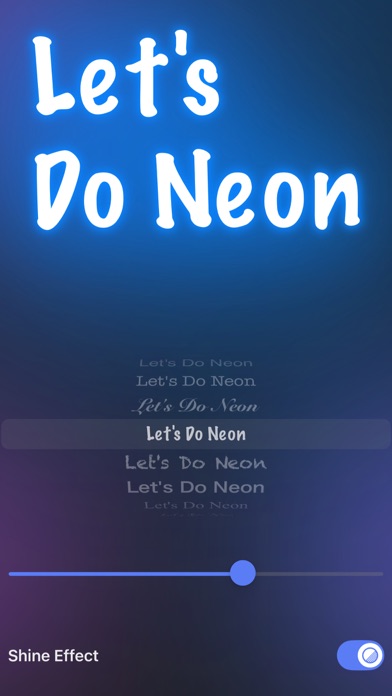


Description by sekleung chang Written by the developer, not by AppBrain. Click to read.
The minimalist user interface allows you to quickly create and show off your own amazing colorful neon text. Whether it's a concert, celebrity appearance, fan meeting, music festival or sports event, simply type your messages and show them on the display with incredible neon text effect. Communication has never been easier when speech doesn't work or when it is too loud.
FEATURES:
• Store input texts locally on the phone and random assign text color
• Display multiple individual text messages
• Able to reorder position of the stored texts
• Switch different text messages using flash countdown transition
• Support display of emojis
• Easily adjust the text size, font style and color
• Able to change the text interval time
• Can apply shine effect when switch text messages
• Support portrait and landscape orientation when on neon text display mode
[How to Use]:
• Tap the textfield to input texts or emojis, hit the “Add” button to store the message
• Drag and drop a stored text to reorder its position
• Tap a stored text to select it, hit the “Delete one” button to delete
• Tap a stored text to select it, hit the circle button with rainbow color stroke(locating on top of stored texts), to change the color of selected text
• Hit the “Remove All” button to remove all the stored texts
• Tap the circle button with finger icon(locating at lower left hand corner), to adjust the text size and font style for neon text
• Tap the circle button with timer icon(locating at lower right hand corner), to adjust the text interval time for neon text
• Tap the big circle button with rainbow color sun icon to enter neon text display mode
• When on neon text display mode, tap anywhere on screen to exit
Safety and technology
Found in the app by AppBrain- Price
- Free
- App size
- 5.17 MB
- Content rating
- Everyone
Technologies used by DoNeon: Flash Neon Text Banner
Releases
Updates seen on the App Store- Version
- 1.01
- Launched
- September 2024
No changelog data
Alternatives
Similar apps and more from sekleung changMore from sekleung chang





Rankings
App Store top chartsApp Store Rankings for DoNeon: Flash Neon Text Banner
About the app and developer
About DoNeon: Flash Neon Text Banner
DoNeon: Flash Neon Text Banner is an utilities app developed by sekleung chang.
User Ratings
DoNeon: Flash Neon Text Banner is rated 5.00 out of 5 stars. The rating is based on 4 ratings.
App Information
DoNeon: Flash Neon Text Banner is freely available from the App Store. The app size is 5.17 MB. The latest version available is 1.01. The last update was on February 5, 2025.
Technical Requirements
The app has a content rating of Everyone. The app has been available on the App Store since September 2024.
Developer information for sekleung chang
Address:
Frequently asked questions about DoNeon: Flash Neon Text Banner
Is DoNeon: Flash Neon Text Banner free?
Yes. DoNeon: Flash Neon Text Banner is free on the App Store.
Is DoNeon: Flash Neon Text Banner still available?
Yes. DoNeon: Flash Neon Text Banner is on the App Store, and the last update we saw was on February 5, 2025.
How large is DoNeon: Flash Neon Text Banner?
DoNeon: Flash Neon Text Banner is 5.17 MB.
Is DoNeon: Flash Neon Text Banner suitable for children?
App Store rates the content of DoNeon: Flash Neon Text Banner as suitable for everyone.
How do people rate DoNeon: Flash Neon Text Banner?
DoNeon: Flash Neon Text Banner scores 5.00 out of 5 stars, from 4 ratings on the App Store.
Who made DoNeon: Flash Neon Text Banner?
DoNeon: Flash Neon Text Banner was developed by sekleung chang. It is listed in the utilities category on the App Store.