
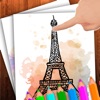
Doodle on the screen – Drawing
Doodle on the screen – Drawing is made and published by Belen Gonzalez. AppBrain is an independent app data site and isn't affiliated with Belen Gonzalez. The app name, icon, screenshots and description belong to Belen Gonzalez and are shown as published on the App Store.
AppBrain's verdict
Established- Rating on App Store
- 5.00
- 2 ratings
- Last updated
- July 12, 2023
It doesn't have enough ratings yet to judge what users think.
Rankings
App Store top chartsApp Store Rankings for Doodle on the screen – Drawing
Competitors
Similar apps and more from Belen GonzalezAlternatives to Doodle on the screen – Drawing




More from Belen Gonzalez






Releases
Updates seen on the App Store- Version
- 1.2
- Launched
- July 2017
No changelog data
User feedback
Ratings and reviews on the App StoreComments on Doodle on the screen – Drawing for iOS
We don't have enough comments to show example comments. Please check back later.
Technology
Found in the app by AppBrain- Price
- Free
- App size
- 20.8 MB
- Content rating
- Everyone
Technologies used by Doodle on the screen – Drawing
About the app and developer
About Doodle on the screen – Drawing
Doodle on the screen – Drawing is an education app developed by Belen Gonzalez.
What is the rating of Doodle on the screen – Drawing?
Doodle on the screen – Drawing is rated 5.00 out of 5 stars, based on 2 ratings.
Is Doodle on the screen – Drawing free?
Doodle on the screen – Drawing is free. The app size is 20.79 MB. The latest version available is 1.2. The last update was on July 12, 2023.
What are the requirements for Doodle on the screen – Drawing?
The app has a content rating of Everyone. The app has been available on the App Store since July 2017.
Developer information for Belen Gonzalez
Address:
Store listing
By Belen Gonzalez, from the App Store


Description by Belen Gonzalez Written by the developer, not by AppBrain. Click to read.
Download now and discover the easiest ways to create striking images in just a few minutes. Use our text editor to write down notes and draw on your images. Choose between different types of fonts and various colors. Make scribbles, drawings or sketches, write notes and doodle on pictures. Add captions on your photos in a quick and easy way. Convey your messages with fun drawings.
Take a photo or select one from your gallery. Write or draw something on it! Send notes or funny drawings to your friends. You can also use it for painting, doodling and coloring the pictures.