




AppBrain's verdict
- Last updated
- October 10, 2026
- Size
- 49.0 MB
User feedback
Ratings and reviews on the App StoreComments on DopaBreak: Mindful Screen Time for iOS
We don't have enough comments to show example comments. Please check back later.
Store listing
By Toshiki Sakuraya, from the App StoreDescription by Toshiki Sakuraya Written by the developer, not by AppBrain. Click to read.
DopaBreak helps you be more deliberate about social media and short videos. Take a breath before opening an app, decide why you're using it, and set a time to stop. You can also block selected apps when you want time to study, work, or sleep.
WHO IT'S FOR
- You scroll longer than you meant to, especially before bed.
- You reach for your phone in the middle of studying or working.
- You want more time for reading, exercise, or something you've been putting off.
- You need social media for work or messages and want limits that fit how you use it.
DOPAMINE AND THE URGE TO CHECK
Dopamine plays a role in how the brain anticipates rewards and learns from them. 'Maybe the next video will be good.' 'Maybe someone has replied.' These expectations can make you want to check your feed again.
DopaBreak adds a breath before you open an app. Choose why you're using it and for how long, then reflect on how it felt. That gives you a chance to notice your habits and decide how you want to use social media.
BREATHING PAUSE (STANDARD MODE)
A short breathing screen appears before an app you've set up opens. Take a breath, choose a reason such as work, messages, or passing time, then open the app or skip it.
IN-USE PAUSES
Choose 5, 10, 15, or 30 minutes. Apps linked through Screen Time can pause when you reach that amount of use. Finish or add time. For work and messages, a check-in notification is the default; you can choose blocking or no time limit instead.
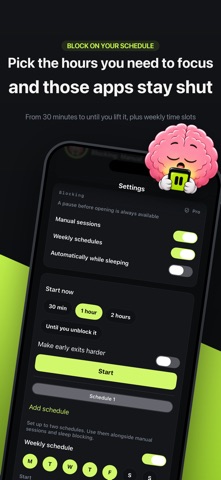
DEEP FOCUS — PRO
Block selected apps for a set time. Start a session when you want to study or work without checking your feed.
WEEKLY SCHEDULE — PRO
Set up to two recurring blocks by day and time, such as your weekday study hours.
STRONGER AT NIGHT — PRO
Automatically block selected apps from bedtime until wake-up time. They stay available during the day.
STRICT BLOCK — PRO
For timed sessions you start yourself, add a 30-second wait before an emergency unlock if you tend to undo your blocks too quickly.
GOALS
Add what you want time for, such as a book or an exam. See your goal before opening social media. You can add as many as you like.
LOCK SCREEN DISPLAY
Keep goals visible through Lock Screen notifications and Live Activities. Extra themes are available with Pro.
REFLECTIONS
Record whether using an app felt worthwhile or left you wishing you'd stopped sooner. You can skip the question.
RECORDS
For apps with breathing pauses, review opening attempts, times you chose not to open, and estimated time reclaimed. Read past reflections to help decide which settings to adjust.
START FREE
The free version supports one app and includes breathing pauses, check-ins during use, reflections, and your full history. You can add as many goals as you like.
Pro removes the limit on how many supported apps you can add. It includes focus and bedtime blocking, weekly schedules, and additional Lock Screen themes.
GETTING SET UP
Automatic breathing pauses need an initial setup for each app in Apple's Shortcuts app. DopaBreak includes video instructions. Blocking and pauses during use require Screen Time setup. Allow notifications if you want check-in reminders.
PRICING AND PURCHASES
- Monthly and yearly subscriptions are available. Eligible users can try the yearly plan free for 7 days. See the in-app purchase screen for prices and eligibility.
- Payment is charged to your Apple ID. Subscriptions renew automatically unless canceled at least 24 hours before the period ends. You can manage or cancel anytime in Settings.
- Terms of Use: https://saku1110.github.io/dopabreak-legal/terms-en.html
- Privacy Policy: https://saku1110.github.io/dopabreak-legal/privacy-en.html
Safety and technology
Found in the app by AppBrain- Price
- Free
- App size
- 49.0 MB
- Content rating
- Everyone
Technologies used by DopaBreak: Mindful Screen Time
Releases
Updates seen on the App Store- Version
- 1.0.4
- Launched
- September 2026
No changelog data
Alternatives
Similar apps and more from Toshiki SakurayaAlternatives to DopaBreak: Mindful Screen Time


Rankings
App Store top chartsApp Store Rankings for DopaBreak: Mindful Screen Time
About the app and developer
About DopaBreak: Mindful Screen Time
DopaBreak: Mindful Screen Time is a productivity app developed by Toshiki Sakuraya.
What is the rating of DopaBreak: Mindful Screen Time?
DopaBreak: Mindful Screen Time has no ratings yet.
Is DopaBreak: Mindful Screen Time free?
DopaBreak: Mindful Screen Time is free. The app size is 49.04 MB. The latest version available is 1.0.4. The last update was on October 10, 2026.
What are the requirements for DopaBreak: Mindful Screen Time?
The app has a content rating of Everyone. The app has been available on the App Store since September 2026.
DopaBreak: Mindful Screen Time is made and published by Toshiki Sakuraya. AppBrain is an independent app data site and isn't affiliated with Toshiki Sakuraya. The app name, icon, screenshots and description belong to Toshiki Sakuraya and are shown as published on the App Store.
Developer information for Toshiki Sakuraya
Address:
Frequently asked questions about DopaBreak: Mindful Screen Time
Is DopaBreak: Mindful Screen Time free?
Yes. DopaBreak: Mindful Screen Time is free on the App Store.
Is DopaBreak: Mindful Screen Time still available?
Yes. DopaBreak: Mindful Screen Time is on the App Store, and the last update we saw was on October 10, 2026.
How large is DopaBreak: Mindful Screen Time?
DopaBreak: Mindful Screen Time is 49.04 MB.
Is DopaBreak: Mindful Screen Time suitable for children?
App Store rates the content of DopaBreak: Mindful Screen Time as suitable for everyone.
Who made DopaBreak: Mindful Screen Time?
DopaBreak: Mindful Screen Time was developed by Toshiki Sakuraya. It is listed in the productivity category on the App Store.
What are the best alternatives to DopaBreak: Mindful Screen Time?
People looking at DopaBreak: Mindful Screen Time also look at these productivity apps: DPro Lite, PiePlan, Weekly: Weekly Habit Tracker, 通知ほしい, Random Reminder App.