

DopaLock: Screen Time Control
DopaLock: Screen Time Control is made and published by Yuta Goto. AppBrain is an independent app data site and isn't affiliated with Yuta Goto. The app name, icon, screenshots and description belong to Yuta Goto and are shown as published on the App Store.
AppBrain's verdict
- Last updated
- October 12, 2026
Rankings
App Store top chartsApp Store Rankings for DopaLock: Screen Time Control
Competitors
Similar apps and more from Yuta GotoMore from Yuta Goto

Releases
Updates seen on the App Store- Version
- 1.2.5
- Launched
- June 2026
No changelog data
User feedback
Ratings and reviews on the App StoreComments on DopaLock: Screen Time Control for iOS
We don't have enough comments to show example comments. Please check back later.
Technology
Found in the app by AppBrain- Price
- Free
- App size
- 45.4 MB
- Content rating
- Everyone
Technologies used by DopaLock: Screen Time Control
About the app and developer
About DopaLock: Screen Time Control
DopaLock: Screen Time Control is a productivity app developed by Yuta Goto.
What is the rating of DopaLock: Screen Time Control?
DopaLock: Screen Time Control has no ratings yet.
Is DopaLock: Screen Time Control free?
DopaLock: Screen Time Control is free. The app size is 45.40 MB. The latest version available is 1.2.5. The last update was on October 12, 2026.
What are the requirements for DopaLock: Screen Time Control?
The app has a content rating of Everyone. The app has been available on the App Store since June 2026.
Developer information for Yuta Goto
Address:
Frequently asked questions about DopaLock: Screen Time Control
Is DopaLock: Screen Time Control free?
Yes. DopaLock: Screen Time Control is free on the App Store.
Is DopaLock: Screen Time Control still available?
Yes. DopaLock: Screen Time Control is on the App Store, and the last update we saw was on October 12, 2026.
How large is DopaLock: Screen Time Control?
DopaLock: Screen Time Control is 45.40 MB.
Is DopaLock: Screen Time Control suitable for children?
App Store rates the content of DopaLock: Screen Time Control as suitable for everyone.
Who made DopaLock: Screen Time Control?
DopaLock: Screen Time Control was developed by Yuta Goto. It is listed in the productivity category on the App Store.
Store listing
By Yuta Goto, from the App Store


Description by Yuta Goto Written by the developer, not by AppBrain. Click to read.
Have you heard the word dopagaki (ドパガキ)? It's Japanese internet slang for young people who get hooked on content engineered to trigger a quick, powerful dopamine hit — short-form videos, social feeds, mobile games, gacha pulls, and the like.
Ever picked up your phone for "just 5 minutes" before bed, and looked up an hour later? This isn't just a youth problem — everyone is losing time to their phone.
And because of that, don't the things you're actually supposed to do — or actually want to do — keep slipping away?
DopaLock locks your apps through a system, not willpower, so you can take back the time your phone has been taking from you.
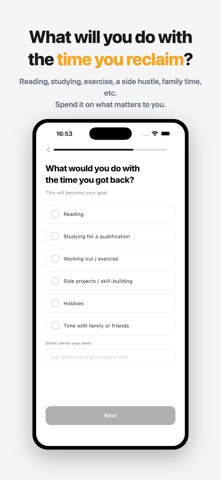
You can log how you spend the time you reclaim right in the app, and watching that progress build up will guide you toward a better future.
■ Stop "just checking" your phone — for good.
DopaLock locks the apps and sites you keep reaching for, for however long you set, so you can actually focus.
Instead of relying on willpower, it builds a system where the apps simply can't be opened — so focus happens naturally.
Every locked session is logged as "time reclaimed" and adds up by day, week, month, and all-time. You're not watching a number go down — you're watching one go up. That's what keeps you going.
■ Who it's for
・You open social media or video apps and lose hours without noticing
・You want to focus on studying, work, or reading, but your phone keeps winning
・You keep blaming yourself for "not having enough willpower"
・You're serious about breaking a phone or dopamine addiction
■ Key features
◎ Lock apps & sites
Choose the apps or categories you want blocked, and they stay locked for exactly as long as you set.
◎ Forced Block Mode
Once it starts, there's no unlocking until the timer ends — built for people who are serious about this.
◎ Scheduled auto-lock (Premium)
Set it once — like weekdays 9am–6pm — and it locks automatically every time, no need to start it yourself.
◎ Block adult & custom sites (Premium)
Uses Apple's built-in content filter to block adult sites automatically, plus any sites you add yourself.
◎ Block in-app purchases (Premium)
Prevents impulsive spending on mobile games and apps during your locked time.
◎ See the time you've reclaimed
Day, week, month, and all-time graphs, a calendar heatmap, and streaks — so you can actually see yourself staying consistent.
◎ Log & notes
Record what you did with your reclaimed time — reading, studying, exercise, and more — and look back on it later.
■ About Premium
Premium unlocks scheduled auto-lock, detailed stats (weekly/monthly/all-time), website blocking, adult site blocking, in-app purchase blocking, and iCloud backup.
Choose from a Monthly plan, Yearly plan, or one-time purchase. Monthly and Yearly plans are auto-renewing subscriptions. Payment is charged to your Apple ID at confirmation of purchase, and renews automatically unless auto-renew is turned off at least 24 hours before the end of the current period. You can cancel anytime in your App Store account settings.
■ Privacy
No account required. Information about which apps you lock is never sent anywhere. We collect only anonymous, non-identifying usage statistics to improve the app (and you can opt out).
Not willpower. A system.
Start reclaiming your time today.
— Legal —
Terms of Use (EULA): https://www.apple.com/legal/internet-services/itunes/dev/stdeula/
Privacy Policy: https://yamataniinfo-spec.github.io/dopalock-privacy/