

DOT AIR is made and published by Sota Ninomiya. AppBrain is an independent app data site and isn't affiliated with Sota Ninomiya. The app name, icon, screenshots and description belong to Sota Ninomiya and are shown as published on the App Store.
AppBrain's verdict
- Best rank
- #49
- New Apps, Slovakia
- Last updated
- October 16, 2026
Rankings
App Store top charts- Highest rank
- #49
- Chart
- New Apps
- Business
- Country
- Slovakia
App Store Rankings for DOT AIR
Top rankings
| Rank | Country | Category | List |
|---|---|---|---|
| 49 | Slovakia | Business | New Apps |
| 49 | Slovakia | Education | New Apps |
| 49 | Slovakia | Entertainment | New Apps |
| 49 | Slovakia | Finance | New Apps |
| 49 | Slovakia | Food & Drink | New Apps |
| 49 | Slovakia | Action Games | New Apps |
| 49 | Slovakia | Board Games | New Apps |
| 49 | Slovakia | Card Games | New Apps |
| 49 | Slovakia | Casino Games | New Apps |
| 49 | Slovakia | Family Games | New Apps |
Ranking history in Slovakia
Competitors
Similar apps and more from Sota NinomiyaMore from Sota Ninomiya


Releases
Updates seen on the App Store- Version
- 1.0
- Launched
- October 2026
No changelog data
User feedback
Ratings and reviews on the App StoreComments on DOT AIR for iOS
We don't have enough comments to show example comments. Please check back later.
Technology
Found in the app by AppBrain- Price
- Free
- App size
- 97.4 MB
- Content rating
- Everyone
Technologies used by DOT AIR
About the app and developer
About DOT AIR
DOT AIR is a productivity app developed by Sota Ninomiya.
What is the rating of DOT AIR?
DOT AIR has no ratings yet.
Is DOT AIR free?
DOT AIR is free. The app size is 97.44 MB. The latest version available is 1.0. The last update was on October 16, 2026.
What are the requirements for DOT AIR?
The app has a content rating of Everyone. The app has been available on the App Store since October 2026.
Developer information for Sota Ninomiya
Address:
Store listing
By Sota Ninomiya, from the App Store


Screenshots by Sota Ninomiya, from the the App Store listing
Description by Sota Ninomiya Written by the developer, not by AppBrain. Click to read.
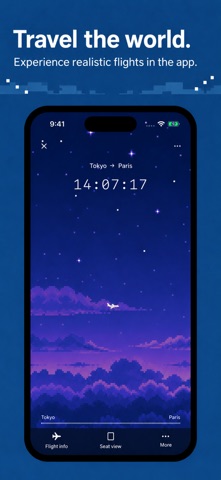
Choose a destination and your plane takes off. DOTAIR is a travel timer that turns the time to your destination into a pixel-art journey.
Fly from Tokyo to Paris or Seoul to Jeju. The countdown is based on real flight durations between cities, taking you through takeoff, cruise, and landing. The sky and scenery gradually change, making your usual study or work session feel like a small trip.
Watch the plane from outside, switch to a cabin seat view, or check your position on the world map. Reaching your destination brings a satisfying sense of completion. Where will you go during your next work session?
WHO WILL ENJOY DOTAIR
• Anyone who wants to make study or work time more enjoyable: Follow the plane instead of watching numbers alone, and use the journey as a gentle marker for focused time.
• Pixel-art and sky lovers: Enjoy starry skies, clouds, airports, and city scenes drawn in calm pixel art.
• Airplane and travel fans: Experience the journey from airport departure to time in the air and arrival, with window scenery and a cabin seat view.
• Anyone looking for a finish line: Feel that your destination is getting closer, and let arrival be a small reward after a longer session.
• People who like to personalize their apps: Premium adds cities, aircraft, and cabin designs to make each trip your own.
FEATURES
Choose a destination: Pick a city route for a short getaway or a longer journey, depending on your mood.
Flight-time timer: The countdown follows the selected route’s real flight duration. DOTAIR is a timer inspired by flight times, not a live airline flight tracker.
Trip details before departure: Check your destination, flight duration, and estimated arrival time before starting.
Airport takeoff: The plane rolls down the runway, accelerates, and climbs. The airport and city recede as it rises into the cruise scene.
Cruise animation: Watch the plane move through the sky as the background scenery drifts slowly by.
Landing journey: As arrival approaches, the plane descends toward the city and airport. See the timer end with a landing at your destination.
Changing skies: Morning, daytime, and night skies transition gradually instead of switching all at once.
Tap to change views: Switch from the outside aircraft view to the cabin seat view during cruise. The outside view returns as landing approaches.
Window scenery: Look at the sky through the airplane window, integrated with the cabin background for a consistent view.
Cabin seat view: Enjoy the seat and cabin atmosphere as well as the view outside.
Current position map: Follow your journey on a world map alongside the countdown.
Route list and search: Browse routes by region or search for a city to find your next destination.
Estimated arrival: See an arrival time calculated from the current time and the selected flight duration.
Language settings: Choose a language on first launch and change it later in Settings. Japanese, English, and other supported languages are available.
Settings tab: Find app preferences in one place. In-flight controls such as cabin lighting remain on the flight screen.
PREMIUM
More cities and routes: Unlock additional destinations around the world beyond the free selection.
Aircraft designs: Choose a different aircraft color and style from the standard look.
Cabin designs: Customize the cabin shown in the seat view and pair it with your aircraft.
World tour plans: Connect multiple destinations and imagine a journey around the world.
Premium is a one-time purchase with no monthly or annual auto-renewal. The price in the Japanese App Store is ¥300.
Choose a destination for the time you have today. Look up at the sky and begin your journey with DOTAIR.
Fly from Tokyo to Paris or Seoul to Jeju. The countdown is based on real flight durations between cities, taking you through takeoff, cruise, and landing. The sky and scenery gradually change, making your usual study or work session feel like a small trip.
Watch the plane from outside, switch to a cabin seat view, or check your position on the world map. Reaching your destination brings a satisfying sense of completion. Where will you go during your next work session?
WHO WILL ENJOY DOTAIR
• Anyone who wants to make study or work time more enjoyable: Follow the plane instead of watching numbers alone, and use the journey as a gentle marker for focused time.
• Pixel-art and sky lovers: Enjoy starry skies, clouds, airports, and city scenes drawn in calm pixel art.
• Airplane and travel fans: Experience the journey from airport departure to time in the air and arrival, with window scenery and a cabin seat view.
• Anyone looking for a finish line: Feel that your destination is getting closer, and let arrival be a small reward after a longer session.
• People who like to personalize their apps: Premium adds cities, aircraft, and cabin designs to make each trip your own.
FEATURES
Choose a destination: Pick a city route for a short getaway or a longer journey, depending on your mood.
Flight-time timer: The countdown follows the selected route’s real flight duration. DOTAIR is a timer inspired by flight times, not a live airline flight tracker.
Trip details before departure: Check your destination, flight duration, and estimated arrival time before starting.
Airport takeoff: The plane rolls down the runway, accelerates, and climbs. The airport and city recede as it rises into the cruise scene.
Cruise animation: Watch the plane move through the sky as the background scenery drifts slowly by.
Landing journey: As arrival approaches, the plane descends toward the city and airport. See the timer end with a landing at your destination.
Changing skies: Morning, daytime, and night skies transition gradually instead of switching all at once.
Tap to change views: Switch from the outside aircraft view to the cabin seat view during cruise. The outside view returns as landing approaches.
Window scenery: Look at the sky through the airplane window, integrated with the cabin background for a consistent view.
Cabin seat view: Enjoy the seat and cabin atmosphere as well as the view outside.
Current position map: Follow your journey on a world map alongside the countdown.
Route list and search: Browse routes by region or search for a city to find your next destination.
Estimated arrival: See an arrival time calculated from the current time and the selected flight duration.
Language settings: Choose a language on first launch and change it later in Settings. Japanese, English, and other supported languages are available.
Settings tab: Find app preferences in one place. In-flight controls such as cabin lighting remain on the flight screen.
PREMIUM
More cities and routes: Unlock additional destinations around the world beyond the free selection.
Aircraft designs: Choose a different aircraft color and style from the standard look.
Cabin designs: Customize the cabin shown in the seat view and pair it with your aircraft.
World tour plans: Connect multiple destinations and imagine a journey around the world.
Premium is a one-time purchase with no monthly or annual auto-renewal. The price in the Japanese App Store is ¥300.
Choose a destination for the time you have today. Look up at the sky and begin your journey with DOTAIR.