

DOT Vehicle Manager
DOT Vehicle Manager is made and published by Road Tech Computer Systems Ltd. AppBrain is an independent app data site and isn't affiliated with Road Tech Computer Systems Ltd. The app name, icon, screenshots and description belong to Road Tech Computer Systems Ltd. and are shown as published on the App Store.
AppBrain's verdict
- Last updated
- July 28, 2026
Rankings
App Store top chartsApp Store Rankings for DOT Vehicle Manager
Competitors
Similar apps and more from Road Tech Computer Systems Ltd.Alternatives to DOT Vehicle Manager


More from Road Tech Computer Systems Ltd.


Releases
Updates seen on the App Store- Version
- 1.1.5
- Launched
- September 2024
No changelog data
User feedback
Ratings and reviews on the App StoreComments on DOT Vehicle Manager for iOS
We don't have enough comments to show example comments. Please check back later.
Technology
Found in the app by AppBrain- Price
- Free
- App size
- 41.0 MB
- Content rating
- Everyone
Technologies used by DOT Vehicle Manager
About the app and developer
About DOT Vehicle Manager
DOT Vehicle Manager is a productivity app developed by Road Tech Computer Systems Ltd.
What is the rating of DOT Vehicle Manager?
DOT Vehicle Manager has no ratings yet.
Is DOT Vehicle Manager free?
DOT Vehicle Manager is free. The app size is 41.03 MB. The latest version available is 1.1.5. The last update was on July 28, 2026.
What are the requirements for DOT Vehicle Manager?
The app has a content rating of Everyone. The app has been available on the App Store since September 2024.
Developer information for Road Tech Computer Systems Ltd.
Road Tech Computer Systems Ltd.
Address:
Store listing
By Road Tech Computer Systems Ltd., from the App Store




Description by Road Tech Computer Systems Ltd. Written by the developer, not by AppBrain. Click to read.
The app seamlessly integrates with all our software to offer you a range of fantastic benefits. Within a few clicks of the app, you can view vehicle details, including reg, activity status, location, sites, direction, mileage, fuel and speed in real-time. See Geofence activities of vehicles entering, leaving and waiting times. View start and finish times, locations, driver details, driver behaviour, distances, and the journey trails on Google Maps.
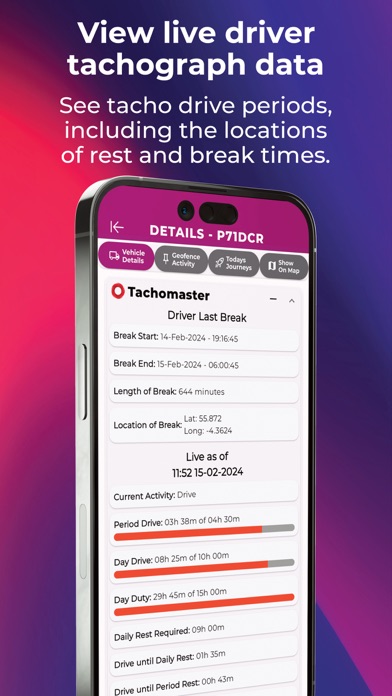
Effortlessly inspect the safety and compliance of your fleet. Review your driver's tachograph hours, break periods, and day duty left. Also, check that the vehicle isn't driven without a driver's card and has completed a vehicle walk-around check.
Ultimately, the DOT Vehicle Manager app increases your insight into your fleet's daily activities, enhances safety and boosts overall efficiency, making it an indispensable tool for fleet managers striving for success.
Core Benefits
• The app is FREE for DOT Tracking customers
• Access valuable live driver tacho data
• View live drive periods and time remaining
• Locate vehicles within a specific area of the map
• See vehicle activity, status, location and direction
• View geofence vehicles’ activities and waiting times
• Watch a specific vehicle for an allocated time
• See start and finish times, distances and snail trails
• View your vehicle walk-around inspections
• See vehicle activities such as site, speed and status
• View vehicle details including reg, status, latest GPS, tacho mode, mileage, speed and fuel.