

dotKiosk Full Screen Browser
dotKiosk Full Screen Browser is made and published by Free Tomorrow. AppBrain is an independent app data site and isn't affiliated with Free Tomorrow. The app name, icon, screenshots and description belong to Free Tomorrow and are shown as published on the App Store.
AppBrain's verdict
- Last updated
- September 3, 2026
Rankings
App Store top chartsApp Store Rankings for dotKiosk Full Screen Browser
Competitors
Similar apps and more from Free TomorrowAlternatives to dotKiosk Full Screen Browser


More from Free Tomorrow

Releases
Updates seen on the App Store- Version
- 1.2.1
- Launched
- December 2025
No changelog data
User feedback
Ratings and reviews on the App StoreComments on dotKiosk Full Screen Browser for iOS
We don't have enough comments to show example comments. Please check back later.
Technology
Found in the app by AppBrain- Price
- Free
- App size
- 3.86 MB
- Content rating
- High
Technologies used by dotKiosk Full Screen Browser
About the app and developer
About dotKiosk Full Screen Browser
dotKiosk Full Screen Browser is an utilities app developed by Free Tomorrow.
User Ratings
The app has no ratings yet.
App Information
dotKiosk Full Screen Browser is freely available from the App Store. The app size is 3.86 MB. The latest version available is 1.2.1. The last update was on September 3, 2026.
Technical Requirements
The app has a content rating of High Maturity. The app has been available on the App Store since December 2025.
Developer information for Free Tomorrow
Address:
Frequently asked questions about dotKiosk Full Screen Browser
Is dotKiosk Full Screen Browser free?
Yes. dotKiosk Full Screen Browser is free on the App Store.
Is dotKiosk Full Screen Browser still available?
Yes. dotKiosk Full Screen Browser is on the App Store, and the last update we saw was on September 3, 2026.
How large is dotKiosk Full Screen Browser?
dotKiosk Full Screen Browser is 3.86 MB.
Is dotKiosk Full Screen Browser suitable for children?
App Store gives dotKiosk Full Screen Browser a high maturity rating. It is meant for adults.
Who made dotKiosk Full Screen Browser?
dotKiosk Full Screen Browser was developed by Free Tomorrow. It is listed in the utilities category on the App Store.
What are the best alternatives to dotKiosk Full Screen Browser?
People looking at dotKiosk Full Screen Browser also look at these utilities apps: Kiosk Launcher, Wisp: Full Screen Browser, FullFrame Browser, Visual Wiz 2.0, Visual Wiz.
Store listing
By Free Tomorrow, from the App Store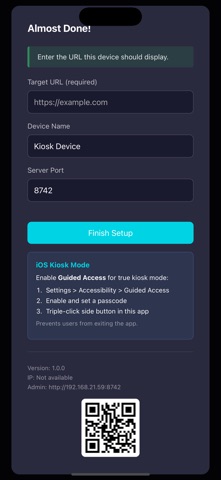


Description by Free Tomorrow Written by the developer, not by AppBrain. Click to read.
Got an old iPhone or iPad sitting in a drawer? Give it a second life as a dedicated display. No need for expensive kiosk hardware — repurpose what you already own.
FEATURES
• Fullscreen Display
Hide the status bar and navigation for a clean, immersive presentation. Perfect for digital signage, point-of-sale displays, or information kiosks.
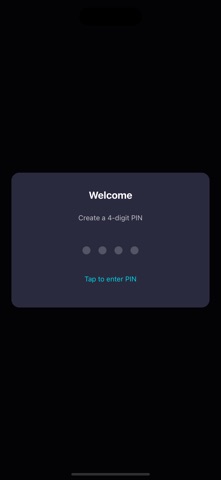
• PIN-Protected Settings
Secure your kiosk with a 4-6 digit PIN. Access settings by shaking the device.
• Remote Administration
Configure your kiosk from any device on the same network. Open the admin dashboard in a browser to change the URL, view device info, or adjust settings — no physical access required.
• Universal App
Works on both iPhone and iPad. Optimized for all screen sizes and orientations.
REPURPOSE YOUR OLD DEVICES
That old iPad collecting dust? Turn it into:
• A kitchen recipe display
• A home dashboard showing weather and calendar
• A baby monitor viewer
• A security camera feed
• A smart home control panel
Any device running iOS 13+ works perfectly — even models no longer receiving updates.
USE CASES
• Retail displays and digital signage
• Restaurant menus and ordering systems
• Museum and exhibit information
• Reception desk check-in kiosks
• Trade show and event displays
• Waiting room entertainment
GETTING STARTED
1. Launch DotKiosk and set your PIN
2. Enter the URL you want to display
3. The webpage loads in fullscreen
4. Access settings anytime by shaking the device
5. For remote config: check your device IP in settings, then visit that IP at port 8742 from another device
TIP: Enable iOS Guided Access (Settings > Accessibility > Guided Access) for complete kiosk lockdown. This prevents users from exiting the app or accessing other device features.
DotKiosk stores all data locally on your device. No accounts, no cloud, no tracking.