AppBrain
AppBrain
  • Apps
  • Apps being viewed right now Trending apps today Most popular apps All-time most installed apps Top rated apps iPhone and iPad apps
  • Intelligence ▾
    Intelligence overview → Track any Android app or your whole market
    Track & analyze
    Keyword Tracker & OptimizerTrack & improve Play rankings App Performance ReportOne-off PDF for any app StatisticsFree Android & Play market stats
    Promote your app
    Featured Apps App Links
  • Intelligence
  • Pricing
  • Dashboard
  • Sign up
  • Log in
App Store Apps > Utilities > Downburst: File Manager
Downburst: File Manager icon

Downburst: File Manager

1.2
Roham Sadeghi
0.00
0 reviews
Free

Downburst: File Manager Screenshot 1 of 7
Downburst: File Manager Screenshot 2 of 7
Downburst: File Manager Screenshot 3 of 7
Downburst: File Manager Screenshot 4 of 7
Downburst: File Manager Screenshot 5 of 7
Downburst: File Manager Screenshot 6 of 7
Downburst: File Manager Screenshot 7 of 7
Screenshots by Roham Sadeghi, from the the App Store listing
View on the App Store

About Downburst: File Manager

Downburst: File Manager is an utilities app developed by Roham Sadeghi.

User Ratings

The app has no ratings yet.

App Information

Downburst: File Manager is freely available from the App Store. The app size is 56.32 MB. The latest version available is 1.2. The last update was on September 30, 2026.

Technical Requirements

The app has a content rating of Everyone. The app has been available on the App Store since September 2026.

Downburst: File Manager is made and published by Roham Sadeghi. AppBrain is an independent app data site and isn't affiliated with Roham Sadeghi. The app name, icon, screenshots and description belong to Roham Sadeghi and are shown as published on the App Store.

Description by Roham Sadeghi (from the App Store)
Downburst is a download manager for iPhone and iPad that shows you the weather.

Paste a link and the file starts falling. The whole queue is one screen: current speed as rainfall, a live graph of the last 45 seconds, and every transfer with its own progress, ETA and stream count. You can tell at a glance whether things are going well.

CLOUDBURST
Big files arrive in up to four parallel streams instead of one. Downburst opens byte ranges, checks the server honours them, pulls the parts at the same time and stitches them back together on arrival. Servers that do not support ranges fall back to a single stream without fuss.

RESUME THAT ACTUALLY RESUMES
Pause anything and pick it up later, byte for byte. Lose Wi-Fi mid-transfer and the queue waits for connectivity rather than starting over. Failures back off and retry on their own at 5s, 15s, 45s, 2m and 4m, then stop bothering you.

IT KEEPS GOING WHEN YOU LEAVE
Downloads continue while the app is closed, because they run on the system background transfer service rather than a timer that dies with the app. A Live Activity counts down on your Lock Screen and Dynamic Island, a Home Screen widget shows the queue, and a notification tells you when a file lands.

THE INLET
Paste a whole wall of text and Downburst pulls every link out of it. Each one gets a pre-flight check before it joins the queue: the real filename, the real size, and whether it can be resumed. Untick the ones you did not mean to grab.

ARCHIVES, UNPACKED
ZIP and RAR extract themselves when they land, multi-part sets included. Password-protected archives ask once, and remembered passwords live in the device keychain so the next one opens without asking.

WATCH IT HERE
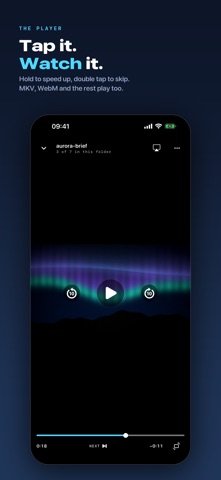
Tap a video and it plays: hold to speed up, double tap to skip, drag for brightness and volume, pinch to fill, rotate with one tap even with the rotation lock on, pull it down by its top edge and keep browsing while it plays in a bar above the tabs. Subtitles from sidecar files or inside the file, chapters, a sleep timer, an A to B loop, AirPlay, Picture in Picture and Lock Screen controls. MP4, MOV and M4V play natively; MKV, AVI, WebM, FLV, TS, OGG and Opus play through VideoLAN's own engine, and Chromecast goes through it too. It remembers where you stopped.

EVERYTHING LANDS IN FILES
Finished downloads go to On My iPhone, Downburst, Downloads, visible in the Files app, or to any folder you choose there, iCloud Drive included, where a file uploads only once it has fully landed. Sorting rules file them into folders by type or by name. Preview them in place, zoom through images, share them onward, or find them from the Home Screen with Spotlight. A checksum published beside a file is checked on arrival.

YOURS TO TUNE
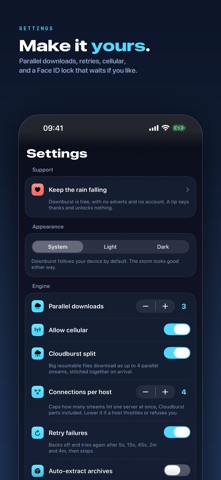
Set how many downloads run at once and how many connections may hit any one server. Allow or block cellular, or mark one enormous download Wi-Fi only. Servers that ask for a login get one, kept in your device's keychain and sent only to them. Lock the app behind Face ID.

AT HOME ON EVERY SCREEN
Two columns on iPad. Hold, release and check the queue from Shortcuts and Siri, or from buttons on the widget. Every control has a name for VoiceOver, every size follows Dynamic Type, and the rain holds still for Reduce Motion.

WHAT IT DOES NOT DO
Downburst downloads files from direct links. It does not save media from streaming or social platforms, and those hosts are blocked in the app by design. There are no torrents and no plugins. Download only what you own or have the rights to save.

FREE, AND STAYING FREE
Every feature above is in the free app: no paid tiers, no trials, nothing held back. Settings has an optional tip jar, and it unlocks nothing.

No account, no analytics, no adverts, no tracking. Nothing you download passes through a server of mine, because there is not one.
Show more Show less

More data about Downburst: File Manager

Price Free
Rating No ratings
Ranking Not ranked
Version 1.2
App size 56.3 MB
Suitable for Everyone

Alternatives to Downburst: File Manager

SuperDown - File Transfers icon SuperDown - File Transfers
Paria Rastegar Jooybari
5.0
Free
1 ratings
Downloora icon Downloora
Immaxp.com
5.0
Free
1 ratings
CodecPlayer: Video Player icon CodecPlayer: Video Player
Hao Xiong
0.0
Free
SEPass icon SEPass
Modiot Labs LLC
5.0
Free
1 ratings
DiscoTranslation icon DiscoTranslation
Oleksandr Vasyliev
0.0
Free
Limi - AI Usage Widget icon Limi - AI Usage Widget
SION NOH
0.0
Free
createskills icon createskills
YONG VENTURES PTE. LTD.
0.0
Free
Voco - Local AI Translator icon Voco - Local AI Translator
Irell Zane
0.0
Free

Changelog of Downburst: File Manager

No changelog data

Developer information for Roham Sadeghi

Roham Sadeghi

Address:

Share Downburst: File Manager

Comments on Downburst: File Manager for iOS

We don't have enough comments to show example comments. Please check back later.

App Store Rankings for Downburst: File Manager

This app is not ranked

Technologies used by Downburst: File Manager

Frequently asked questions about Downburst: File Manager

Is Downburst: File Manager free?

Yes. Downburst: File Manager is free on the App Store.

Is Downburst: File Manager still available?

Yes. Downburst: File Manager is on the App Store, and the last update we saw was on September 30, 2026.

How large is Downburst: File Manager?

Downburst: File Manager is 56.32 MB.

Is Downburst: File Manager suitable for children?

App Store rates the content of Downburst: File Manager as suitable for everyone.

Who made Downburst: File Manager?

Downburst: File Manager was developed by Roham Sadeghi. It is listed in the utilities category on the App Store.

What are the best alternatives to Downburst: File Manager?

People looking at Downburst: File Manager also look at these utilities apps: SuperDown - File Transfers, Downloora, CodecPlayer: Video Player, SEPass, DiscoTranslation.

Apps other people are watching Popular Utilities Apps Price drops on Google Play Today's trending apps Top new apps
SuperDown - File Transfers icon SuperDown - File Transfers
Downloora icon Downloora
CodecPlayer: Video Player icon CodecPlayer: Video Player
SEPass icon SEPass
DiscoTranslation icon DiscoTranslation
Limi - AI Usage Widget icon Limi - AI Usage Widget
createskills icon createskills
Voco - Local AI Translator icon Voco - Local AI Translator
AppBrain Intelligence premium content

Subscribe now to get full and unlimited access to AppBrain Intelligence. You'll have access to:

  • App Intelligence dashboard (performance timeline, competitor comparison, country rankings, insight cards)
  • Detailed ranking data per app
  • Full timeline per developer
  • Device market shares data per country
  • Unlimited keyword tracking
  • AI assistant access via MCP (Claude, Cursor or any MCP client)
1 Month

$75/mo
(billed every month)

SAVE 0%
Subscribe
3 Months

$65/mo
($195 billed every 3 months)

SAVE 13%
Subscribe
1 Year

$57.50/mo
($690 billed every year)

SAVE 23%
Subscribe
Each subscription will automatically renew 3 days before the expiration date for the same time period. Subscriptions can be cancelled at any time before the renewal.

AppBrain is an app data site, we track rankings, ratings, installs for all apps and games on Google Play and the App Store. AppBrain doesn't host app files or APKs, all install links go directly to the official store. All trademarks are owned by their respective owners.

More apps

  • Top Android apps being viewed
  • View Bungee Beat
  • Jackpot Winner - Slots Casino
  • Silver Moonmane: Slot Machine

App statistics

  • Android statistics
  • Google Play Developer stats
  • Trending Android Apps
  • Trending iOS apps
  • Top popular Apps
  • Buy the best Android phone
  • Buy & sell app businesses

About AppBrain

  • Contact
  • Privacy
  • Documentation
  • DMCA takedowns
  • Blog
  • Top Free Games Apps for your iPhone or iPad
© 2010-2026 - AppBrain