

Downsizer: Photo & Video
Downsizer: Photo & Video is made and published by Chih-Yu Tung. AppBrain is an independent app data site and isn't affiliated with Chih-Yu Tung. The app name, icon, screenshots and description belong to Chih-Yu Tung and are shown as published on the App Store.
AppBrain's verdict
- Last updated
- September 20, 2026
- Size
- 3.63 MB
User feedback
Ratings and reviews on the App StoreComments on Downsizer: Photo & Video for iOS
We don't have enough comments to show example comments. Please check back later.
Store listing
By Chih-Yu Tung, from the App Store



Description by Chih-Yu Tung Written by the developer, not by AppBrain. Click to read.
A CLEANER PHOTO WORKSPACE
Tap the photo to reveal Original/Preview, zoom, and size details; tap again for a clean view. Adjust width and height beside the photo, keep proportions locked, and inspect details up close. Glass controls sit above solid, easy-to-read settings panels on iOS 26 or later; earlier supported versions use a native material appearance.
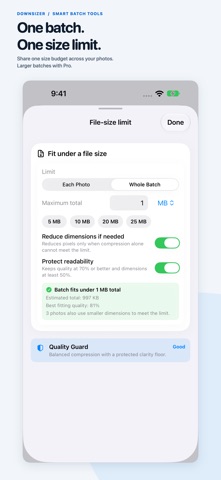
FIT UNDER A FILE-SIZE LIMIT
Enter a KB or MB target for JPEG, HEIC, or WebP. Choose a limit for each photo or one total for the whole selection. Downsizer adjusts compression and can reduce dimensions when needed, then checks the output before export. If your settings cannot meet the target, it asks you to adjust them. WebP and larger photo selections require Pro.
QUALITY GUARD
An Excellent, Good, or Review rating helps you assess the estimated result. Protect Readability sets a minimum compression quality and dimension scale. It is guidance, not a guarantee: compare the actual preview, especially for text and fine detail.
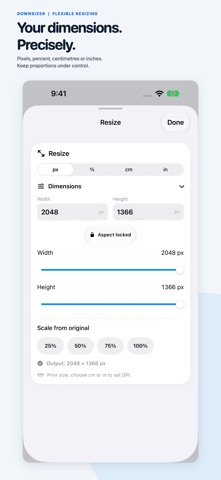
PRECISE RESIZING
Use pixels, percent, centimetres, or inches. Set print resolution, use quick scale options, and control the aspect lock. Work with one photo or apply settings across a Pro batch.
QUICK PRESETS
Start with Email 10 MB, Web Upload, or Application Form, then fine-tune the settings. Use Quick Downsizer in the app, from the Photos share extension, or through Shortcuts.
CONVERT YOUR PHOTOS
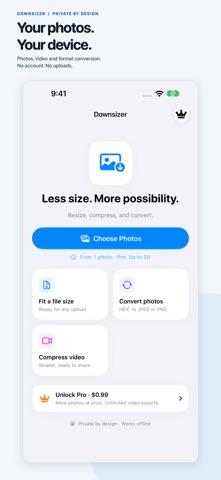
Convert HEIC photos to JPEG or PNG, or choose HEIC for efficient storage. JPEG, HEIC, and PNG are included free. Pro adds WebP and PDF. Supported embedded metadata is retained where the output format allows it.
COMPRESS VIDEO
Choose Original, 1080p, 720p, or 480p. Adjust quality or enter a target size, choose H.264 or HEVC, export MP4, MOV, or M4V, and optionally remove audio. Video target sizes are estimates; the final size can vary.
SAVE OR SHARE
Save copies to Photos or share to Files, Mail, Messages, AirDrop, and other apps. Import directly from Apple Photos with Add to Downsizer. Deleting originals is optional and requires an iOS confirmation.
PRIVATE BY DESIGN
Photo and video processing stays on your iPhone or iPad. No account, no ads, and no media uploads to a Downsizer server.
FREE AND PRO
Free includes unlimited photo exports, one photo at a time, with JPEG/HEIC/PNG, resizing, file-size targets, Quality Guard, presets, and the first completed video export.
Downsizer Pro is a one-time purchase, not a subscription. It unlocks larger batches: up to 50 photos on supported higher-memory devices, or up to 20 on other supported devices. Pro also includes WebP, PDF, and unlimited video exports. Restore Purchase is available for existing purchasers.
Safety and technology
Found in the app by AppBrain- Price
- Free
- App size
- 3.63 MB
- Content rating
- Everyone
Technologies used by Downsizer: Photo & Video
Releases
Updates seen on the App Store- Version
- 2.3
- Launched
- July 2026
No changelog data
Alternatives
Similar apps and more from Chih-Yu TungAlternatives to Downsizer: Photo & Video


Rankings
App Store top chartsApp Store Rankings for Downsizer: Photo & Video
About the app and developer
About Downsizer: Photo & Video
Downsizer: Photo & Video is a photo & video app developed by Chih-Yu Tung.
What is the rating of Downsizer: Photo & Video?
Downsizer: Photo & Video has no ratings yet.
Is Downsizer: Photo & Video free?
Downsizer: Photo & Video is free. The app size is 3.63 MB. The latest version available is 2.3. The last update was on September 20, 2026.
What are the requirements for Downsizer: Photo & Video?
The app has a content rating of Everyone. The app has been available on the App Store since July 2026.
Developer information for Chih-Yu Tung
Address:
Frequently asked questions about Downsizer: Photo & Video
Is Downsizer: Photo & Video free?
Yes. Downsizer: Photo & Video is free on the App Store.
Is Downsizer: Photo & Video still available?
Yes. Downsizer: Photo & Video is on the App Store, and the last update we saw was on September 20, 2026.
How large is Downsizer: Photo & Video?
Downsizer: Photo & Video is 3.63 MB.
Is Downsizer: Photo & Video suitable for children?
App Store rates the content of Downsizer: Photo & Video as suitable for everyone.
Who made Downsizer: Photo & Video?
Downsizer: Photo & Video was developed by Chih-Yu Tung. It is listed in the photo & video category on the App Store.
What are the best alternatives to Downsizer: Photo & Video?
People looking at Downsizer: Photo & Video also look at these photo & video apps: Video to GIF: Vifto, Picto: Photo & Image Converter, Flit Photo Editor, Deface: Blur Faces in Video, VidFloat - PiP Video Player.