

Dozecal is made and published by Johan Kovacs. AppBrain is an independent app data site and isn't affiliated with Johan Kovacs. The app name, icon, screenshots and description belong to Johan Kovacs and are shown as published on the App Store.
AppBrain's verdict
Established- Rating on App Store
- 4.20
- 5 ratings
- Last updated
- August 10, 2025
It doesn't have enough ratings yet to judge what users think.
Rankings
App Store top chartsApp Store Rankings for Dozecal
Competitors
Similar apps and more from Johan KovacsAlternatives to Dozecal






More from Johan Kovacs

Releases
Updates seen on the App Store- Version
- 1.0.9
- Launched
- July 2020
No changelog data
User feedback
Ratings and reviews on the App StoreComments on Dozecal for iOS
We don't have enough comments to show example comments. Please check back later.
Technology
Found in the app by AppBrain- Price
- Free
- App size
- 27.4 MB
- Content rating
- Everyone
Technologies used by Dozecal
About the app and developer
About Dozecal
Dozecal is an utilities app developed by Johan Kovacs.
User Ratings
Dozecal is rated 4.20 out of 5 stars. The rating is based on 5 ratings.
App Information
Dozecal is freely available from the App Store. The app size is 27.39 MB. The latest version available is 1.0.9. The last update was on August 10, 2025.
Technical Requirements
The app has a content rating of Everyone. The app has been available on the App Store since July 2020.
Developer information for Johan Kovacs
Address:
Store listing
By Johan Kovacs, from the App Store

Description by Johan Kovacs Written by the developer, not by AppBrain. Click to read.
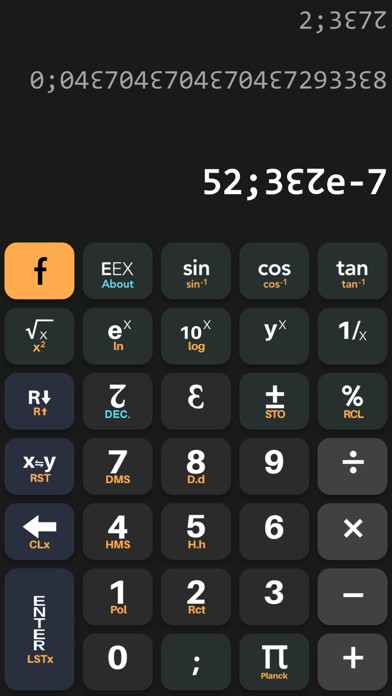
The usual math functions are available in both DUODECIMAL and DECIMAL modes.
Conversion is automatically made when switching from one mode to the other one.
Trigonometric operations uses DEGREE as unit of measure.
For more information about Base 12, please visit the Dozenal Society of America.
* RPN : the Dozecalc calculator uses the Reverse Polish Notation (RPN). This notation seems complex but has many advantages over algebraic notation and is more intuitive once you have understood the idea.
The calculator has a stack and any operation that requires two numbers is using the bottom stack layers (X and Y). Key ENTER to push the stack up and separate one number from the next. To perform arithmetic, key in the first number, press ENTER to separate the first number from the second, then key in the second number and then select and operator such as the numerical functions +, -, * or /. The result appears immediately after you press the numerical function key. The operator is keyed in only after both operands are in the stack.
Example: calculate 3 + 4
Key sequence: 3 ENTER 4 +
Result: 7
The result of any operation may itself become an operand. You do not need to press enter again to use the result. The "7" is already entered.
Example: add 2 to the previous result
Key sequence: 2 +
Result: 9
Example: calculate 5 * (3 + 4)
Key sequence: 3 ENTER 4 + 5 *
Alternate key sequence: 5 ENTER 3 ENTER 4 + *
Disclaimer: results and precision may occasionally be incorrect. Should you report them at johan@unumdesignum.com, and the author will be happy to fix !