AppBrain
AppBrain
  • Apps
  • Apps being viewed right now Trending apps today Most popular apps All-time most installed apps Top rated apps iPhone and iPad apps
  • Intelligence ▾
    Intelligence overview → Track any Android app or your whole market
    Track & analyze
    Keyword Tracker & OptimizerTrack & improve Play rankings App Performance ReportOne-off PDF for any app StatisticsFree Android & Play market stats
    Promote your app
    Featured Apps App Links
  • Intelligence
  • Pricing
  • Dashboard
  • Sign up
  • Log in
App Store Apps > Productivity > Draft Paper
Draft Paper icon

Draft Paper

1.19.9
Giles Goddard
4.41
15,900 reviews
Free

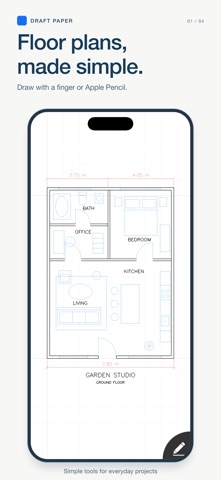
Draft Paper Screenshot 1 of 4
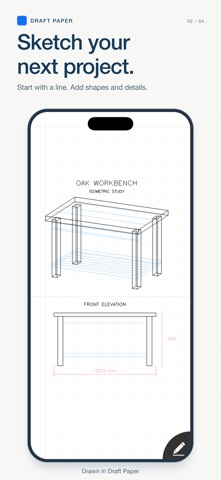
Draft Paper Screenshot 2 of 4
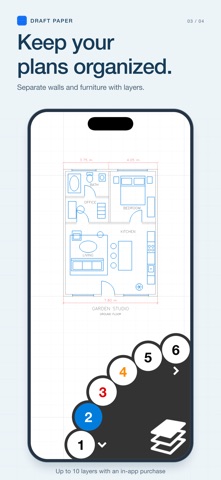
Draft Paper Screenshot 3 of 4
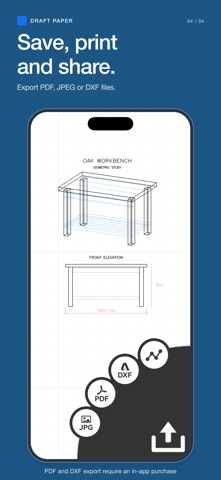
Draft Paper Screenshot 4 of 4
Screenshots by Giles Goddard, from the the App Store listing
View on the App Store

AppBrain's verdict

EstablishedWell rated
Rating on App Store
4.41
15,900 ratings
Last updated
November 4, 2026
Size
2.37 MB

Users rate it well: 4.4 stars from 15,900 ratings.

Official page on the App Store

User feedback

Ratings and reviews on the App Store

Comments on Draft Paper for iOS

We don't have enough comments to show example comments. Please check back later.

Store listing

By Giles Goddard, from the App Store
Description by Giles Goddard Written by the developer, not by AppBrain. Click to read.
Draft Paper is a simple and intuitive way to make floor plans, layouts or blueprints quickly and easily.

Touch and drag to draw lines and rectangles on up to 10 independent layers, then export directly to PDF, JPEG or DXF ready for printing, emailing or editing in other software.

Full feature list:

+ Drawing: Line, Dotted Line, Arrow, Rectangle, Ellipse, Segment, Text, Erase, Measure, Presentation
+ Multi file iCloud support
+ Export to JPEG / Vector PDF / DXF
+ Upload / download from DropBox or any other compatible app
+ Mirror / translate / rotate / scale operations
+ Smooth, fast and intuitive zooming / panning
+ Multiple layers and colors
+ Selectable right / left handed modes.
+ Unlimited undo
+ Unlimited size drawing area
+ Apple Pencil support (including double tap)
+ Metric / Imperial (USC) units support
+ Designed for iPhone and iPad

For full instructions please visit our website, http://draftpaper-app.com

Safety and technology

Found in the app by AppBrain
Price
Free
App size
2.37 MB
Content rating
Everyone

Technologies used by Draft Paper

Releases

Updates seen on the App Store
Version
1.19.9
Launched
August 2014

No changelog data

Alternatives

Similar apps and more from Giles Goddard

Alternatives to Draft Paper

ArcSite: Quick CAD Floor Plans icon ArcSite: Quick CAD Floor Plans
Arctuition LLC
4.7
Free
9.3K ratings
DrawPlan: Floor Plan Maker AI icon DrawPlan: Floor Plan Maker AI
Fleet Investments LLC
3.5
Free
5.3K ratings
Planit2d Lite icon Planit2d Lite
Paul Wright
2.0
Free
231 ratings
Keyplan 3D Lite - Home design icon Keyplan 3D Lite - Home design
Quasarts LLC
4.5
Free
52.8K ratings
magicplan icon magicplan
Technologies magicplan Inc.
4.7
Free
41.4K ratings
AutoCAD icon AutoCAD
Autodesk Inc.
4.4
Free
6.3K ratings
Live Home 3D - House Design icon Live Home 3D - House Design
Belight Software, ltd
4.6
Free
19.2K ratings
Autodesk Fusion icon Autodesk Fusion
Autodesk Inc.
4.5
Free
4.1K ratings

More from Giles Goddard

Just Japanese (JLPT) icon Just Japanese (JLPT)
Giles Goddard
0.0
Free
Offline RSS icon Offline RSS
Giles Goddard
0.0
Free

Rankings

App Store top charts

App Store Rankings for Draft Paper

This app is not ranked

About the app and developer

About Draft Paper

Draft Paper is a productivity app developed by Giles Goddard.

User Ratings

Draft Paper is rated 4.41 out of 5 stars. The rating is based on 16 thousand ratings.

App Information

Draft Paper is freely available from the App Store. The app size is 2.37 MB. The latest version available is 1.19.9. The last update was on November 4, 2026.

Technical Requirements

The app has a content rating of Everyone. The app has been available on the App Store since August 2014.

Draft Paper is made and published by Giles Goddard. AppBrain is an independent app data site and isn't affiliated with Giles Goddard. The app name, icon, screenshots and description belong to Giles Goddard and are shown as published on the App Store.

Developer information for Giles Goddard

Giles Goddard

Address:

Frequently asked questions about Draft Paper

Is Draft Paper free?

Yes. Draft Paper is free on the App Store.

Is Draft Paper still available?

Yes. Draft Paper is on the App Store, and the last update we saw was on November 4, 2026.

How large is Draft Paper?

Draft Paper is 2.37 MB.

Is Draft Paper suitable for children?

App Store rates the content of Draft Paper as suitable for everyone.

How do people rate Draft Paper?

Draft Paper scores 4.41 out of 5 stars, from 15,900 ratings on the App Store.

Who made Draft Paper?

Draft Paper was developed by Giles Goddard. It is listed in the productivity category on the App Store.

What are the best alternatives to Draft Paper?

People looking at Draft Paper also look at these productivity apps: ArcSite: Quick CAD Floor Plans, DrawPlan: Floor Plan Maker AI, Planit2d Lite, Keyplan 3D Lite - Home design, magicplan.

Share Draft Paper

Price drops on Google Play Today's trending apps Popular Productivity Apps Apps other people are watching Top new apps
ArcSite: Quick CAD Floor Plans icon ArcSite: Quick CAD Floor Plans
DrawPlan: Floor Plan Maker AI icon DrawPlan: Floor Plan Maker AI
Planit2d Lite icon Planit2d Lite
Keyplan 3D Lite - Home design icon Keyplan 3D Lite - Home design
magicplan icon magicplan
AutoCAD icon AutoCAD
Live Home 3D - House Design icon Live Home 3D - House Design
Autodesk Fusion icon Autodesk Fusion
Overview Alternatives Reviews Rankings Technology
AppBrain Intelligence premium content

Subscribe now to get full and unlimited access to AppBrain Intelligence. You'll have access to:

  • App Intelligence dashboard (performance timeline, competitor comparison, country rankings, insight cards)
  • Detailed ranking data per app
  • Full timeline per developer
  • Device market shares data per country
  • Unlimited keyword tracking
  • AI assistant access via MCP (Claude, Cursor or any MCP client)
1 Month

$75/mo
(billed every month)

SAVE 0%
Subscribe
3 Months

$65/mo
($195 billed every 3 months)

SAVE 13%
Subscribe
1 Year

$57.50/mo
($690 billed every year)

SAVE 23%
Subscribe
Each subscription will automatically renew 3 days before the expiration date for the same time period. Subscriptions can be cancelled at any time before the renewal.

AppBrain is an app data site, we track rankings, ratings, installs for all apps and games on Google Play and the App Store. AppBrain doesn't host app files or APKs, all install links go directly to the official store. All trademarks are owned by their respective owners.

More apps

  • Top Android apps being viewed
  • Avaritia Mod for Minecraft PE
  • Super Exchange
  • Scavenger : Penny Deal Finder

App statistics

  • Android statistics
  • Google Play Developer stats
  • Trending Android Apps
  • Trending iOS apps
  • Top popular Apps
  • Buy the best Android phone
  • Buy & sell app businesses

About AppBrain

  • Contact
  • Privacy
  • Documentation
  • DMCA takedowns
  • Blog
  • Free webpage for your Android app
© 2010-2026 - AppBrain