

Drawget: Shared Drawing Widget
Drawget: Shared Drawing Widget is made and published by Aftab fazal Qayum. AppBrain is an independent app data site and isn't affiliated with Aftab fazal Qayum. The app name, icon, screenshots and description belong to Aftab fazal Qayum and are shown as published on the App Store.
AppBrain's verdict
- Last updated
- September 27, 2026
- Size
- 65.5 MB
User feedback
Ratings and reviews on the App StoreComments on Drawget: Shared Drawing Widget for iOS
We don't have enough comments to show example comments. Please check back later.
Store listing
By Aftab fazal Qayum, from the App Store

Description by Aftab fazal Qayum Written by the developer, not by AppBrain. Click to read.
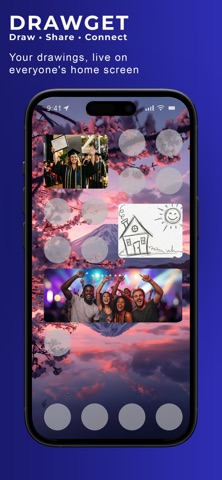
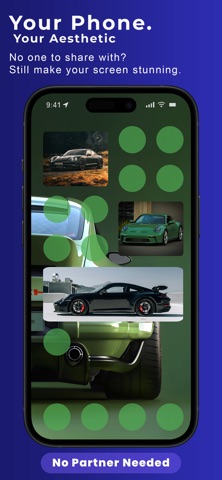
Drawget turns a home screen widget into a private shared canvas. Sketch a doodle, write a note, send a photo collage or share a 5-second video—and your creation appears on your friend’s, partner’s or family member’s widget after you send it.
No social feed. No strangers. Just small moments shared with the people who matter.
HOW DRAWGET WORKS
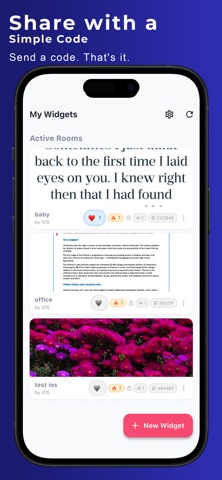
1. Create a private room and share its invite code
2. Your partner, friend or family member joins
3. Approve them and add the Drawget widget
4. Draw, write, add photos or create a short video
5. Send your creation to the shared home screen widget
CREATE MORE THAN A PHOTO
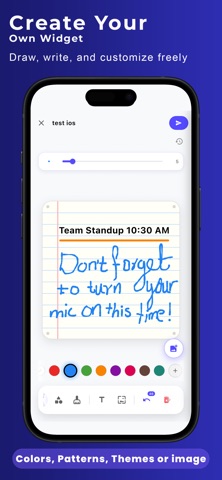
• Draw and doodle on a full-color canvas
• Add text, shapes, backgrounds and custom colors
• Write love notes, reminders and handwritten messages
• Add a photo, then freely move and resize it
• Draw or write over your photos
• Use undo, redo and zoom controls while editing
• Choose whether your name appears on the widget
PHOTO COLLAGES
Turn several photos into one personal widget update.
• Choose from multiple collage patterns
• Select the exact number of photos required
• Drag every photo inside its tile to reveal the part you want
• Use Duo and Feature Trio layouts without PRO
• Unlock additional unique layouts with Drawget PRO
COLOR-CHANGING DRAWING TOOLS
Palette Stroke lets you choose 2–5 colors and decide how many completed strokes should pass before the next color appears.
Flow Color blends continuously through your chosen colors while your finger moves. Everyone can preview its palette and speed settings; drawing with Flow Color is included with Drawget PRO.
5-SECOND VIDEO MOMENTS
Share a quick moving moment directly through the widget. Record or select a short 5-second clip and send it with Drawget PRO.
MADE FOR THE PEOPLE YOU MISS
• Couples sharing love notes throughout the day
• Partners staying close in a long-distance relationship
• Families exchanging drawings, reminders and photos
• Best friends sharing doodles, collages and inside jokes
• Roommates leaving useful notes on the home screen
• Parents and children trading creative moments
REACT, COMMENT AND CELEBRATE
React to shared Drawgets with emojis and leave comments inside your private room.
Each drawing, photo, collage or video adds to your room’s Drawget count. Celebrate special milestones together and create a shareable milestone card.
PRIVATE SHARED ROOMS
• Join using a private invite code
• Room owners approve every new member
• No public profiles, followers or discovery feed
• No email address or phone number is required to join
• Keep different relationships in separate rooms with Drawget PRO
• No ads
DRAWGET PRO
Use Drawget without a subscription with one private room and core drawing, note and photo-sharing tools.
Optional Drawget PRO unlocks:
• Multiple private rooms and widgets
• Premium backgrounds and themes
• Additional photo collage layouts
• HD artwork quality up to 2048px
• 5-second video sharing
• The continuously changing Flow Color pen
• Streak restoration
Choose a monthly or yearly auto-renewable subscription, or unlock PRO with a one-time Lifetime purchase. Available options and localized prices are shown before purchase.
Lifetime is a one-time purchase and does not renew. Monthly and yearly subscriptions automatically renew unless cancelled at least 24 hours before the end of the current period. You can manage or cancel subscriptions in your App Store account settings.
Your rooms are private, and only the people you approve can join. Drawget has no public social feed and does not show ads.
Built with love by an indie developer. Your feedback helps shape every update.
Drawget. Draw it. Share it. Send a moment. Live on their screen.
Terms of Use:
https://ak375456.github.io/widgetlink-terms/
Privacy Policy:
https://ak375456.github.io/widget-link-privacy-policy/
Safety and technology
Found in the app by AppBrain- Price
- Free
- App size
- 65.5 MB
- Content rating
- Everyone
Technologies used by Drawget: Shared Drawing Widget
Releases
Updates seen on the App Store- Version
- 2.2.3
- Launched
- May 2026
No changelog data
Alternatives
Similar apps and more from Aftab fazal QayumAlternatives to Drawget: Shared Drawing Widget


More from Aftab fazal Qayum


Rankings
App Store top chartsApp Store Rankings for Drawget: Shared Drawing Widget
About the app and developer
About Drawget: Shared Drawing Widget
Drawget: Shared Drawing Widget is a social networking app developed by Aftab fazal Qayum.
What is the rating of Drawget: Shared Drawing Widget?
Drawget: Shared Drawing Widget has no ratings yet.
Is Drawget: Shared Drawing Widget free?
Drawget: Shared Drawing Widget is free. The app size is 65.47 MB. The latest version available is 2.2.3. The last update was on September 27, 2026.
What are the requirements for Drawget: Shared Drawing Widget?
The app has a content rating of Everyone. The app has been available on the App Store since May 2026.
Developer information for Aftab fazal Qayum
Address:
Frequently asked questions about Drawget: Shared Drawing Widget
Is Drawget: Shared Drawing Widget free?
Yes. Drawget: Shared Drawing Widget is free on the App Store.
Is Drawget: Shared Drawing Widget still available?
Yes. Drawget: Shared Drawing Widget is on the App Store, and the last update we saw was on September 27, 2026.
How large is Drawget: Shared Drawing Widget?
Drawget: Shared Drawing Widget is 65.47 MB.
Is Drawget: Shared Drawing Widget suitable for children?
App Store rates the content of Drawget: Shared Drawing Widget as suitable for everyone.
Who made Drawget: Shared Drawing Widget?
Drawget: Shared Drawing Widget was developed by Aftab fazal Qayum. It is listed in the social networking category on the App Store.
What are the best alternatives to Drawget: Shared Drawing Widget?
People looking at Drawget: Shared Drawing Widget also look at these social networking apps: Doodle Mates: Couple Drawing, Chance: College Matchmaking, Tour Us Travel, only u - lock screen widget, Proximity Chat: Nearby Friends.