

Drawwii: Draw, Edit & Collage
Drawwii: Draw, Edit & Collage is made and published by JIYOUNG RYU. AppBrain is an independent app data site and isn't affiliated with JIYOUNG RYU. The app name, icon, screenshots and description belong to JIYOUNG RYU and are shown as published on the App Store.
AppBrain's verdict
- Last updated
- July 3, 2026
Rankings
App Store top chartsApp Store Rankings for Drawwii: Draw, Edit & Collage
Competitors
Similar apps and more from JIYOUNG RYUMore from JIYOUNG RYU

Also available on Google Play

Releases
Updates seen on the App Store- Version
- 26.27.5
- Launched
- August 2025
No changelog data
User feedback
Ratings and reviews on the App StoreComments on Drawwii: Draw, Edit & Collage for iOS
We don't have enough comments to show example comments. Please check back later.
Technology
Found in the app by AppBrain- Price
- Free
- App size
- 80.2 MB
- Content rating
- Everyone
Technologies used by Drawwii: Draw, Edit & Collage
About the app and developer
About Drawwii: Draw, Edit & Collage
Drawwii: Draw, Edit & Collage is a graphics & design app developed by JIYOUNG RYU.
What is the rating of Drawwii: Draw, Edit & Collage?
Drawwii: Draw, Edit & Collage has no ratings yet.
Is Drawwii: Draw, Edit & Collage free?
Drawwii: Draw, Edit & Collage is free. The app size is 80.17 MB. The latest version available is 26.27.5. The last update was on July 3, 2026.
What are the requirements for Drawwii: Draw, Edit & Collage?
The app has a content rating of Everyone. The app has been available on the App Store since August 2025.
Developer information for JIYOUNG RYU
Address:
Frequently asked questions about Drawwii: Draw, Edit & Collage
Is Drawwii: Draw, Edit & Collage free?
Yes. Drawwii: Draw, Edit & Collage is free on the App Store.
Is Drawwii: Draw, Edit & Collage still available?
Yes. Drawwii: Draw, Edit & Collage is on the App Store, and the last update we saw was on July 3, 2026.
How large is Drawwii: Draw, Edit & Collage?
Drawwii: Draw, Edit & Collage is 80.17 MB.
Is Drawwii: Draw, Edit & Collage suitable for children?
App Store rates the content of Drawwii: Draw, Edit & Collage as suitable for everyone.
Who made Drawwii: Draw, Edit & Collage?
Drawwii: Draw, Edit & Collage was developed by JIYOUNG RYU. It is listed in the graphics & design category on the App Store.
Store listing
By JIYOUNG RYU, from the App Store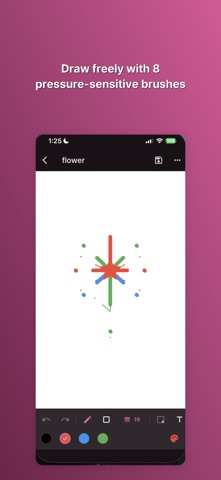


Description by JIYOUNG RYU Written by the developer, not by AppBrain. Click to read.
DRAW FREELY
• 8 pressure-sensitive brushes — pen, highlighter, calligraphy, neon, spray, marker, pencil, and eraser
• 10 shapes with gradient fill, plus selection & transform tools (marquee, lasso)
• Unlimited layers with blend modes and opacity
• Symmetry & mirror mode, color picker, eyedropper, and recent colors
• Snapshot undo/redo, pinch-to-zoom canvas
EDIT PHOTOS — PRIVATELY, ON YOUR DEVICE
• Magic Eraser: remove unwanted objects from any photo with AI inpainting, and compare before/after
• Background Remover: cut out the subject and swap in a solid color, gradient, photo, or blur
• All AI processing happens on your device — your photos are never uploaded to a server
COLLAGE & TEMPLATES
• Combine photos with grid or freeform collage layouts
• Start from 290+ ready-made templates across 20+ categories, including invitations, planners, checklists, and celebrations
• Keep editing your collage or template right in the drawing editor
STICKERS & PHOTO ELEMENTS
• Add emoji stickers or cut-out photos as movable layers
• Draw directly on top of a photo, or overlay a reference image while you sketch
MORE TOOLS, ONE TAP AWAY
• Filters, watermark, borders & frames, and social media resize presets
• Batch background removal, image compressor, and image-to-PDF
• Document scanner, QR code generator, GIF maker, and photo stitching
BUILD A DRAWING HABIT
• Track your daily drawing streak, see your activity heatmap, and take on weekly challenges
YOUR GALLERY, ORGANIZED
• Search, sort, tag, and favorite your work
• Trash with undo, plus full backup & restore to a file
Available in English, Japanese, and Korean, with manual language switching in Settings.
Start drawing — Drawwii is free to download.