

Drift: Ideas, Write & Plan
Drift: Ideas, Write & Plan is made and published by Sjoerd Wesselink. AppBrain is an independent app data site and isn't affiliated with Sjoerd Wesselink. The app name, icon, screenshots and description belong to Sjoerd Wesselink and are shown as published on the App Store.
AppBrain's verdict
- Last updated
- October 12, 2026
Rankings
App Store top chartsApp Store Rankings for Drift: Ideas, Write & Plan
Competitors
Similar apps and more from Sjoerd WesselinkAlternatives to Drift: Ideas, Write & Plan


Releases
Updates seen on the App Store- Version
- 2.3
- Launched
- July 2026
No changelog data
User feedback
Ratings and reviews on the App StoreComments on Drift: Ideas, Write & Plan for iOS
We don't have enough comments to show example comments. Please check back later.
Technology
Found in the app by AppBrain- Price
- Free
- App size
- 14.8 MB
- Content rating
- Everyone
Technologies used by Drift: Ideas, Write & Plan
About the app and developer
About Drift: Ideas, Write & Plan
Drift: Ideas, Write & Plan is a productivity app developed by Sjoerd Wesselink.
User Ratings
The app has no ratings yet.
App Information
Drift: Ideas, Write & Plan is freely available from the App Store. The app size is 14.80 MB. The latest version available is 2.3. The last update was on October 12, 2026.
Technical Requirements
The app has a content rating of Everyone. The app has been available on the App Store since July 2026.
Developer information for Sjoerd Wesselink
Address:
Store listing
By Sjoerd Wesselink, from the App Store




Description by Sjoerd Wesselink Written by the developer, not by AppBrain. Click to read.
CATCH EVERY IDEA
Some of the best ideas show up at the worst possible time. In the shower. On a walk. Halfway through something else. Speak a thought or type a line, and Drift catches it, cleans it up, and files it in the right place before you have finished talking. No folders to pick. No form to fill in. You keep moving.
CATCH IT HANDS FREE
Say "Hey Siri, catch my drift" and start talking. Your idea lands in Drift with the phone in your pocket, the screen locked, and no signal at all. There is a home screen widget and a one tap capture too.
AND ON YOUR WRIST
Drift is on Apple Watch. Raise your wrist, tap once, and talk for as long as you need. Your arm can drop, the recording keeps going, and the idea is waiting when you pick your phone back up. The phone can stay at home.
IT SORTS ITSELF
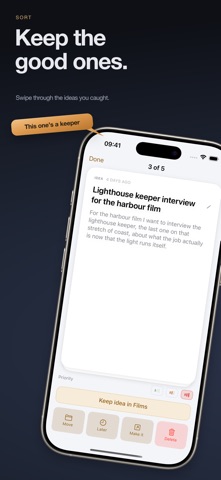
Every capture is read, tidied into clean sentences, and pointed at the area it belongs to. Drift pulls out the to-dos, spots the deadline you mentioned, and writes a clear headline. You keep it with one tap or move it. Nothing is ever filed behind your back.
SORT A WEEK IN A MINUTE
Ideas arrive faster than anyone files them. Drift deals them back one at a time. Swipe right to keep it, left to come back to it later. What is left is a list you actually chose.
A REAL PLACE TO WRITE
Drift is not only for catching ideas. It is a serious writing tool. A calm, full screen writer with nothing in your way. Press / to mark a shot, a voiceover, a hook, whatever your trade calls them, and the marks stay part of the script. When you are done, pull every shot out as one list. Focus mode dims all but the line you are on. Find and replace. Export as Markdown.
READ IT BACK TO CAMERA
A teleprompter scrolls your own words at your own speed. Turn on voice follow and it moves with your voice, waits when you stop to think, and picks up where you left off.
YOUR WEEK, WHERE YOU ALREADY LOOK
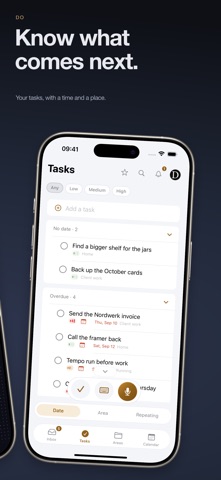
Give a task a time and Drift blocks the hour. Day, three day and month views, and dragging to reschedule. Sync with Apple Calendar one way, so nothing else is ever read, or both ways, so what you already promised sits beside what you planned.
TABLES THAT ADD UP
Shot lists, call sheets, budgets. Put numbers in a column and Drift totals them, counts them or averages them at the foot, in euros or whatever you work in. Group rows into scenes or days. Send the whole thing out as a PDF or a CSV when somebody else needs it.
IDEAS BECOME PROJECTS
When a spark is worth more, open it up. A board with tasks, dates, notes and sub projects. Mark an idea Potential, Good or Really good, give work one to three exclamation marks, and filter any list by it.
BUILT FOR MAKERS
Keep an area for every side of what you do. Your channel, your brand, your podcast, your newsletter. Share an area or a single idea with someone, view only or full edit, one person at a time.
YOUR VOICE STAYS ON YOUR PHONE
Speech becomes text on the device itself. The recording is never uploaded. A Watch recording waits on your phone only until it has become words. Only the words go on, to be sorted and titled.
FREE TO START
10 captures a week and up to 6 areas, forever, with the whole manual toolkit and no card. Pro is 4.99 a month, or 47.90 a year, for unlimited captures sorted for you, areas without a limit, the writing tools and voice follow. The monthly plan starts with a 14 day free trial.
Catch every idea. Write the ones that matter.
Terms of Use (EULA): https://letsdrift.app/terms
Privacy Policy: https://letsdrift.app/privacy