

Drift: Random Metronome
Drift: Random Metronome is made and published by Mick Gelissen. AppBrain is an independent app data site and isn't affiliated with Mick Gelissen. The app name, icon, screenshots and description belong to Mick Gelissen and are shown as published on the App Store.
AppBrain's verdict
- Last updated
- August 25, 2026
Rankings
App Store top chartsApp Store Rankings for Drift: Random Metronome
Competitors
Similar apps and more from Mick GelissenAlternatives to Drift: Random Metronome


Releases
Updates seen on the App Store- Version
- 1.0
- Launched
- August 2026
No changelog data
User feedback
Ratings and reviews on the App StoreComments on Drift: Random Metronome for iOS
We don't have enough comments to show example comments. Please check back later.
Technology
Found in the app by AppBrain- Price
- Free
- App size
- 4.28 MB
- Content rating
- Everyone
Technologies used by Drift: Random Metronome
About the app and developer
About Drift: Random Metronome
Drift: Random Metronome is a music app developed by Mick Gelissen.
User Ratings
The app has no ratings yet.
App Information
Drift: Random Metronome is freely available from the App Store. The app size is 4.28 MB. The latest version available is 1.0. The last update was on August 25, 2026.
Technical Requirements
The app has a content rating of Everyone. The app has been available on the App Store since August 2026.
Developer information for Mick Gelissen
Address:
Store listing
By Mick Gelissen, from the App Store

Description by Mick Gelissen Written by the developer, not by AppBrain. Click to read.
This one changes tempo while you play.
RANDOM TEMPO
Set a range — 70 to 140 BPM, say — and the tempo moves inside it. Every 30 seconds, every 8 bars, or at intervals it picks for itself. Cap how far it may jump for a gentle drift, or leave it uncapped and hold on.
GAP TRAINER
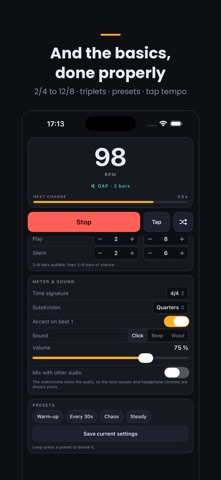
The click plays for a few bars, then goes silent while you keep the tempo yourself. When it comes back, you hear whether you drifted. The beat indicators go dark during the silence, so there is nothing to lean on. Tempo changes wait until the click returns, because a change you cannot hear would make the exercise meaningless.
GLIDE
Instead of jumping, the tempo can slide gradually into each new value over a few seconds. Good for practising a controlled accelerando.
EVERYTHING ELSE
Time signatures from 2/4 to 12/8, with the accent on beat one — or switch that accent off so every beat sounds identical
Eighths, triplets and sixteenths
Three click sounds, from a dry tick to a woodblock
Tap tempo
Shuffle straight to a new tempo, from the app or from your headphones
Save your practice setups as presets
Lock screen and headphone controls
Keeps playing with the screen off, and can mix with a backing track
BUILT AROUND THE TIMING
Every click is scheduled ahead of time on the audio clock rather than fired by a timer. That is why the beat stays where it should be instead of slowly sliding, even at high tempos with sixteenths running.